Key takeaways:
- Why 24/7 support matters: 42% of customer inquiries happen outside business hours, and 57% of customers expect quick responses at any time. Poor support can cost businesses billions in lost revenue.
- How to implement it: Start by analyzing customer needs, choosing the right channels (e.g., chat, email, phone), and planning for demand fluctuations. Use AI tools and outsourcing to reduce costs while maintaining quality.
- Outsourcing with Aidey: Aidey specializes in SaaS support with flexible plans, fast onboarding (10–30 days), and a 21-day free trial. Outsource repetitive tasks while keeping in-house teams focused on growth.
- Boost efficiency with AI: Automate up to 80% of routine tasks like password resets. Combine AI with human agents for complex issues to save costs and improve response times.
- Measure success: Track metrics like First Response Time (under 4 hours for email, 2 minutes for chat), Customer Satisfaction Score (78–85%), and ticket resolution rates to ensure performance aligns with customer expectations.
Steps to get started:
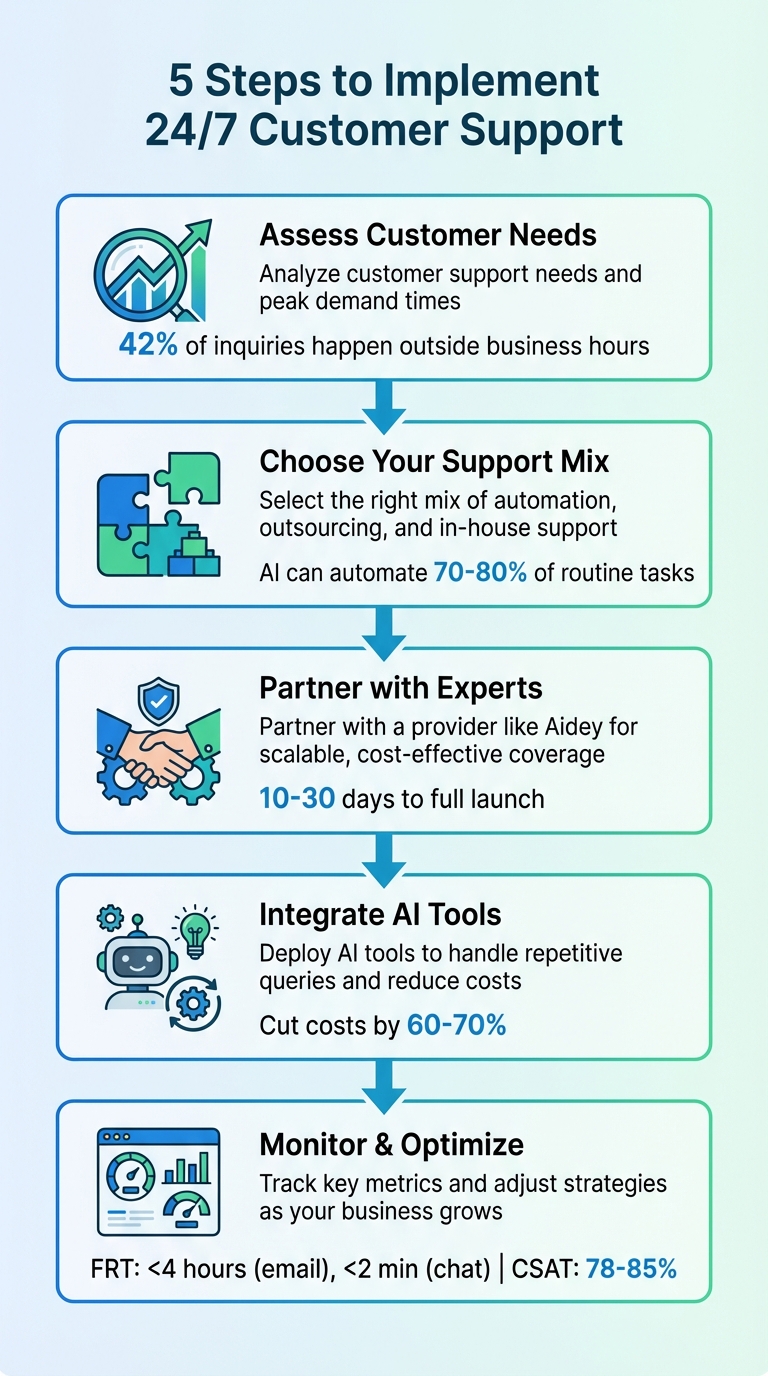
- Assess customer support needs and peak demand times.
- Choose the right mix of automation, outsourcing, and in-house support.
- Partner with a provider like Aidey for scalable, cost-effective coverage.
- Integrate AI tools to handle repetitive queries and reduce costs.
- Monitor key metrics and adjust strategies as your business grows.
This guide outlines everything you need to build a scalable, efficient 24/7 support system to meet customer expectations and reduce churn.
5-Step Implementation Guide for 24/7 Customer Support
BEST Way to Build a 24/7 AI Customer Support System in 2025
sbb-itb-8132e49
Evaluating Your Support Requirements
Before launching a 24/7 support operation, it’s essential to understand when your customers actually need help. For instance, 69% of customers expect real-time support at any hour – day or night.
Analyzing Customer Expectations
Customer expectations vary significantly depending on where they are in their journey. During the onboarding phase, the quality of support can make or break loyalty – 90% of customers stick around with excellent service. At this stage, quick answers for setup are critical. Later on, simpler issues like password resets can often be automated, while more complex concerns, such as billing inquiries, still require human involvement.
Industry specifics also play a big role. In sectors like healthcare, finance, or enterprise SaaS, downtime isn’t just an annoyance – it can lead to compliance risks. For these industries, 24/7 availability isn’t optional; it’s essential. Moreover, 57% of customers expect the same quick responses during nights and weekends as they do during regular hours.
Even though 73% of customers prefer self-service options, only 14% manage to resolve their problems entirely without needing a live agent. This highlights the importance of having a smooth handoff from automation to human support when needed.
These insights can help you identify the right mix of support channels to meet your customers’ needs.
Selecting the Right Support Channels
Start by evaluating the channels your customers rely on the most. For many SaaS companies, chat and email dominate after-hours inquiries, making them ideal for 24/7 coverage. However, phone support may still be necessary for enterprise clients with specific contractual agreements.
The urgency of customer issues should guide how you allocate resources across channels:
- Automate low-priority tasks.
- Use live chat for moderately complex questions.
- Reserve human agents for high-stakes or sensitive issues.
AI-powered chatbots can handle 70–80% of routine queries, but for the remaining cases, the personalized assistance of a live agent is invaluable.
To ensure a smooth customer experience, integrate all channels with a central CRM. This allows agents to access the full conversation history, eliminating the frustration of customers having to repeat their issues. 88% of customers value seamless, integrated support just as much as the product itself.
Once you’ve aligned your channels with customer needs, it’s time to plan for fluctuations in demand to maintain service quality.
Planning for Demand Fluctuations
Building scalable 24/7 support isn’t just about choosing the right channels – it also requires flexible staffing. Support demand often spikes during product launches, billing cycles, and seasonal trends. Your staffing model needs to adapt to these fluctuations without overloading your team or overspending.
A follow-the-sun model – with teams distributed across Asia-Pacific, Europe, and the Americas – ensures coverage aligns with local daylight hours while reducing employee burnout. Scheduling one-hour overlaps between shifts ensures smooth handoffs and prevents unresolved issues from being passed around.
Keep an eye on key metrics like ticket backlogs lasting more than three days, first response times exceeding one hour, or CSAT scores dipping below 85%. These signals can help you decide when to scale up capacity. Outsourcing is another option to consider – it can transform fixed staffing costs (domestic agents typically cost $65,000–$72,000 annually) into variable expenses that adjust with demand, often cutting operating costs by 30–50%.
Prepare for predictable surges by creating seasonal playbooks. These should detail recruitment timelines, training schedules, and ramp-up processes. A well-maintained knowledge base can also ease the pressure, reducing ticket volume by 20–70%.
Understanding customer expectations, selecting the right channels, and planning for demand spikes are all critical steps to building an efficient and scalable support system.
Partnering with Aidey for Outsourced Support
After identifying your customer support needs, the next step is choosing a partner that understands the unique challenges SaaS companies face. Aidey brings over seven years of experience in providing 24/7 customer support outsourcing specifically for SaaS businesses. Their management operates out of Tel Aviv, offering firsthand knowledge of the startup ecosystem, while their support teams are based in the Philippines, ensuring access to skilled and cost-effective representatives.
One of Aidey’s standout features is their risk-free onboarding process. This includes recruitment, training, system setup, and process management – all at no cost until the service goes live. Plus, they offer a 21-day free trial, giving you nearly a month to evaluate their performance before committing. This setup ensures you can test their capabilities without financial pressure, making it easier to scale your support infrastructure alongside your business growth.
"Aidey managed to cut the cost of our customer service significantly while providing high quality & consistent level of support. The setup was fast and efficient and the team was quick to adapt to our product."
– Shlomit Kugler, CEO, MyCheck
Aidey’s hybrid support model is particularly suited for SaaS companies. It allows you to outsource high-volume Tier 1 tickets, like password resets, payment issues, and basic troubleshooting, while keeping your in-house team focused on strategic tasks like customer retention and product development. This division of labor ensures that your internal resources remain dedicated to growth, while repetitive queries are handled seamlessly by Aidey.
Aidey’s 3 Support Plans Explained
Aidey offers three flexible support plans designed to meet varying business needs:
| Plan Name | Coverage | Team Structure | Best For | Key Features |
|---|---|---|---|---|
| Basic Support | 24/7 chat and email | Shared team across multiple brands | Small businesses with simple inquiries | Affordable entry-level option; handles routine questions |
| Advanced Support | 24/7 chat, email, and phone | Dedicated team exclusively for your brand | Growing businesses with moderate complexity | Customized training; faster response times; phone coverage |
| Enterprise Support | 24/7 across all channels | Custom team with advanced capabilities | Large organizations with complex needs | Multilingual support; advanced analytics; custom workflows |
The Basic plan’s shared team model is a cost-friendly choice for startups with straightforward support needs, as costs are distributed across multiple clients. As your business scales or your product becomes more complex, the Advanced and Enterprise plans provide dedicated teams trained specifically on your product, ensuring deeper expertise.
Aidey tailors its approach by assessing your ticket volumes, workflows, and complexity levels to deploy a team that fits your requirements. This means you’re not just getting generic support reps – you’re getting agents who are trained on the unique aspects of your product.
What Makes Aidey Suitable for SaaS Companies
Aidey’s operational efficiency is another reason they’re a great fit for SaaS companies. Their setup process is quick, with recruitment completed by Day 7 and full operations launching within 10 to 30 days. This speed allows you to implement a robust support system without long delays.
They also integrate seamlessly with tools you’re already using – like Zendesk, Front, and other help desk platforms – so there’s no need to overhaul your existing workflows. This eliminates unnecessary friction and ensures your team can continue operating as usual.
"I would highly recommend its services for winning customer service for SaaS companies that are looking to scale up."
– Tatiana Ozanikova, Head of Global Operations, Shiji Guest Solutions
With global operations covering all time zones, Aidey provides true 24/7 support without the hassle of managing complex shift schedules. Their teams in the Philippines are proficient in English, making them well-suited to serve North American and European markets where clear communication is critical for customer satisfaction.
For startups looking to manage costs effectively, Aidey’s pay-for-performance model replaces the high fixed costs of an in-house support team. This scalable approach ensures that your expenses align directly with your support needs, helping you maintain budget efficiency while delivering excellent service.
Getting Started with Aidey
Once you’ve chosen your support plan, Aidey’s 24/7 service can be up and running in just 10–30 days from your first meeting to the full launch. The process is broken down into clear milestones, so you’ll always know what’s coming next. Plus, there are no upfront costs for recruitment, training, or system setup – you only start paying when the service is live and meeting your expectations. Here’s how the onboarding process works.
On Day 1, Aidey kicks things off with a needs assessment. This step evaluates your customer service volumes, protocols, and the complexity of your requirements. By Day 2, you’ll receive a quote and sign the service agreement, ensuring the process moves quickly without unnecessary delays.
Step 1: Recruitment at No Cost
By Day 7, Aidey completes recruitment for your initial support agent or team. The company sources professionals primarily from the Philippines, focusing on native English speakers who can work across any time zone. The recruitment process is tailored to your needs – Aidey evaluates your ticket complexity and service requirements to handpick agents with the right skills and experience. Best of all, this phase is completely free until your service goes live.
Once your team is in place, the focus shifts to thorough training.
Step 2: Product and Policy Training
Training runs from Day 7 to Day 30. This isn’t just a crash course in customer service – Aidey ensures the team gains an in-depth understanding of your product, creating a deeper connection to your brand.
"The setup was fast and efficient and the team was quick to adapt to our product. The feedback from our clients is excellent." – Shlomit Kugler, CEO, MyCheck
During this phase, you’ll work with Aidey to establish Key Performance Indicators (KPIs), such as ticket resolution times, average response times, and escalation rates. Collaborative strategy sessions help develop scripts, define customer profiles, and finalize escalation procedures. To ensure a smooth process, have your documentation ready early. This includes product manuals, policy guidelines, and brand voice documents, all of which Aidey uses to create a comprehensive information packet for agents.
Step 3: Tool Integration and Pre-Launch Testing
Aidey integrates seamlessly with your existing tools like Zendesk, Front, or Salesforce during the training period. This ensures that all systems – ticketing platforms, CRMs, knowledge bases, and communication channels (email, chat, phone) – are fully connected and tested before the service goes live. For tools without direct API compatibility, alternative solutions are implemented to ensure everything works smoothly. Pre-launch testing is also conducted to catch and resolve any issues before your customers interact with the team.
"Throughout the entire setup of the project, Aidey have delivered exactly what they promised." – Tatiana Ozanikova, Head of Global Operations, Shiji Guest Solutions
Once live, you’ll enjoy a 21-day free trial, giving you nearly a month to evaluate the service before making a financial commitment. After 60 days, Aidey conducts a formal review to assess performance and make any necessary adjustments.
| Milestone | Activity |
|---|---|
| Day 1 | Initial needs assessment |
| Day 2 | Receive quote and sign service agreement |
| Day 7 | Complete recruitment and launch training |
| Day 10–30 | Complete training and launch support service |
| Day 60 | Evaluate performance and implement adjustments |
Adding AI Tools and Chatbots to Your Support
Once your human support team is trained and running smoothly, the next step is to boost efficiency by introducing AI tools. Adding AI after training can slash costs by 60–70% and automate 70–80% of routine tasks. The trick is to automate strategically instead of trying to overhaul everything at once.
A Three-Tier System Works Best.
Here’s how it breaks down:
- Tier 1: Fully automated tasks like password resets, invoice requests, or plan comparisons – these typically make up about 80% of your ticket volume.
- Tier 2: Handles data collection, such as error logs or account details, before passing complex issues to your human team.
- Tier 3: Directly routes urgent matters like security breaches or data privacy concerns to human agents.
This system ensures that AI and your support team work together seamlessly, giving each issue the attention it needs.
Connecting the Dots for Effective Integration.
For your chatbot to perform well, it needs to integrate with four main systems:
- Your ticketing platform (e.g., Zendesk, Freshdesk)
- Your CRM (e.g., Salesforce, HubSpot)
- Your knowledge base
- Your authentication system
This setup allows the AI to be "context-aware." For example, it can differentiate between Free and Pro plan users and adjust its responses accordingly. Many modern AI systems use RAG (retrieval-augmented generation) to pull real-time answers from live documents.
Start Small with Testing.
Before going all-in, test your AI with a "Pilot Weekend." Launch it on a Friday at 5:00 PM to manage weekend inquiries through web chat. By Monday, you can review the logs to identify knowledge gaps and make adjustments. Always let customers know they’re interacting with an AI assistant – being upfront builds trust and keeps expectations realistic.
Here’s the financial upside: human-handled tickets cost $15–$25 each. For a company with 10,000 users, AI can lower monthly support costs from $22,500–$50,000 down to $6,750–$15,000. AI takes care of repetitive questions, especially during off-hours when 42% of customer inquiries come in. Meanwhile, your team can focus on handling the more complicated issues that require a human touch.
Creating Multi-Channel Support Workflows
To provide continuous 24/7 support, it’s essential to align all customer interactions across channels. Customers don’t think in terms of channels – they just want their issues resolved. They might start with a chat, follow up with an email, and then make a phone call if the problem persists. Without a unified interaction history, customers are forced to repeat the same details, leading to frustration.
To avoid this, focus on integrating your tools into a single, cohesive system. Combine your ticketing platform, CRM, knowledge base, and authentication system into one infrastructure. This ensures agents have a complete view of every customer interaction, no matter which channel was used. When customers switch channels, the context of their issue moves with them, eliminating the need for them to re-explain.
Consistency across channels is equally important. Each platform requires a tailored approach: chat demands quick, conversational responses; email allows for detailed explanations; and phone calls require attentive listening and real-time solutions. Develop playbooks for common scenarios on each channel to maintain a consistent level of service and ensure your brand voice remains uniform.
Streamlined workflows also enable smarter ticket routing. Instead of routing tickets based solely on agent availability, consider the complexity of the issue. Use a tiered system where simpler tasks (like password resets or billing inquiries) are assigned to Tier 1 agents, while more difficult problems are escalated to specialists. Automate this process by tagging and routing tickets based on keywords, customer priority, and urgency. This ensures high-priority issues are addressed quickly and efficiently.
Tracking Performance and Growing with Aidey
Performance Metrics to Track
Once your support system is live, it’s crucial to measure how well it’s performing. Start by keeping an eye on First Response Time (FRT). For 2025–2026, aim for responses under 4 hours for email and under 2 minutes for chat. Why does this matter? Because 90% of customers consider an "immediate" response essential, with 60% defining that as within 10 minutes. Another key metric is First Contact Resolution (FCR) – strive for a rate of 70–80%, as this can reduce churn by up to 67%.
To identify bottlenecks, break down your data by channel, product tier, and issue complexity instead of relying on overall averages. For example, a simple password reset should be resolved much faster than a complex technical issue.
Two other important metrics are Customer Satisfaction Score (CSAT) and Customer Effort Score (CES). CSAT reflects how happy customers are with individual interactions, with benchmarks typically falling between 78–85%. CES, on the other hand, measures how easy it is for customers to get their issues resolved and is a strong predictor of long-term loyalty. While both are valuable, CES can be especially useful for spotting trends in customer retention.
Don’t forget to track internal metrics as well, such as agent productivity and turnover rates. High agent churn can disrupt your team’s consistency and drive up retraining costs. Real-time dashboards are a great tool for monitoring daily and weekly CSAT trends, as well as SLA breaches, so you can address problems as they happen.
As you fine-tune these metrics, you’ll be better equipped to scale your support operations effectively.
Expanding Support Capacity Over Time
With robust workflows and AI-driven tools in place, scaling your support operations becomes more manageable. As your SaaS business grows, your support needs will naturally evolve. Aidey’s adaptable outsourcing model allows you to expand your customer support without the challenges of traditional hiring.
Leverage historical data to predict staffing needs and adjust your team during busy periods, like product launches or seasonal spikes. The "Human+AI" hybrid approach is especially useful here, enabling you to handle larger ticket volumes without significantly increasing your team size. For instance, AI-powered chatbots and automated knowledge bases can manage up to 85% of Level 1 support tasks, such as password resets and billing inquiries.
Consider Slack’s example: by implementing a hybrid system, they cut their average response time from 4.2 hours to 1.7 hours – a 60% improvement. Their AI now handles 73% of initial interactions, giving human agents the full context they need for escalations. This approach allowed Slack to scale to over 12 million daily users without adding a proportional number of staff.
As your operations grow, revisit your tiered support structure. Routine tasks like password resets can remain with Tier 1 agents, while more complex issues are escalated to specialists. This ensures that high-priority problems are resolved quickly, without overwhelming your most experienced team members.
Conclusion
Setting up 24/7 customer support doesn’t have to break the bank or feel overwhelming. By teaming up with Aidey and leveraging a mix of remote customer support team and AI-driven tools, you can provide round-the-clock service while keeping costs in check. With so many inquiries happening after hours, having constant availability is crucial – especially when SaaS companies face a 58% higher abandonment rate for free trials signed up during off-hours.
The hybrid model explained here – where human agents handle complex problems – offers a balance between efficiency and personalization. This approach helps you cut labor costs without losing the human connection that fosters customer loyalty. Aidey’s scalable three-tiered support plans cater to businesses of all sizes, whether you’re a startup managing your first 100 customers or a large enterprise handling thousands of interactions every day.
Start by identifying the gaps in your current support system. Then, follow the simple three-step onboarding process: free recruitment, in-depth product training, and seamless tool integration with pre-launch testing. Add AI chatbots for instant replies, build multi-channel workflows to engage customers on their preferred platforms, and monitor key metrics like First Response Time and Customer Satisfaction Score to keep improving. This all-in-one strategy not only fills support gaps but also boosts efficiency and delivers real value.
FAQs
How many agents do I need for 24/7 coverage?
The number of agents needed for 24/7 coverage varies based on your support structure, workload, and specific operational requirements. One popular strategy is to set up teams in different time zones, ensuring shifts align with peak activity periods and transitions between teams are seamless. Incorporating AI chatbots to handle routine inquiries can also ease the burden on human agents. This allows a leaner team to concentrate on more complex issues while still providing uninterrupted support.
What should I automate first with AI in support?
To kick things off, focus on automating the repetitive, high-volume questions that tend to pile up – things like order updates, password resets, FAQs, and basic troubleshooting. These tasks are perfect for automation because they allow for instant responses, lighten the load on your support team, and keep your service available 24/7.
Once you’ve got these routine inquiries under control, you can start tackling more advanced processes. For example, you could automate escalations or even integrate your systems for more seamless operations. By taking this step-by-step approach, you’ll ensure a smooth transition while making the most of AI’s potential in customer support.
How do I set realistic 24/7 response-time SLAs?
To create realistic 24/7 response-time SLAs, it’s important to align customer expectations with what your team can realistically deliver. Begin by analyzing your current response times and workload to understand your baseline. Consider implementing tiered SLAs that account for factors like urgency, customer priority, and the complexity of issues.
Build in flexibility by including provisions such as pausing SLA timers during off-hours or when waiting for a customer’s reply. Finally, make it a habit to regularly monitor and evaluate SLA performance. This helps ensure your goals stay practical and continue to meet both customer needs and your team’s capacity without overextending resources.