

Remote customer support is now a must-have for SaaS companies in 2026. Here’s why:
- 69% of contact centers have work-from-home setups, and 59% of leaders plan to expand remote teams.
- Remote hiring gives access to a 340% larger talent pool and saves $10,000 per employee annually.
- Companies offering 24/7 remote support see an 18% boost in customer satisfaction, which directly impacts retention.
This guide covers six steps to build and manage your team: defining roles, hiring skilled agents, setting up tools, streamlining workflows, onboarding effectively, and scaling for global coverage. Whether you’re starting small or growing fast, these tips will help you create a high-performing remote support team.
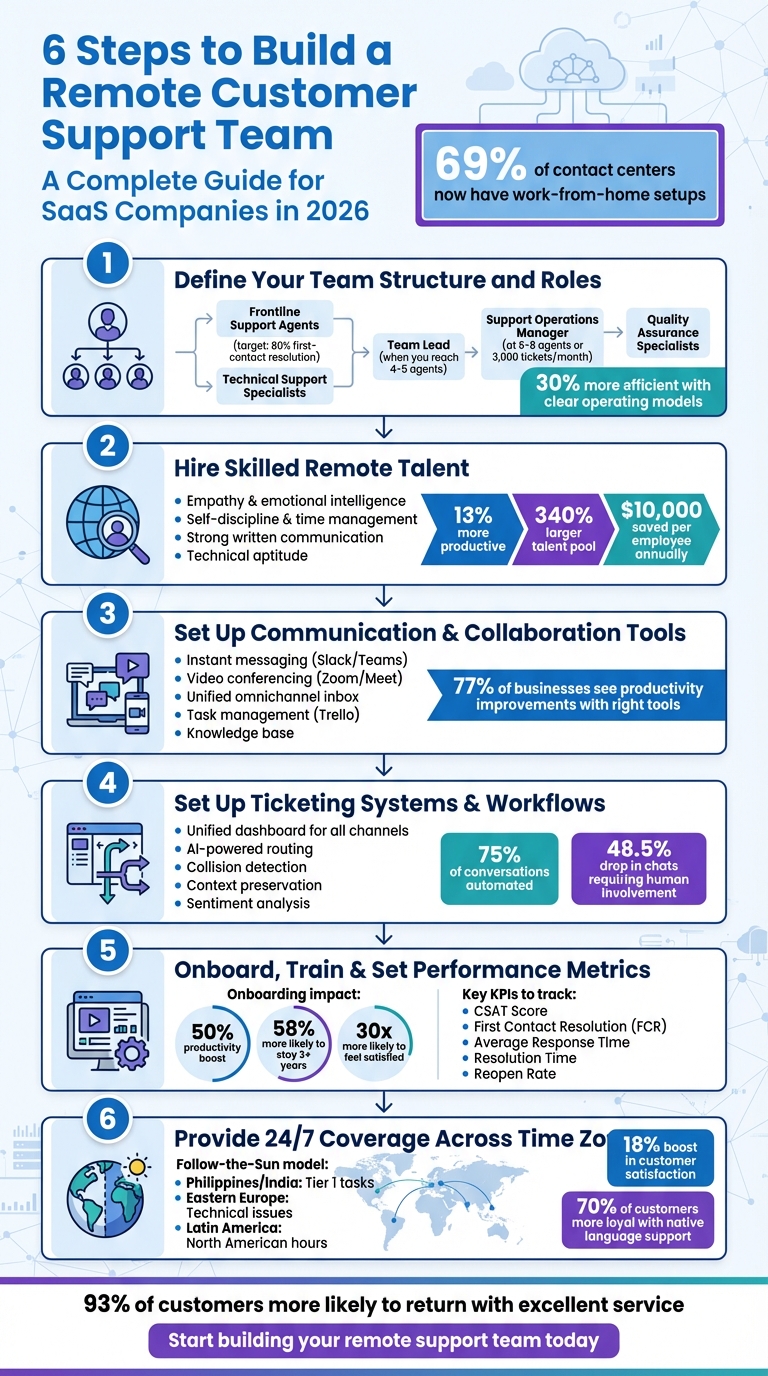
6 Steps to Build a Remote Customer Support Team
How To Build And Manage A Remote Customer Service Team?
sbb-itb-8132e49
Step 1: Define Your Team Structure and Roles
Before diving into hiring, it’s crucial to map out your team structure. Businesses that establish clear operating models and defined roles can operate up to 30% more efficiently than those without a formal structure. This clarity becomes especially important when ticket volumes start to climb.
Key Roles to Include
Start with Frontline Support Agents who handle customer inquiries across email, chat, and social channels. Their main goal should be achieving an 80% first-contact resolution rate by following workflows and using pre-written responses for common issues. As your product becomes more complex, bring in Technical Support Specialists. These specialists can replicate bugs, collect system logs, and liaise directly with the engineering team.
Once your team grows to 4–5 agents, it’s time to add a Team Lead. This role is essential for monitoring ticket queues and keeping track of metrics like SLA compliance and customer satisfaction. When you reach 6–8 agents or handle around 3,000 tickets per month, consider hiring a Support Operations Manager. This person ensures your helpdesk platform is optimized, automation rules are maintained, and workflows run smoothly. To maintain quality, include Quality Assurance Specialists who can ensure tone consistency and identify training gaps.
By laying out these roles early, you’ll create a scalable foundation for your support team as your business grows.
Creating a Scalable Team Structure
With roles defined, the next step is to organize your team into tiers. Tier 1 agents handle straightforward issues like password resets or basic how-to questions. Tier 2 focuses on more complex problems like technical bugs or billing disputes. Tier 3 escalates critical issues to engineering. Many SaaS companies adopt this tiered approach once they surpass 500 to 1,000 monthly support tickets.
For product-led SaaS businesses, consider structuring your team by specialty – such as Onboarding, Billing, or API/Integrations – rather than just by tiers. This allows agents to build deeper expertise in specific areas. Additionally, document clear escalation triggers, such as breached SLAs, security concerns, or VIP account issues, to ensure every ticket has a dedicated owner. This structured approach not only keeps your team organized but also simplifies performance tracking, which ties into later steps.
"The addition or subtraction of just one role within a team can make the difference between good customer service and five-star customer service." – Justina Altiere, VP of Customer Experience, Quo
Step 2: Hire Skilled Remote Talent with Aidey
With your team structure in place, the next step is finding professionals who can bring your remote support strategy to life. Did you know that remote workers are 13% more productive than their in-office counterparts and tend to work 9.5% longer on average? The key is hiring candidates who excel at self-management. Let’s explore the traits that set top remote support professionals apart.
What to Look for in Remote Support Professionals
Start with empathy and emotional intelligence – these are non-negotiable. As Olek Potrykus, Head of Customer Success at Tidio, explains: "We need to test how attentive, empathic, and flexible the candidates are. We can teach them some advanced technical stuff later on, but empathy is the key". Beyond this, prioritize skills like self-discipline, time management, autonomy, and strong written communication. Candidates with freelancing experience, previous remote roles, or entrepreneurial backgrounds are often better equipped for the demands of remote work.
For SaaS support roles, look for individuals who can balance technical know-how with excellent customer-facing skills. They should also be quick learners, capable of mastering complex products. During interviews, role-play scenarios can be a great way to assess how candidates handle escalations with minimal guidance. Ask targeted questions like, "What does empathy mean to you?" or "How would you deal with an irritated customer?" to evaluate their attentiveness, flexibility, and problem-solving abilities.
Keep in mind that 30 customers per day is the tipping point where support agents often experience fatigue and stress. Hiring professionals who can manage their workload and energy effectively is essential for building a resilient team. Thoughtful hiring decisions now will set the stage for a scalable and high-performing remote support operation.
How Aidey Simplifies Hiring
Once you’ve identified the qualities you need, Aidey makes the hiring process seamless. By tapping into a global network of skilled professionals, Aidey expands your talent pool, offering access to multilingual agents and enabling 24/7 coverage across time zones – ideal for SaaS companies with diverse customer bases.
Aidey takes care of the hard work by vetting candidates for traits like self-management, proactive communication, and reliability. Plus, their free onboarding service handles everything from recruitment and training to system setup. This ensures new hires integrate smoothly into your team from day one. Companies that use standardized digital onboarding processes report a 50% productivity boost for new employees, and those employees are 58% more likely to stay with the company for at least three years.
Step 3: Set Up Communication and Collaboration Tools
Once you’ve assembled a skilled remote team, the next step is ensuring they have the right tools to stay connected and productive. As of early 2026, 69% of contact centers operate work-from-home programs, and the success of these teams often hinges on their tech stack. The goal? Make collaboration seamless and efficient.
Communication Platforms You Need
Instant messaging is the backbone of effective remote communication. Tools like Slack or Microsoft Teams allow agents to share customer insights, tackle complex issues together, and foster a sense of community that mimics in-office interaction. Rustam, Head of Customer Support at Electronic, captures this perfectly:
"We are constantly in touch with each other on messaging apps: sharing customer feedback, elaborating on strategies to best assist our customers, and exchanging new knowledge we obtain every day".
For face-to-face interaction, video conferencing tools like Zoom or Google Meet are essential. Use them for weekly check-ins and team meetings, and record sessions for team members in different time zones. Over time, these recordings can double as a training resource. To simplify explanations of technical issues, consider asynchronous visual tools like Zight (formerly CloudApp). These allow agents to create screen recordings, GIFs, and annotated screenshots, which are often quicker and clearer than lengthy emails. With 83% of employees preferring video for learning new tasks, this approach can save time and reduce misunderstandings.
Another must-have is a unified omnichannel inbox. Tools that consolidate email, live chat, social media, and marketplace messages into a single dashboard eliminate the inefficiency of switching between apps. This is particularly important for SaaS startups juggling multiple customer channels.
Once your communication tools are in place, it’s time to focus on collaboration tools that enhance task management and knowledge sharing.
Collaboration Tools for Remote Teams
For task management, platforms like Trello offer visual boards that make it easy to track support initiatives, bug fixes, and deadlines across different time zones. Features like internal notes allow agents to collaborate on sensitive cases, while real-time activity visibility ensures no two agents work on the same ticket unnecessarily.
A searchable knowledge base is another essential tool. Since remote agents can’t simply ask a colleague nearby for help, they need quick access to troubleshooting guides and response templates. For technical support teams, remote desktop tools like HelpWire enable agents to resolve issues directly on a customer’s device without needing to visit in person.
Centralizing everything is key. Research shows that 77% of businesses see productivity improvements with remote work, but only when teams use integrated tools that minimize the need to constantly switch between apps. By streamlining communication and collaboration, you set your remote team up for success.
Step 4: Set Up Ticketing Systems and Omnichannel Workflows
After establishing solid communication tools, the next step is to streamline how customer inquiries are managed. A dependable ticketing system becomes the backbone of your remote support team, while omnichannel workflows ensure customers get consistent help no matter which channel they use.
Choosing the Right Ticketing Software
A good ticketing system brings all customer inquiries – whether from email, live chat, social media, or WhatsApp – into a single dashboard, making it easier to manage conversations without missing anything. Look for features like collision detection, which stops multiple agents from responding to the same ticket simultaneously. Tools like internal notes and @mentions also allow agents to collaborate behind the scenes on tricky issues without confusing the customer.
AI capabilities are becoming increasingly important. Many modern systems now include automated ticket routing based on agent skills, sentiment analysis to flag unhappy customers, and AI assistants that draft responses using your knowledge base. For instance, LiveAgent reports that 75% of conversations can be automated, leading to a 48.5% drop in chats requiring human involvement. This frees up agents to focus on more complicated problems.
Integration is another key factor. Your ticketing system should work smoothly with tools like Jira, your CRM, and communication apps. This creates a unified view where agents can quickly access subscription details, recent product usage, and past conversations. Real-time dashboards tracking metrics like SLAs, resolution times, and CSAT scores also help remote managers oversee performance without micromanaging.
Once your ticketing system is in place, the focus shifts to designing workflows that ensure smooth interactions across all channels.
Creating Omnichannel Support Workflows
An effective ticketing system is only part of the equation – your workflows must provide seamless, consistent support across channels. Omnichannel support isn’t just about offering multiple contact options; it’s about preserving context. For example, if a customer switches from email to chat, agents need access to the full conversation history to avoid making the customer repeat themselves.
As BlueHub explains:
"Omnichannel customer support is a single, continuous conversation across email, chat, voice, social media, and SMS, with a shared source of truth and context for both human agents and bots."
Start by implementing intelligent ticket routing. AI can assign tickets based on factors like agent expertise, customer status (e.g., VIP), or the complexity of the issue. Natural language processing can even identify the type of inquiry – whether it’s billing, troubleshooting, or a feature request – and send it to the right agent.
It’s also important to set clear channel guidelines. For instance, use Slack for urgent issues, email for detailed queries, and your knowledge base for self-service. Communicate these guidelines to customers during onboarding to ensure clarity. Apply consistent SLAs across all channels, so every customer gets the same level of service. Automated triggers can help escalate tickets based on factors like issue severity, customer tier, or how close they are to missing an SLA deadline.
For routine questions like “Where’s my order?” or password resets, AI agents can handle the initial response. Research shows that AI chatbots now manage about 85% of routine inquiries, reducing the workload for human agents by around 30%. This allows remote teams to handle 25–40% more tickets without compromising quality.
| Feature | Benefit for Remote Teams |
|---|---|
| Collision Detection | Avoids duplicate responses when agents are working remotely |
| Unified Inbox | Cuts down on app-switching fatigue across time zones |
| Skills-Based Routing | Assigns tickets to the best-suited agent automatically |
| Context Preservation | Keeps the full conversation history intact when customers switch channels |
| Sentiment Analysis | Highlights frustrated customers for quicker escalation |
With your ticketing system and workflows ready, the next step is to onboard and train your remote team effectively.
Step 5: Onboard, Train, and Set Performance Metrics
Once your ticketing system and workflows are ready, it’s time to focus on onboarding new team members and tracking their performance. A structured onboarding process can boost new hire productivity by 50%, while employees who go through effective onboarding are 30 times more likely to feel satisfied with their roles. Even better, employees are 58% more likely to stay with the company for at least three years when onboarding is done right.
How to Onboard New Team Members
Start by sending essential documents, the company handbook, hardware, and a detailed first-week plan before their official start date. On Day 1, organize a team-wide video meeting to introduce the new hire and outline the week ahead. This helps remote employees feel connected from the start.
Break the onboarding process into structured phases over two to four weeks. Cover product knowledge, soft skills like empathy and tone, and technical training for tools like your ticketing system, Slack, and CRM. Use "sandbox" accounts in your ticketing system to let new hires practice handling simulated customer interactions before they work on live tickets.
Make use of asynchronous training materials like recorded screen captures, GIFs, and annotated screenshots. Research shows that 83% of employees prefer learning through video rather than text-heavy manuals. Schedule regular one-on-one meetings and weekly check-ins during the first month to address any challenges and track progress. Encourage them to actively engage through Slack or video calls to reduce feelings of isolation, especially for remote roles.
Once onboarding is complete, structured training ensures your team delivers consistent, high-quality support.
Training for Customer Support Excellence
Divide training into shorter, focused phases. For instance, agents can learn one ticket type, practice handling it in the live queue for a few weeks, and then return for the next module. Peak Support, in January 2024, reduced training attrition by 57% by shrinking class sizes from 50 to 15. They also condensed a 30-day training program into 10-day modules focused on specific ticket types, which helped the team meet 100% of productivity targets.
Maintain a searchable internal knowledge base (Wiki) containing policies, troubleshooting steps, and escalation paths. This ensures remote agents can find answers without waiting for colleagues in another time zone. Keep the trainer-to-trainee ratio low – ideally 1:7 and no more than 1:15 for live virtual sessions – to maintain engagement.
Consider setting aside "Out of the Queue" (OOTQ) time, where agents dedicate part of their week (e.g., 20%) to personal development or OKR projects. Trello’s support team used this approach in February 2026 to achieve an average CSAT in the 90th percentile and maintain a turnover rate of just one person every two years.
With training in place, the next step is to establish clear performance metrics.
Setting KPIs and Metrics
Focus on outcome-based metrics like resolution quality and customer satisfaction rather than just activity-based stats. Stick to two or three key KPIs to avoid overwhelming your team with massive dashboards.
Key metrics to track include:
- CSAT (Customer Satisfaction Score): Measures satisfaction with individual interactions and ensures quality remains consistent across remote agents.
- First Contact Resolution (FCR): Tracks the percentage of issues resolved without follow-up, indicating whether agents have the tools and authority to solve problems.
- Average Response Time: Measures how quickly agents respond to initial inquiries, ensuring SLAs are met across different time zones.
Use these metrics for coaching rather than micromanagement. As Nooshin Alibhai, Founder and CEO of Supportbench, puts it:
"If your one-on-ones feel like performance audits, you’re not coaching – you’re micromanaging."
Additional metrics like Reopen Rate can reveal if agents are closing tickets prematurely, while Escalation Frequency highlights areas where frontline training might need improvement. In subscription-based models, measuring support’s impact on Net Revenue Retention (NRR), churn reduction, and product adoption is critical. After all, 72% of consumers have stopped doing business with a company after just one poor support experience.
| KPI | What It Measures | Why It Matters for Remote Teams |
|---|---|---|
| CSAT Score | Customer satisfaction with individual interactions | Confirms quality stays consistent across distributed agents |
| First Contact Resolution (FCR) | Issues resolved without follow-up | Shows agents have the tools and authority to solve problems |
| Average Response Time | Speed of initial reply | Ensures SLAs are met across different time zones |
| Resolution Time | Total time from first contact to closure | Identifies bottlenecks in remote workflows or training gaps |
| Reopen Rate | Percentage of closed tickets that are reopened | Indicates if the initial resolution was effective or premature |
Step 6: Provide 24/7 Coverage Across Time Zones
Once your team is set, the next hurdle is ensuring support is available around the clock. Studies indicate that offering 24/7 remote support can increase customer satisfaction by 18%. The solution lies in building a truly global team that operates smoothly across time zones while balancing workloads effectively.
Building a Global Team
One proven method for ensuring continuous support is the Follow-the-Sun (FTS) model. This approach allows support tickets to move between teams in different regions as their workdays end, eliminating the need for night shifts while maintaining uninterrupted service. A Senior Manager of Customer Support and Onboarding at Trakstar highlights this advantage:
"Hiring folks remotely allows you to cover 24 hour a day time zones, without anyone working strange hours – just hire in the time zones your customers are living in."
To implement this, consider leveraging regional hubs strategically. For example:
- Teams in the Philippines and India can handle Tier 1 tasks.
- Eastern Europe can address more complex technical issues.
- Latin America can align with North American business hours.
Language support is another critical factor. Research shows that 70% of customers are more loyal when support is offered in their native language. This global and multilingual approach shows your dedication to delivering consistent, high-quality service that meets the expectations of a SaaS business model.
Scheduling and Shift Management
Once your global team is established, effective scheduling becomes the backbone of smooth operations. Staggering start times within each region can create natural overlaps. For instance, instead of starting everyone at 9 AM, schedule shifts at 7 AM, 8 AM, and 9 AM to extend coverage and ensure seamless handoffs.
A centralized helpdesk system is essential to this process, giving all agents access to the same ticket history and customer data, no matter their location. Additionally, handover updates can be streamlined with dedicated communication channels, like a Slack channel (e.g., #cs-important), where agents share context through internal ticket comments. Some teams even use automated tools to notify managers during shift changes.
Pam Dodrill, Vice President of Customer Support at Zapier, underscores the importance of staying transparent:
"Real-time dashboards are essential so that everyone around the world can see and make adjustments dynamically."
Investing in workforce management tools can help synchronize global shifts, maintain adequate staffing, and offer agents flexibility for breaks. To further support your team, rotate meeting times and appoint regional leads in key zones like AMER, EMEA, and APAC. This approach reduces the strain of odd-hour meetings and ensures that local teams have the resources they need to succeed.
How to Scale Your Remote Customer Support Team
Once you’ve established a solid foundation for remote support, the next step is scaling effectively. This means handling more customer inquiries without sacrificing quality. Instead of simply hiring more agents as ticket volumes grow, focus on smarter processes that reduce the need for customers to reach out in the first place.
Using Automation and AI
Start by analyzing the last 90 days of support tickets to identify the top 20 recurring issues. Addressing these through a robust knowledge base can cut ticket volume by 20% to 70%. As Hyperengage puts it:
"The fastest ticket is the one that never gets created".
AI tools can take scaling to the next level. For example, AI-powered ticket routing uses natural language processing to direct inquiries to the most qualified agent instantly. In 2025, ClickUp integrated Maven AGI‘s Co-Pilot (built on ChatGPT), which provided agents with instant ticket summaries and response suggestions. This change boosted ticket resolution rates by 25% in just one week.
For routine questions, implement AI chatbots that can handle up to 70% of Tier 1 inquiries. This allows agents to focus on more complex or sensitive issues. Genesys Cloud, for instance, used AI-powered analytics to improve service levels by 7–9% and increase agent productivity by 12–15%.
AI can also assist agents by drafting responses that are reviewed before sending, maintaining a personal touch. Additionally, embedding AI assistants directly into your SaaS product can proactively surface relevant documentation based on the user’s current activity – eliminating the need to create a ticket in many cases.
By automating repetitive tasks, your team can focus on delivering high-quality support as your operations grow.
Maintaining Quality as You Scale
As your team expands, centralizing workflows into a unified platform becomes essential. A single view of customer data – like account details, plan information, and past interactions – saves time and prevents frustration for both agents and customers. Maintain your tiered support model to separate routine issues from more complex ones.
To improve efficiency, ensure every ticket includes all necessary context upfront. This prevents agents from wasting time searching for information. Collision detection tools can also help avoid duplicate responses.
Focus on metrics like resolution quality and customer satisfaction to gauge success. Instead of adding layers of approval that slow progress, implement coaching loops. Regularly review a sample of tickets using scoring standards to ensure consistency and reinforce good decision-making. Teams with clearly defined roles and operating models are up to 30% more efficient than those without.
When planning capacity, aim for agent utilization rates between 70% and 80%. Exceeding this can lead to burnout, while lower rates may indicate inefficiencies. Use real-time dashboards to make performance metrics visible to the team, encouraging shared accountability. Clearly document escalation triggers, such as breached SLAs or VIP accounts, to prevent delays and keep customers satisfied.
As Wilson Wilson from Ferndesk explains:
"Most support teams scale linearly when they should scale logarithmically. If doubling your customer base means doubling your support team, you’re building a cost center that will eventually consume your margins".
The ultimate objective isn’t just to handle more tickets but to manage a broader range of customer issues efficiently.
Conclusion
Building a remote customer support team isn’t just about saving money – it’s about unlocking access to top-tier talent, ensuring 24/7 availability, and setting the stage for sustainable growth. Companies that excel in this area prioritize structured hiring, thorough onboarding, and results-driven management right from the start.
The statistics back this up: 93% of customers are more likely to return to businesses that deliver excellent service, and remote agents have been shown to be 13% more productive than their office-based counterparts. By combining smart hiring practices with the right tools and workflows, you’re not just assembling a support team – you’re gaining a competitive edge that boosts both customer loyalty and revenue.
Aidey takes the guesswork out of this process by offering pre-vetted talent, tailored onboarding systems, and operational expertise specifically designed for SaaS companies and startups. Instead of wrestling with the complexities of global recruitment and compliance, you can quickly establish a high-performing team with clear goals, well-defined roles, and seamless round-the-clock support across time zones.
As Geoff Hucker, CEO of Work for Impact, aptly puts it: "Reliable remote customer support isn’t built through shortcuts or cost savings alone. It’s built through clear structure, thoughtful hiring, and management systems designed for distributed teams".
Start with a clear roadmap for success over the first 30, 60, and 90 days. Focus on hiring individuals who excel in empathy and self-management. Introduce tiered support systems and automation thoughtfully. And remember – the ultimate goal isn’t to just resolve more tickets but to solve problems efficiently, keeping both your team motivated and your customers happy.
FAQs
How many support agents do I need to start?
The number of support agents your business needs hinges on factors like the size of your company, the volume of customer inquiries, and the level of service you aim to provide. For smaller SaaS startups, having 1 to 3 agents is usually enough to get started, particularly if you’re leveraging effective tools and streamlined workflows. The key is to maintain a balance between adequate coverage and manageable workloads, while staying ready to expand as your customer base and demand increase.
Which KPIs should I track first for remote support?
Tracking the right metrics is crucial for managing remote support effectively. Some key performance indicators (KPIs) to keep an eye on include:
- Customer Satisfaction Scores (CSAT): This measures how customers feel about the support they’ve received. It’s a direct reflection of their experience.
- First Response Time: A gauge of how quickly your team acknowledges a customer’s issue. Faster response times can lead to happier customers.
- Resolution Time: This tracks how long it takes to fully resolve a ticket, highlighting your team’s efficiency.
- Ticket Volume: By monitoring the number of incoming tickets, you can identify workload patterns and adjust staffing as needed.
Keeping tabs on these metrics early on helps you spot issues, fine-tune your team’s performance, and maintain a high standard of support, even in a remote environment.
When should I add 24/7 coverage across time zones?
When your customers span multiple time zones, offering 24/7 support can be a game-changer. It helps improve satisfaction, cuts down response times, and keeps up with growing demands. One effective way to achieve this is through a follow-the-sun model, where teams in different regions handle support during their local daytime hours. This ensures seamless coverage without overloading your agents.
However, before jumping in, think about a few critical factors: When do your customers typically need the most help? What will it cost to staff a round-the-clock team? And, most importantly, can you maintain high-quality support across all hours? Carefully weighing these elements will help you decide if this approach fits your business and meets your customers’ expectations.