

Effective SaaS onboarding can make or break user retention. Up to 75% of new users churn in the first week if onboarding fails to show value. Your customer support team plays a critical role in guiding users during this early stage, ensuring they understand your product and stay engaged. Here’s a quick breakdown of how to train your team for success:
- Assess Skills: Audit team strengths and weaknesses in product knowledge, soft skills, technical abilities, and customer experience.
- Role-Based Training: Tailor training programs for specific roles, such as technical support or account management, with clear milestones and hands-on practice.
- Interactive Tools: Use videos, in-app walkthroughs, and sandbox environments to simplify learning and improve retention.
- Simulations: Practice mock onboarding scenarios and client interactions to build confidence and problem-solving skills.
- Continuous Feedback: Provide regular check-ins, targeted feedback, and certification programs to ensure ongoing improvement.
Investing in structured onboarding training boosts productivity, improves customer retention, and increases revenue. Equip your team with the right tools and skills to deliver a smooth onboarding experience that turns new users into loyal customers.
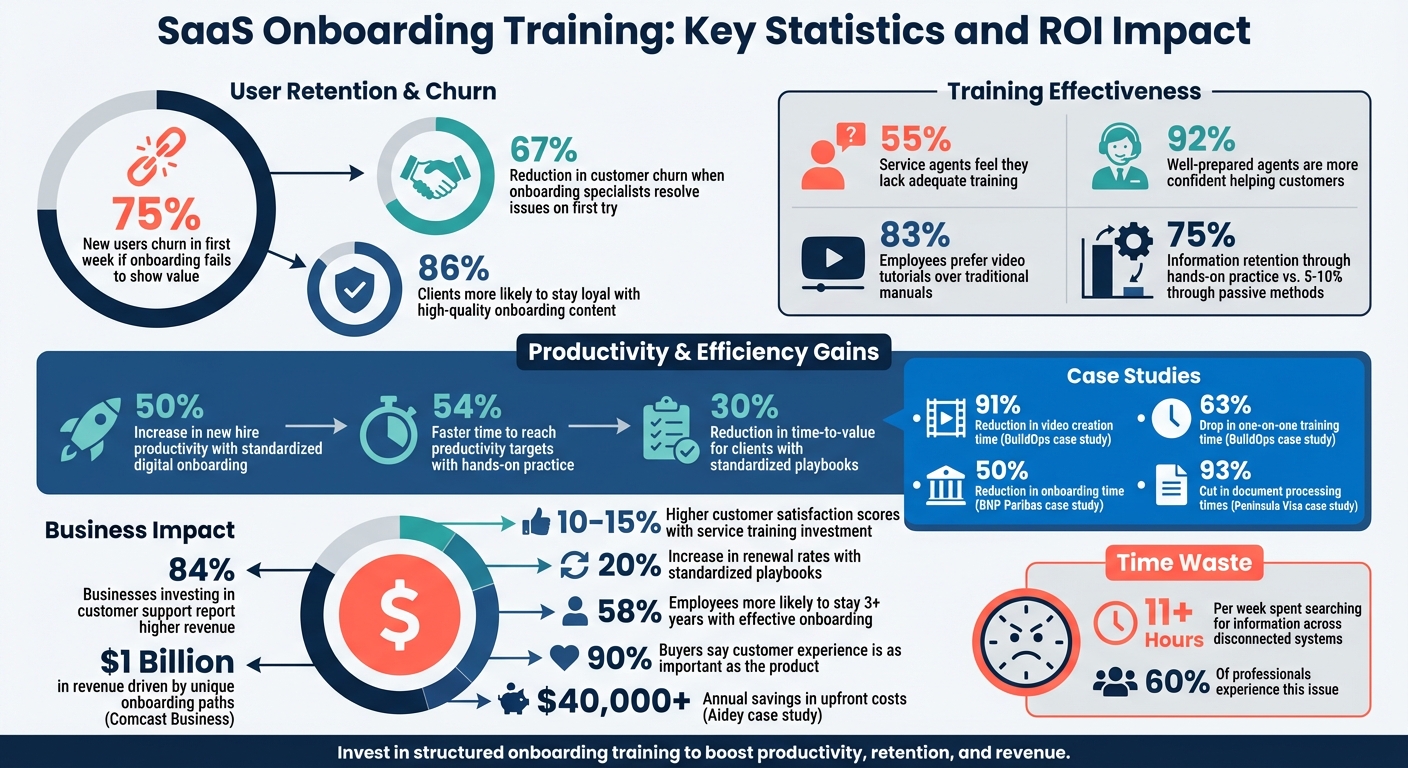
SaaS Onboarding Training: Key Statistics and ROI Impact
How to Structure your SaaS Onboarding Team
sbb-itb-8132e49
Assessing Team Skills and Knowledge Gaps
Before diving into training, it’s crucial to understand where your team currently stands. A skills audit helps uncover strengths and areas that need improvement, giving you a clear roadmap for effective training. This isn’t about catching anyone off guard – it’s about creating a solid foundation to build on.
Focus on five key areas during your audit: product knowledge (features, pricing, workflows), soft skills (like empathy and active listening), technical abilities (help desk tools, SSO, APIs), a customer experience mindset (understanding user journeys), and compliance (privacy policies and data handling). These categories help you evaluate readiness across all aspects of SaaS onboarding support. Research shows that 55% of service agents feel they lack adequate training to perform effectively, and companies that invest in service training often experience 10–15% higher customer satisfaction scores.
Conducting Skills Audits
One effective way to conduct a skills audit is by setting up sandbox environments in your help desk software. Use test accounts with simulated issues to observe how team members handle problem-solving, communication, and workflows. This hands-on approach often reveals gaps that written tests miss. Incorporating AI-powered roleplay tools can also help evaluate soft skills like objection handling and tone before agents interact with actual customers.
Behavioral analytics add another layer of insight. Track data like frequently accessed help articles, hesitation points during ticket resolution, or underused tools. For example, if agents spend more than 11 hours a week searching for information across disconnected systems, it may indicate issues with your internal knowledge base or tool navigation.
Jenn Southan, Director of Customer Support at TeamSnap, highlights the importance of this approach:
"Not only does [this] allow the new employee to see everything that’s coming, it also allows them to work autonomously with checklists and other information for what they need to get set up".
Using Role-Based Assessments
Once you’ve identified general training gaps, it’s time to get specific. Not every team member needs the same skills, so tailor assessments to match their roles. For instance, a Technical Implementation Specialist should focus on API troubleshooting and SSO configuration, while an Account Manager benefits more from honing relationship-building and communication skills. Role-based assessments ensure training is relevant and impactful.
Modular assessments can help distinguish between foundational knowledge (like brand standards and UI navigation) and specialized skills (such as technical integrations or escalation protocols). Take Comcast Business as an example: they created unique onboarding paths for executives, marketing operations, and campaign teams, which played a role in driving $1 billion in revenue.
To track progress effectively, implement a 3-month checklist with milestones at 30, 60, and 90 days. Monitor role-specific metrics like time-to-first-value to spot areas for improvement. For example, if technical specialists consistently take longer to resolve API issues, it’s a clear sign that targeted training is needed.
Developing a Training Curriculum
Once you’ve identified skill gaps, the next step is to design a focused training plan that equips your team to adopt the product effectively and contribute to growth. This involves creating a curriculum tailored to specific roles, using engaging formats, and providing clear, easy-to-follow documentation.
Think of your curriculum as a multi-layered system. Start with foundational modules that cover brand standards, product basics, and company culture. From there, introduce role-specific training paths for positions like Customer Success Managers (CSMs), Technical Support Specialists, and Account Representatives. Each path should include clear milestones. For instance, a CSM might need to complete four shadowed customer calls and pass a product certification before managing accounts independently. This milestone-driven structure ensures thorough training while avoiding information overload.
Designing Role-Specific Training Modules
Every role requires a unique skill set, so training modules should reflect these differences. For example:
- Technical Support Specialists benefit from hands-on practice, such as troubleshooting APIs or configuring single sign-on using a sandbox environment.
- Customer Success Managers need training on relationship-building, goal-setting discussions, and simplifying technical language for customers.
GitLab offers an excellent example of this tailored approach. In August 2025, the company launched a 7-module "CSM Onboarding" program. It required new CSMs to earn certifications like GitLab Certified Git Associate, shadow at least four customer calls weekly, and complete role-play exercises before being deemed "customer ready". This training spanned three months, progressing from foundational knowledge and shadowing to role plays, feedback, and eventually independent management with mentor oversight. Research shows that 92% of customer support agents who feel well-prepared by their training are more confident in helping customers. Such role-specific training ensures your team can deliver a seamless onboarding experience, driving early success for users.
Using Interactive Learning Tools
Traditional manuals often fall short, especially when 83% of employees prefer video tutorials. Interactive tools – like e-learning platforms, video guides, and in-app walkthroughs – can break down complex workflows into short, digestible segments under 90 seconds. This approach minimizes cognitive overload and improves retention.
A real-world example is BuildOps. In late 2025, Sabina Rana, Head of Support, spearheaded the creation of a self-service learning center using the Trainn platform. Her team produced over 100 tutorial videos in just 45 days. This initiative resulted in a 91% reduction in video creation time and a 63% drop in one-on-one training time.
Consider adding in-app enablement tools that trigger tutorials based on user behavior within your platform. Features like overlays, tooltips, and guided walkthroughs can teach team members as they navigate the interface. Pair these tools with sandbox environments where employees can safely experiment with technical setups, account configurations, and third-party integrations without affecting live client data. To reinforce learning, embed knowledge checks – such as quizzes or interactive questions – within your training modules.
Creating Standardized Onboarding Playbooks
Playbooks act as a roadmap for workflows, technical setups, and communication. Without them, teams risk inefficiencies and inconsistent client experiences. In fact, nearly 60% of professionals spend over 11 hours weekly searching for information across disconnected tools.
A well-crafted playbook should include:
- Clear objectives for each onboarding stage
- Assigned task owners
- Embedded resources like video guides and FAQs
- Communication templates for welcome emails, kickoff agendas, and follow-ups
Centralize these playbooks using a knowledge hub, whether it’s a dedicated LMS, a Trello board, or an internal wiki. This prevents the fragmentation caused by scattered materials across emails, Slack channels, or personal drives. Encourage a habit of over-documenting by setting up alerts to notify managers when playbooks haven’t been updated for several months, ensuring information stays current.
For example, a mid-sized SaaS company implemented standardized onboarding playbooks through the OnRamp platform. The result? A 30% reduction in time-to-value for new clients and a 20% increase in renewal rates.
Hands-On Practice and Real-Time Simulations
Getting hands-on experience is one of the most effective ways to build confidence and retain knowledge. Studies show that learners retain about 75% of information through hands-on practice, compared to just 5–10% through passive methods like reading or lectures. Plus, they hit productivity targets 54% faster when they can safely experiment before dealing with real customers. These simulations serve as an extension of structured training, ensuring your team is fully prepared for customer-facing situations.
Mock Onboarding Scenarios
Simulations are where theory meets practice. The most effective mock scenarios closely replicate the challenges your team will face daily. Start by reviewing recent support tickets and help desk queries as part of a customer support checklist to identify common issues – questions like "How do I set up SSO?" or "How do I onboard a teammate?". Turn these into decision-tree exercises, where each choice leads to different outcomes, such as resolving the issue, creating confusion, or escalating the problem.
Use dedicated testing environments for simulations so your team can practice high-stakes tasks without risking live client data. For instance, in February 2024, Jonathan DeVore at ScreenSteps led a remote training session where a new support agent tackled seven real-world questions using only a knowledge base and a test environment. Create detailed customer personas that represent a variety of user profiles, technical skills, and communication styles. Add time constraints to simulate real-world pressure, like delivering a report before an urgent meeting.
"Training is the perfect place to struggle. It’s a safe place to make mistakes." – Jonathan DeVore, Customer Success, ScreenSteps
Simulated Client Interactions
Technical skills are essential, but soft skills often make the difference in customer interactions. Role-playing exercises help your team navigate the emotional nuances of real conversations. Let team members switch roles between support specialist and customer to build empathy and understand both perspectives. Encourage them to pick up on emotional cues beneath technical questions, such as anxiety or fear of making mistakes.
Record these sessions for later analysis. Spread practice sessions throughout the first month instead of cramming them into the first week to avoid overwhelming new hires. Pairing new hires with experienced mentors during role-play exercises can also provide more realistic and challenging scenarios. Some companies are even using AI-powered simulations that adapt to an agent’s tone in real-time, offering immediate feedback without needing a manager’s input. Teams that incorporate role-playing into their training see faster productivity gains – new hires hit targets 54% sooner – and onboarding specialists who resolve issues on the first try can reduce customer churn by 67%.
Using Tools for Onboarding Management
The right tools can turn onboarding chaos into a well-oiled machine. SaaS teams are moving away from manual processes and embracing dedicated onboarding platforms that bring structure and best practices to the forefront. These platforms create streamlined, time-sensitive workflows, treating onboarding with the same level of importance as product development. This consistency lays the groundwork for more efficient, tool-driven onboarding methods.
Why does this shift matter? Because 86% of clients are more likely to stay loyal to a company that delivers high-quality onboarding content. When juggling multiple client implementations, centralized systems ensure that no detail falls through the cracks – especially in the maze of email threads.
Project Management Tools
Platforms like Rocketlane, Dock, and Arrows offer structured project plans paired with customer-facing features, such as shared timelines and documentation hubs. These tools create a "single execution narrative" for clients while keeping cross-functional teams aligned.
Take Dock, for example. In early 2026, Rachel Jennings-Keane, Global Head of Customer Success at Assignar, introduced standardized onboarding templates using Dock. This move replaced inconsistent regional processes with a unified template, cutting kickoff call times by an average of 25 minutes. Similarly, Noah Massucci at Robin used these tools to keep clients informed about their progress (e.g., "75% complete"), boosting accountability and ensuring that initial goals were consistently met.
To get the most out of these tools, integrate them with your CRM – whether it’s HubSpot, Salesforce, or another platform. This integration automates the transition from sales to customer success. However, before diving into automation, map out your current manual processes. Otherwise, you risk automating something that’s already broken. Breaking down long implementations into smaller, manageable steps with visible progress indicators can also help maintain momentum and prevent clients from feeling overwhelmed.
Client Communication Platforms
While project management tools handle the structure, communication platforms bring clarity. These platforms consolidate resources, task lists, and meeting notes into a single hub. This creates what experts call a "shared reality", where both your team and the client are on the same page regarding project ownership, next steps, and progress.
For instance, BNP Paribas Wealth Management digitized client onboarding across multiple regions using Moxo‘s workflow orchestration. The result? A 50% reduction in onboarding time. Similarly, Peninsula Visa implemented dynamic flow branching based on traveler location and nationality, cutting document processing times by an impressive 93%.
"With Dock, it only takes us about 10 to 20 seconds to launch a new customer. I just type in their name, and we have this fully personalized template ready to go." – Brittany Soinski, Manager of Onboarding, Loom
To maximize efficiency, choose tools with customer-facing dashboards. These allow clients to track their own progress without needing to ask. Embed walkthrough videos, training materials, and meeting links directly into the onboarding hub to keep everything centralized. Additionally, engagement analytics can help identify clients who are falling behind, allowing your team to step in proactively before renewals are at risk. By equipping your team with these tools, you reinforce the structured and consistent training process necessary for successful onboarding.
Continuous Training, Feedback, and Certification
Onboarding doesn’t stop after the first week – it’s an ongoing process that thrives on continuous feedback and structured learning. Research shows that standardized digital onboarding can increase new hire productivity by 50% when paired with regular feedback and training opportunities. To keep the momentum going, it’s essential to provide consistent feedback and ensure employees achieve certified competence. As Matt Lubbers, Director of Partnerships at Lessonly, puts it:
"Real development occurs when agents receive targeted feedback."
Regular Performance Check-Ins
Regular check-ins are a cornerstone of effective onboarding. Weekly one-on-one meetings, combined with more in-depth reviews at one, two, and three months, help track progress and identify areas for improvement. For email-based tasks, senior team members can review responses, while live channels benefit from pairing new hires with mentors who can offer real-time coaching. Tools like CSAT ratings and thorough ticket reviews provide valuable data to guide these coaching efforts.
Companies that integrate OKRs (Objectives and Key Results) with professional development time often see impressive results: average CSAT scores in the 90th percentile and employee turnover rates as low as one person every two years.
To set clear expectations, use resources like call recordings, screen captures, or transcripts of successful interactions. These examples visually define what "great" looks like, giving new hires a tangible benchmark for success. Additionally, connect support tickets to your internal knowledge base. If an agent struggles to find an answer, it signals an opportunity to update training materials. As Kayako highlights:
"A culture of feedback is a culture of growth, and your team will continuously strive to be better if you let them know where their strengths and weaknesses lie."
The combination of regular feedback and clear guidance lays the groundwork for formal certification, which ties learning to measurable performance outcomes.
Certification Programs
Certification programs play a critical role in validating that employees are ready to handle core responsibilities independently. Studies show that employees who experience effective onboarding are 58% more likely to stay with their company after three years. Certification provides clear milestones that boost confidence and foster a sense of achievement.
A Learning Management System (LMS) can streamline this process by delivering certification courses, tracking progress in real time, and centralizing all training materials. Certification programs should be designed with specific outcomes in mind. Liz Jukovsky, Content Marketing Manager at Litmos, explains:
"Readiness defines what ‘good’ looks like at the end of onboarding. Teams design role- or persona-based onboarding paths with clear confidence milestones, so users know when they’re ready to perform core tasks independently."
To measure the success of your certification efforts, track metrics like time to competency, assessment scores, and course completion rates. Companies like Cisco exemplify this approach by offering formal customer training certifications that not only enhance individual careers but also raise team standards across the board.
Conclusion: Building a Skilled Onboarding Team
Key Takeaways
Creating an effective SaaS onboarding program takes thoughtful planning, practical training, and ongoing improvement. Start by evaluating your team’s current abilities with role-specific audits to pinpoint any skill gaps. Then, design a training plan that simplifies complex topics into smaller, digestible segments – spreading the training over weeks tends to be far more effective than trying to cram everything in at once.
Incorporating simulated environments and pairing team members with mentors helps build confidence before they face real customer situations. Companies that adopt standardized digital onboarding processes report a 50% boost in new hire productivity, while employees who experience thorough onboarding are 58% more likely to stay with the company for at least three years.
A strong onboarding process doesn’t just improve employee retention – it also enhances revenue. Studies show that 84% of businesses investing in customer support report higher revenue, and 90% of buyers say the customer experience is just as important as the product or service itself. A well-prepared support team not only solves problems but also builds trust, drives user engagement, minimizes escalations, and identifies growth opportunities.
By implementing these strategies, you lay the groundwork for scalable, efficient support systems – an area where Aidey excels.
How Aidey Can Help
Aidey offers 24/7/365 customer support outsourcing tailored for SaaS businesses, with pre-trained teams skilled in software onboarding. Their complimentary onboarding services cover recruitment, training, and system setup, saving small-to-medium businesses over $40,000 annually in upfront costs.
Aidey’s representatives, all fluent English speakers, receive training specific to your product and processes, ensuring seamless and consistent customer interactions. Whether you need technical support, back-office operations, or scalable customer service solutions, Aidey’s global expertise equips you to provide an onboarding experience that transforms new users into loyal, long-term customers.
FAQs
What metrics prove onboarding training is working?
Metrics that highlight the success of onboarding training are those tied to measurable outcomes, like enhanced customer success and a drop in support demands. Some key indicators to watch for include a decrease in support ticket volume, higher adoption rates of key features, and lower churn rates. Beyond these, tools like Customer Satisfaction (CSAT) scores, Net Promoter Score (NPS), and a shorter time to value (TTV) can provide insight into how well the training is driving customer engagement and long-term retention.
How long should SaaS onboarding training take per role?
SaaS onboarding training generally requires a minimum of three months per role to ensure team members are equipped to perform effectively. For roles with greater complexity, extending the training period beyond three months can lead to better retention and increased engagement. This approach follows best practices for onboarding, enabling teams to provide high-quality, tailored experiences for SaaS clients.
What’s the simplest way to run safe onboarding simulations?
The easiest method is to use roleplay scenarios. These let your team practice real customer interactions in a safe, controlled environment. By simulating common challenges, staff can prepare without the pressure of live onboarding. Pair these exercises with coaching sessions and platform tools to refine their skills even further. This hands-on approach helps boost both their confidence and their ability to perform effectively during actual onboarding.