
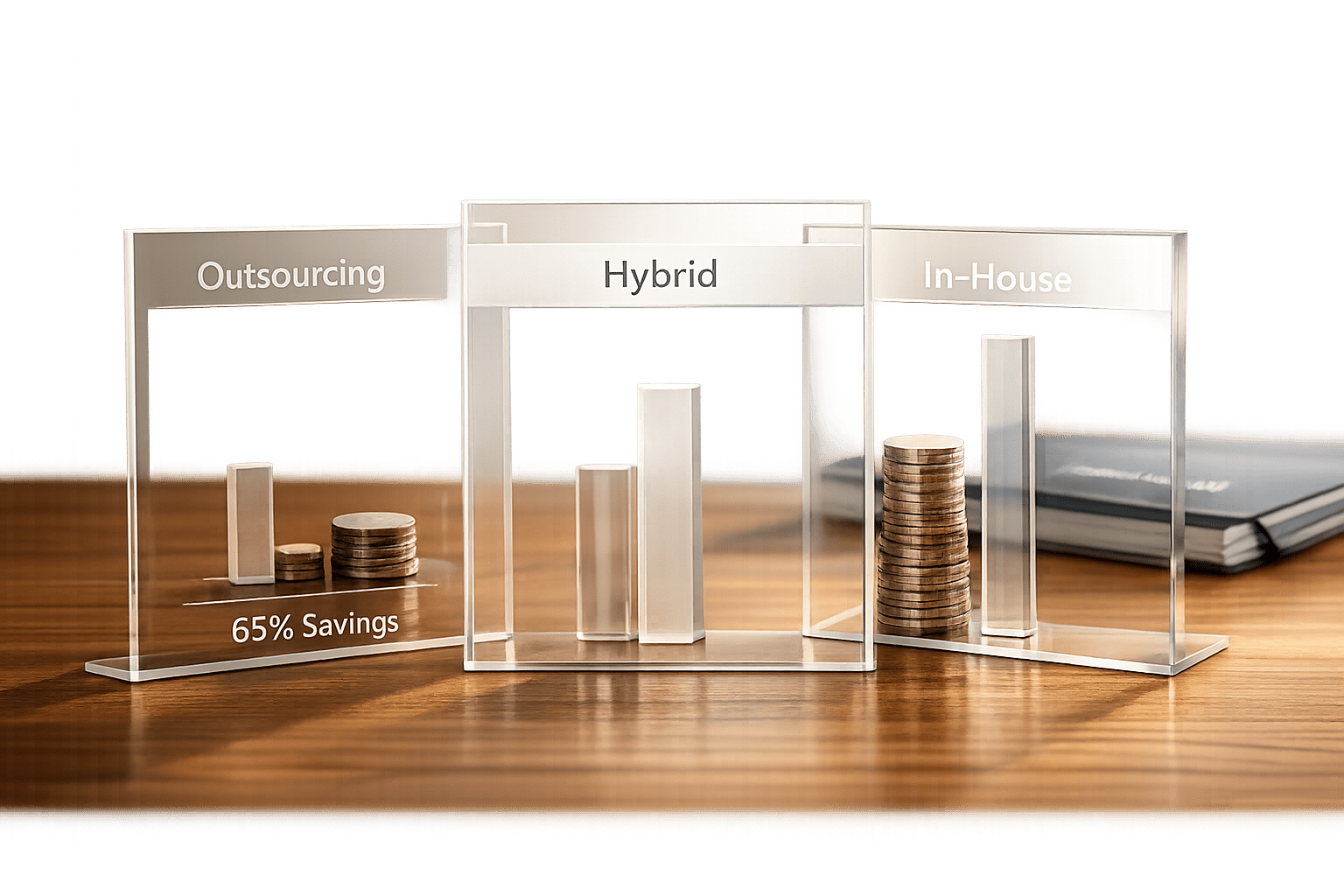
Choosing between outsourcing and in-house customer support boils down to cost, scalability, and control. Outsourcing can save 50–65% on costs by reducing overhead, while in-house teams offer deeper product knowledge but come with 25–40% higher expenses beyond salaries. Here’s a quick breakdown:
- Outsourcing: Costs $1–$4 per ticket offshore/nearshore or $28,000 annually per agent, with fast scalability and lower attrition (18%). Hidden costs include vendor management and compliance.
- In-House: Costs $72,700+ per agent annually, with slower scaling, high attrition (35%), and fixed costs like recruitment, facilities, and training.
- Hybrid Model: Combines the benefits of both, keeping complex tasks in-house while outsourcing routine work.
| Factor | In-House Support | Outsourced Support |
|---|---|---|
| Cost | High fixed costs | Variable, 50–65% cheaper |
| Scalability | Slow (weeks/months) | Fast (days) |
| Attrition | 35% | 18% |
| Product Knowledge | Deep | Requires strong documentation |
For startups with tight budgets, outsourcing frees resources for growth. Mid-sized SaaS companies ($10M–$100M ARR) often benefit from hybrid models. Larger firms may combine in-house Tier 3 support with outsourced Tier 1 tasks for cost and efficiency balance.
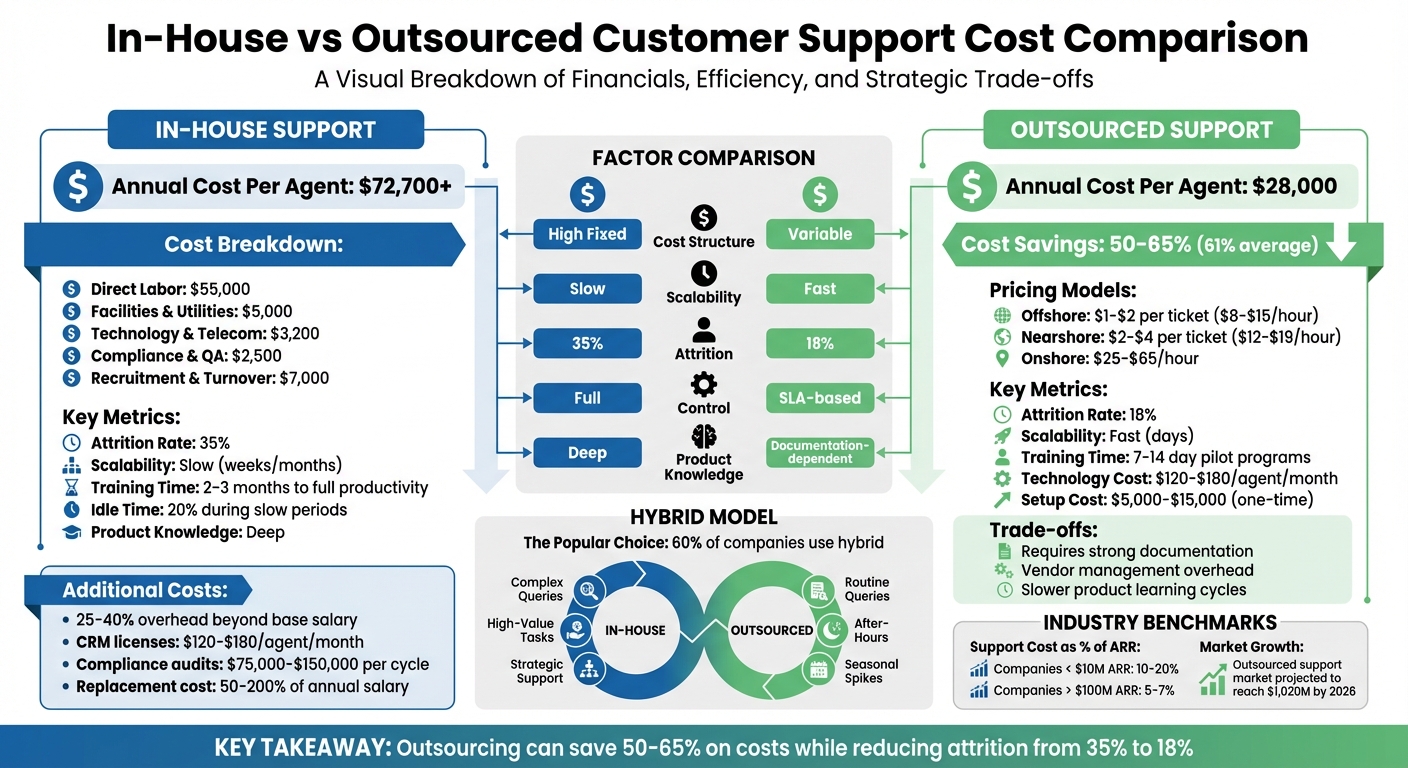
In-House vs Outsourced Customer Support Cost Comparison
1. Outsourcing Customer Support
Cost Breakdown
Outsourcing customer support offers a flexible cost structure that adapts to ticket volume. Hourly rates vary based on location: $8–$15 for offshore teams in the Philippines or India, offshore teams in the Philippines or India, $12–$19 for nearshore providers in Latin America or Eastern Europe, and $25–$65 for onshore agents2–offshore teams in the Philippines or India, $12–$19 for nearshore providers in Latin America or Eastern Europe, and $25–$65 for onshore agents9 for nearshore providers in Latin America or Eastern Europe, and $25–$65 for onshore vs offshore support agents in the U.S. or Canada. For SaaS companies, nearshore support typically costs $2–$4 per ticket, while offshore support is more affordable at $1–$2 per ticket. Transitioning to an outsourced model, including system integration, can cost between $5,000–$15,000. Monthly technology expenses, such as cloud licenses, VoIP, and analytics tools, range from $120–$180 per agent. Specialized services, like HIPAA compliance or bilingual support, can increase base rates by 15% to 30%.
To put this into perspective, a nearshore outsourced seat costs around $28,000 per year, compared to $72,700 annually for an in-house North American agent – representing a cost reduction of approximately 61%. These figures provide a strong foundation for assessing the operational upside of outsourcing.
Scalability
One of the standout advantages of outsourcing is its ability to scale quickly. Vendors can ramp up staffing in just days, sidestepping the lengthy hiring, onboarding, and training processes typical of in-house teams. This flexibility allows businesses to maintain 24/7 support across multiple time zones, all while focusing internal resources on product development and other priorities.
Training Needs
Outsourcing providers streamline the training process by supplying agents already well-versed in customer support basics. Your team only needs to deliver product-specific training. Many vendors also offer 7–14 day pilot programs to ensure agents meet quality and brand standards.
However, as Türkü Şimşek, Content Marketing Specialist at LiveChatAI, points out, "The biggest hidden cost of outsourcing isn’t the vendor fee – it’s the loss of feedback loops and slower product learning cycles." Outsourced teams may lack the in-depth product knowledge that fosters innovation, making it critical to implement strong reporting and feedback systems to bridge this gap. While outsourcing reduces training time, businesses should remain aware of these indirect challenges.
Hidden Expenses
In addition to visible costs, outsourcing comes with indirect expenses that need consideration. These include vendor management overhead, compliance audits for industries with strict regulations like HIPAA, PCI-DSS, or GDPR (if certification upgrades are required), data security reviews, and legal consultations to ensure contract compliance. Another potential cost is the missed opportunity to gather direct customer feedback, which can influence product development.
To avoid surprises, carefully review contracts for transparency on technology fees and specialized service charges. These hidden costs, while adding complexity, still leave outsourcing as a cost-effective option when managed properly.
sbb-itb-8132e49
Scaling SaaS support teams: In-house vs. Outsourced?
2. In-House Customer Support
While outsourcing helps control variable costs, managing customer support in-house comes with a unique set of expenses that can stretch a company’s resources.
Cost Breakdown
Running an in-house support team involves fixed costs that stay consistent, no matter the ticket volume. Breaking it down, the annual cost per seat typically includes:
- Direct labor: Base salary, health insurance, retirement contributions, and payroll taxes, averaging about $55,000 per seat.
- Facilities and utilities: An additional $5,000 per seat.
- Technology and telecom: Around $3,200 per seat.
- Compliance and quality assurance: Roughly $2,500 per seat.
- Recruitment and turnover: About $7,000 per seat.
Altogether, these costs make the total expense per seat 25–40% higher than just the base salaries. On top of that, companies often face added technology costs. For example, CRM licenses range from $120–$180 per agent monthly, AI routing tools cost $25–$35 monthly, and server maintenance runs $40–$60 monthly. Organizations under strict regulations, such as HIPAA, PCI-DSS, or GDPR, face periodic audits costing between $75,000 and $150,000 per cycle. These fixed costs can create challenges, especially when scaling or onboarding new team members.
Scalability
When scaling customer support, in-house teams are far less flexible than outsourcing. Fixed overhead persists, even during slower periods, with agents spending up to 20% of their time idle. When demand spikes, hiring and onboarding new agents – often a weeks- or months-long process – slows the ability to adapt quickly. Additionally, new hires typically take 2–3 months to become fully productive, meaning they’re paid full salaries while operating below peak efficiency.
The proportion of support costs relative to revenue also varies. For SaaS companies earning less than $10 million in ARR, support expenses can consume 10–20% of revenue, while companies with over $100 million in ARR generally see this drop to 5–7% due to economies of scale.
Training Needs
For technical SaaS products, finding skilled support agents is a challenge – 63% of IT professionals report difficulty locating candidates with the required technical expertise. Once hired, agents need comprehensive training on product features, company policies, and support protocols. This process not only diverts leadership focus from core business goals but also adds to costs, with ongoing training averaging $1,300 per agent annually.
Hidden Expenses
In-house support comes with less obvious costs, such as management time spent on recruitment and HR tasks, which detracts from product development and innovation. High attrition rates, averaging 35% annually, further compound expenses. Replacing employees can cost 50–200% of their annual salary, factoring in lost productivity and knowledge gaps.
Maintaining 24/7 global support adds another layer of complexity. Employees working irregular hours are 26% more likely to experience burnout, which can drive attrition even higher. Other hidden costs include recruitment advertising, background checks, legal consultations for contracts, and the administrative workload of HR management. These factors make the overall cost structure for in-house support more intricate than it might initially appear.
Pros and Cons
After diving into the cost structures, let’s break down the practical trade-offs of different support models.
In-house support gives you total control and unmatched product expertise – perfect for tackling complex issues. However, it comes with high fixed costs and slower scalability. On the flip side, outsourcing can cut costs by 50–65% thanks to variable pricing. It also eliminates the headaches of managing recruitment, training, and infrastructure. Outsourcing providers can scale quickly, offer 24/7 coverage across time zones, and avoid the burnout that often comes with night shifts. The trade-off? You’ll need strong vendor management to ensure quality doesn’t slip.
"Outsource everything but your core business".
The hybrid model has become the go-to choice for many companies – 60% of organizations now use it. This approach keeps high-value or complex support in-house while outsourcing routine tasks, after-hours coverage, or seasonal spikes. For SaaS businesses earning less than $10M in ARR, customer support can eat up 10–20% of revenue.
| Factor | In-House Support | Outsourced Support |
|---|---|---|
| Cost Structure | High fixed costs (salaries, benefits) | Variable pricing (pay-per-use/per-agent) |
| Scalability | Slow (weeks/months to hire) | Fast (days to add agents) |
| Product Knowledge | Deep, specialized knowledge | May need strong documentation |
| Control | Full direct oversight | Relies on SLAs; less direct control |
| Hidden Expenses | Recruitment, churn (20–30%), IT upkeep | Setup fees, vendor oversight costs |
| Training | High internal effort and ongoing costs | Provider handles it with minimal input |
Each model has its strengths and weaknesses, and the best choice often depends on your company’s size, growth goals, and how much control you want over customer interactions. For startups laser-focused on product innovation, outsourcing can free up leadership to focus on core priorities. On the other hand, established SaaS companies with intricate products often find the hybrid model delivers the right mix of cost savings and quality control. These considerations are key for SaaS businesses aiming to craft a support strategy that aligns with their overall goals.
Conclusion
This analysis broke down the cost structures, scalability, training needs, and hidden expenses of different support models. Outsourcing can deliver 50–65% cost savings compared to in-house support by cutting fixed costs and minimizing attrition-related expenses. Meanwhile, in-house teams often face 25–40% additional overhead costs.
Running an internal support team can also pull leadership away from key priorities like product development and fundraising. For early-stage startups, outsourcing is a smart way to conserve essential resources.
For mid-sized SaaS companies with annual recurring revenue (ARR) between $10M and $100M, a hybrid model often strikes the right balance. This setup keeps specialized technical support in-house while outsourcing routine queries and after-hours coverage. It’s a practical way to retain product expertise without the burden of staffing a 24/7 operation.
Larger companies with highly complex or proprietary products may find it beneficial to manage internal Tier 3 support while outsourcing Tier 1 tasks. Outsourced teams also tend to have lower attrition rates – 18% compared to 35% for in-house teams – which helps cut recruitment and retraining costs. Don’t forget to factor in a 25–40% increase over base salaries for benefits, office space, and other overhead costs when assessing in-house options.
These models not only help align support expenses with revenue but also reflect the expanding outsourced support market. By 2026, the market is projected to reach $1,020 million, as more companies recognize its strategic advantages. Whether you choose in-house, outsourced, or hybrid support, aim to align your spending with industry benchmarks: 10–20% of ARR for companies under $10M, scaling down to 5–7% as revenue exceeds $100M.
Ultimately, the goal is to develop a scalable support strategy that lets your team stay focused on what matters most.
FAQs
How do I calculate my true cost per ticket for each model?
To figure out your actual cost per ticket, here’s what you need to do:
- Add up all support-related expenses: This includes salaries, software fees, infrastructure costs, training programs, and any overhead.
- Count the total number of resolved tickets: Be sure to include tickets that were reopened and resolved again.
- Divide the total costs by the number of resolved tickets: This gives you the cost per ticket.
Using this approach allows you to better evaluate the costs of in-house versus outsourced support, factoring in often-overlooked expenses like employee turnover and software licensing.
What should I include in an outsourcing SLA to protect quality and security?
An outsourcing SLA should lay out clear expectations for performance standards, security protocols, data privacy measures, and response/resolution times. These details ensure the provider delivers consistent quality and adheres to security requirements. To reinforce accountability, it’s wise to include penalties for non-compliance. This approach protects your operations and helps maintain dependable service.
When does a hybrid support model make more sense than fully outsourcing?
A hybrid support model strikes the right balance between managing costs and maintaining control over critical support functions. By outsourcing routine tasks – like password resets – companies can free up internal resources for more complex and sensitive issues. This setup provides the flexibility to scale during busy periods, lowers fixed expenses, and helps reduce challenges such as high employee turnover. At the same time, it ensures customers receive personalized, high-quality support where it matters most.