

Your SaaS is growing fast, but so are your support tickets. Scaling customer service for SaaS companies isn’t just about hiring more agents – it’s about smarter systems, efficient workflows, and leveraging tools like outsourcing and automation to handle increased demand without breaking your budget.
Here’s the challenge:
- Support requests often grow 3–4x faster than your customer base.
- Each ticket costs $25–$35, and doubling your team size can drain profits.
- Poor support drives customers away – 96% of unhappy customers leave without complaining.
The solution?
- Outsource strategically: Offload routine tasks like password resets to providers like Aidey, cutting costs by 30–60% while maintaining quality.
- Use automation: AI chatbots and helpdesk tools can handle 70–80% of tickets, reducing response times and saving $150,000+ annually.
- Streamline workflows: Automate repetitive tasks, train specialized teams, and maintain a well-organized knowledge base to boost efficiency.
Key metrics to watch:
- First Response Time (FRT): Aim for <4 hours (email) or <2 minutes (chat).
- Customer Satisfaction (CSAT): Keep scores above 85%.
- Cost-per-ticket: Optimize to stay within $25–$35.
Scaling support doesn’t mean hiring endlessly. By combining outsourcing, automation, and data-driven improvements, you can grow efficiently while keeping customers happy.
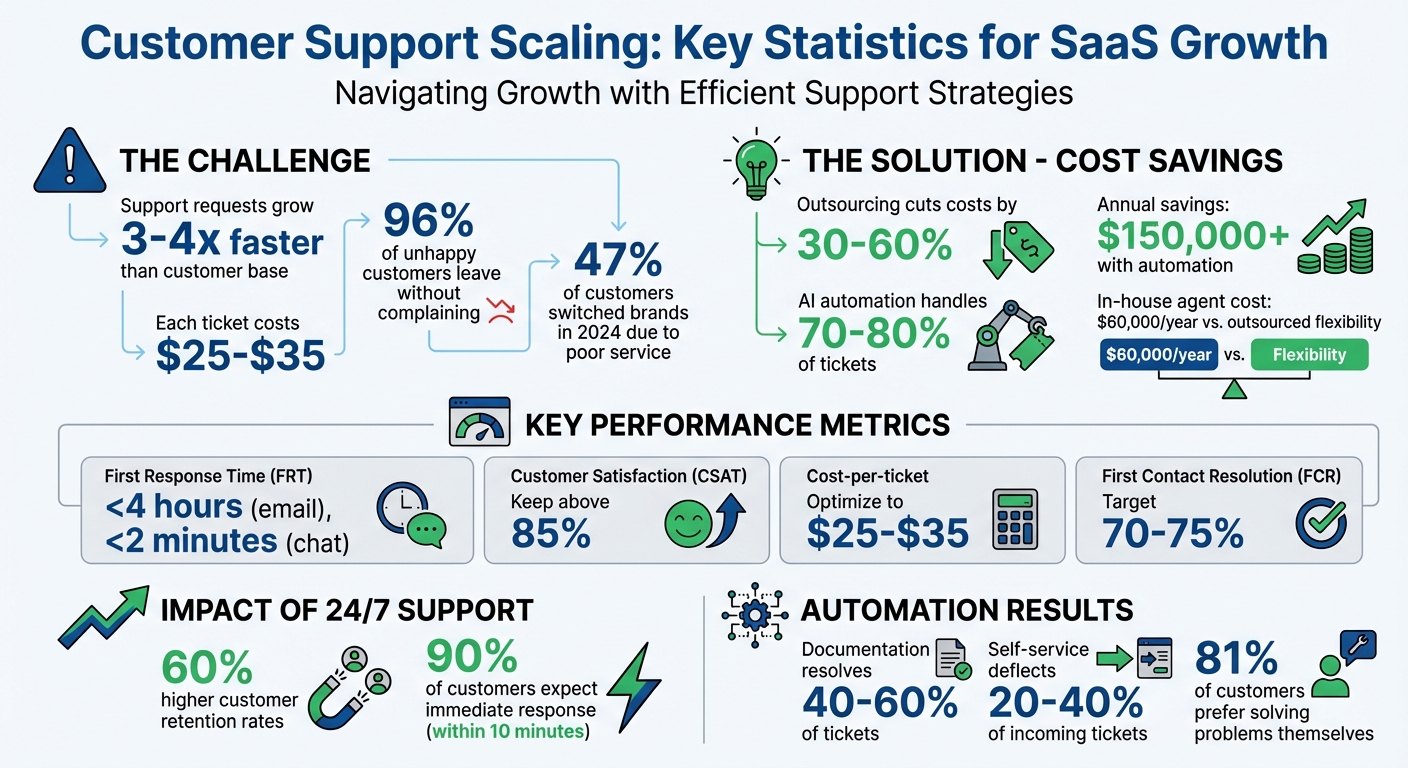
Customer Support Scaling Statistics for SaaS Companies
How I Scaled Customer Support From 5 Users to Thousands (What I’d Do Differently)
sbb-itb-8132e49
When to Outsource Customer Support
Figuring out the right time to outsource customer support can be tricky. Many SaaS founders hold off too long, letting service quality drop while costs skyrocket. The trick is spotting the warning signs early – before they start cutting into your profits. Let’s break down the key metrics and scenarios that show it’s time to make the switch.
Warning Signs You Need to Outsource
As your customer base grows, support demands can quickly overwhelm your internal team. Metrics often tell the story. If your ticket backlog regularly takes more than three days to clear, your first response time (FRT) stretches past an hour, or your customer satisfaction (CSAT) score dips below 85%, it’s a red flag that your current setup isn’t keeping up.
Another sign? If founders or senior engineers are spending 40% or more of their time handling support tickets. That’s time they could be using to build and improve your product. As Enshored points out:
"Every hour your engineers spend resetting passwords costs you $150 in opportunity cost."
Other indicators include handling more than 200 tickets daily or struggling to hire and train new agents fast enough – especially when hiring takes 6 to 8 weeks and training adds another 4 to 6 weeks. Add to that the fact that 56% of customer service reps report burnout, and 69% of service leaders cite attrition as a major challenge. It’s clear that sticking with an overburdened internal team can hurt both morale and performance.
Customer loyalty is also at stake. In 2024, 47% of customers switched brands because of poor service. That’s a risk no growing SaaS company can afford to ignore.
How Outsourcing Helps SaaS Companies
Outsourcing customer support isn’t just about solving problems – it can actually turn support into a growth driver. One major advantage is cost flexibility. Instead of paying about $60,000 annually for each in-house agent (including benefits and overhead), outsourcing lets you pay only for the support you need. This typically results in 30% to 60% savings.
Here’s a real-world example: A styling service app teamed up with a support provider in early 2026, bringing in 20 agents to handle 50,000 monthly requests. The results? A 20-second first response time, a jump in their TrustPilot score from 3.7 to 4.4, and a drop in refund rates from 12% to 4%. Later, they introduced AI support and reduced their team from 24 agents to just 8, cutting their support costs by 54% while maintaining the same workload.
Outsourcing also makes scaling easier. Providers can deploy teams up to 10× faster, often in under 30 days. Plus, they offer 24/7 global coverage, which is key for companies aiming to provide round-the-clock service. Businesses with 24/7 support see 60% higher customer retention rates. This allows your internal team to focus on what they do best – developing your product, building strategic partnerships, and driving innovation.
Choosing Aidey for Customer Support Outsourcing
If your SaaS business is feeling the pressure of growing support demands, Aidey offers a tailored solution to meet your needs. When outsourcing becomes a necessity, picking the right partner can make all the difference. Aidey focuses on Support‑as‑a‑Service, designed specifically for SaaS companies. They handle everything – system design, recruitment, training, and quality assurance – without charging any setup fees. This means you can get started without worrying about upfront costs draining your budget.
What sets Aidey apart is their integrated approach. Your strategic Customer Success team stays in-house, while Aidey takes over high-volume Tier 1 tickets. These include common issues like password resets, payment problems, account inquiries, and basic connectivity troubleshooting. Their dedicated agents ensure quick resolutions, while important customer feedback and documentation are passed along to your internal product team. This allows your core team to focus on developing new features and driving your business forward.
Aidey also provides round-the-clock support, 24/7/365, across phone, email, and chat channels. Their team of native English-speaking agents is well-versed in SaaS, ensuring they can manage technical troubleshooting and user onboarding with ease. As one satisfied client, Ram, shared:
"Our company needed customer support with experience in using SaaS tools and Aidey was able to provide us highly skilled individuals suited for our business".
And with a variety of support plans, Aidey makes it easy to find the right fit for your business.
Aidey’s Support Plans Comparison
Aidey offers three flexible support packages to match your company’s growth stage:
- Basic Support: Perfect for startups, this plan provides 24/7 chat and email support through a shared team. It’s ideal for handling straightforward inquiries.
- Advanced Support: Designed for growing businesses, this plan includes a dedicated team, phone support, and tailored training to manage higher ticket volumes.
- Enterprise Support: Built for larger operations, it offers custom solutions, multilingual support, and advanced analytics to meet more complex needs.
All plans integrate seamlessly with your existing helpdesk software, ensuring a smooth transition and precise cost control as your ticket volume fluctuates. These options make it easy to scale your support as your business evolves.
Why Aidey Works for Growing SaaS Businesses
Aidey’s approach aligns perfectly with the fast-paced nature of SaaS growth. Their flexible pricing structure ensures you’re not stuck paying for extra capacity during slower periods, and they allow you to scale up quickly when demand spikes. This adaptability eliminates the usual hurdles of outsourcing, like lengthy hiring processes, and helps you adjust your team size as needed.
With a 4.2/5 rating on Trustpilot from 15 reviews, Aidey has earned praise for its cost-effective solutions. As Dianne Morgan noted:
"Our satisfaction rate improved a lot and it’s really cost‑effective".
Using Technology to Scale Support Operations
For SaaS companies, scaling support doesn’t have to mean endlessly growing your team. Instead, many are turning to helpdesk software and AI automation to handle increasing ticket volumes without a proportional rise in staffing. Why? Resolving tickets manually costs between $15 and $25 each, but automation can slash those costs by 40–60%. Plus, documentation alone can resolve 40–60% of support tickets.
Take Slack, for example. Between 2023 and 2025, they introduced a hybrid automation system that cut average response times from 4.2 hours to just 1.7 hours – a 60% improvement. Even more impressive, their AI managed 73% of initial interactions, including tasks like account setup and basic troubleshooting. This isn’t about replacing human agents but making their jobs easier and more efficient.
Before diving into new tools, it’s smart to review your support data from the past 90 days. Look for the 10–20 most common issues that could benefit from automation. Start with high-volume, straightforward tasks like account status checks or simple troubleshooting. Pairing these tools with outsourcing can help you scale support operations efficiently as your customer base grows. Using a customer support outsourcing checklist can help ensure your team is ready for this transition.
Here’s a closer look at how helpdesk software and AI chatbots can transform your support system.
Helpdesk Software for Managing Tickets
Helpdesk platforms streamline ticket management by consolidating all customer messages – whether they come via email, live chat, social media, or in-app forms – into one dashboard. This eliminates the risk of losing context or duplicating efforts. AI plays a key role here, automatically scanning ticket content to gauge urgency and routing requests based on predefined rules.
Modern helpdesk tools also speed up agent workflows. Instead of starting from scratch, agents can verify and tweak AI-drafted responses. Features like one-click ticket summaries, tag suggestions, and pre-written replies help resolve issues faster. As Melissa Hannam, Director of Marketing at Valley Driving School, puts it:
"The minute you create the automation rules, you can mark it as ready to go live, and it immediately starts working for you".
Service Level Agreements (SLAs) can also be set up within helpdesk software to prioritize high-value accounts. For instance, enterprise customers paying $50,000+ annually might have a 1-hour response target, while self-serve customers might receive a 24-hour response time.
The numbers back up the impact of AI-powered ticketing systems. They can boost an agent’s daily capacity from 12 to 23 tickets – a 92% increase in productivity. DataSync, a SaaS company with 50 employees, implemented hybrid automation in 2025. The result? They reduced their support team from 8 to 5 agents, increased ticket resolution by 156%, improved CSAT scores from 72% to 89%, and cut customer churn by 23%.
While helpdesk software improves ticket management, AI chatbots take customer responsiveness to the next level.
AI Chatbots for Automated Responses
AI chatbots are game-changers for handling routine inquiries, especially outside business hours. By combining AI with human agents, companies can address common questions quickly while escalating complex issues to real people when needed.
To ensure quality, set a confidence threshold – automated replies should only go out when the AI is at least 85% confident. Anything below that can be routed to human agents.
Consider OPPO’s success. Using an AI-powered chatbot through Sobot, they achieved an 83% resolution rate for automated interactions and earned a 94% positive feedback score from customers.
For chatbots to work effectively, they need to be backed by a well-maintained knowledge base. This ensures they provide accurate answers. Tools like help centers and chatbots can deflect up to 30% of incoming tickets, and 81% of customers try to resolve issues on their own before contacting support. Simon Bacher, CEO of Ling, shared:
"The statistics we have recorded show that about 60% of clients prefer Knowledge Base, while 40% use AI chatbot".
When choosing a chatbot platform, look for ones with built-in AI features and seamless integration with your existing CRM and billing systems. This gives agents a complete view of the customer journey. Mid-size SaaS companies often save $150,000 to $250,000 annually by automating routine tasks, which typically make up 70–80% of total ticket volume.
Improving Workflows for High Ticket Volumes
Once you’ve implemented the right tools, the next step is to fine-tune your ticket workflows. Even the most advanced technology won’t help if your processes are clunky or your team isn’t prepared. Efficient workflows let you handle more requests without cutting corners on quality.
On average, SaaS companies deal with 847 support tickets per 1,000 active users each year. That kind of volume can quickly overwhelm teams relying on manual processes. But the answer isn’t just hiring more staff. Instead, it’s about automating repetitive tasks and equipping your team to tackle complex issues more effectively. In fact, businesses that adopt support automation often report a 300–400% ROI in their first year.
Automating Repetitive Support Tasks
Start by analyzing your support data to identify the top 20 most common inquiries – these typically account for about 70% of your ticket volume.
Automation can make a huge difference here. For example:
- Automated ticket triage: This system scans incoming tickets for urgency and sentiment, ensuring they’re routed to the right team member. It can even flag frustrated customers and escalate their cases automatically.
- SLA-based triggers: These monitor service level agreement deadlines and alert your team as critical deadlines approach.
- Self-service portals: Many customers prefer solving simple issues themselves – 61%, to be exact. A well-organized knowledge base can deflect 20–40% of tickets before they even reach your agents.
To ensure automation works smoothly, set AI confidence thresholds between 85–90%. Anything below that threshold should be routed to a human agent for review.
By automating routine tasks, you free up your team to focus on what really matters – handling complex, high-stakes issues.
Training Support Teams for Better Performance
Automation is a game-changer for repetitive tasks, but skilled agents are still essential for dealing with complex or high-value interactions. As Faareha Sajjad from Hyperengage puts it:
"Scaling customer support teams is not just ‘handle more tickets.’ It is ‘handle more variety.’ More channels, more product complexity, more stakeholders, and more urgency."
As your company grows, you’ll need to create specialized roles. Generalist support teams often struggle to keep up, so consider adding dedicated positions for technical troubleshooting, enterprise account management, or onboarding.
Take Hexaware as an example. In 2026, they used Genesys Cloud‘s AI-powered analytics to evaluate agent performance. This system pinpointed specific knowledge gaps, enabling targeted training that led to a 7–9% improvement in service quality and a 12–15% boost in productivity.
When onboarding new hires, a phased approach works best. For instance:
- Week 1: Focus on product basics.
- Weeks 2–4: Run scenario-based training simulations.
- Ongoing: Hold monthly calibration sessions to align agent tone with your brand standards.
AI tools can also streamline coaching. Instead of relying on manual reviews, use AI-driven systems to audit agent interactions and identify areas for improvement. Scheduling at least one hour per week for coaching ensures your team maintains high standards as you scale.
Cross-training is another effective strategy. Teaching team members to cover multiple product areas prevents bottlenecks during staff absences or peak periods, keeping ticket resolution times consistent.
Lastly, let AI handle the time-consuming tasks. Tools that summarize lengthy ticket threads or draft initial responses can save agents valuable time, allowing them to focus on more nuanced cases. For example, ClickUp integrated Maven AGI‘s Co-Pilot in 2026, and within just one week, support reps were resolving 25% more tickets per hour.
Tracking Performance and Maintaining Quality
Once workflows are optimized for handling high ticket volumes, the next step is keeping an eye on performance while ensuring quality doesn’t slip. Metrics are your compass, but tracking too many can scatter your focus, while tracking too few might leave you blind to potential problems. The ideal approach? Focus on 5–7 key metrics that align with your main objectives, whether you’re aiming to cut costs or boost growth.
Customer Support Metrics to Monitor
Start by looking at efficiency metrics – these gauge speed and productivity. One critical metric is First Response Time (FRT), which measures how quickly your team acknowledges customer requests. Did you know that 90% of customers consider an "immediate" response critical, with 60% defining "immediate" as within 10 minutes? For email, aim to respond within 4 hours. For chat, keep it under 2 minutes.
Another key metric is First Contact Resolution (FCR), which tracks the percentage of issues solved during the first interaction. High-performing SaaS support teams often hit FCR rates of 70–75%. Even a 1% improvement here can reduce operating costs, boost customer satisfaction, and lower churn rates by as much as 67%.
Next, focus on quality metrics to gauge customer sentiment. Customer Satisfaction Score (CSAT) collects feedback on support experiences, typically on a scale of 1–5. Aiming for an 80–90% CSAT score is a solid benchmark. Then there’s the Net Promoter Score (NPS), which measures customer loyalty by asking how likely they are to recommend your product. For SaaS companies, the average NPS is +36.
Don’t ignore operational metrics, which track how well your systems are holding up. Monitor your ticket backlog and deflection rate – a strong self-service portal can deflect 20–40% of incoming tickets. Also, keep an eye on your agent utilization rate, aiming for 75–85%. Anything over 85% could lead to burnout and declining quality.
Finally, connect your support performance to business outcomes. Track cost-per-ticket, which typically ranges from $25 to $35 for SaaS companies when factoring in salaries, tools, and overhead. Also, measure how customer support impacts Net Revenue Retention (NRR) and customer churn rates. Companies that excel at customer service grow five times faster than their competitors.
| Metric | Channel | Excellent | Good | Needs Improvement |
|---|---|---|---|---|
| First Response Time (FRT) | < 4 hours | 4–12 hours | > 12 hours | |
| Chat | < 2 minutes | 2–5 minutes | > 5 minutes | |
| CSAT Score | All | 80–90% | 70–80% | < 60% |
But remember, metrics alone don’t tell the full story. You need to dig deeper to understand the quality behind the numbers.
Setting Up Quality Control Processes
If metrics show you what’s happening, quality control processes explain why. While KPIs like response time measure efficiency, quality assurance (QA) focuses on qualitative factors that software can’t fully capture – things like empathy, tone, grammar, and adherence to your brand’s voice.
Consider creating a 100-point QA scorecard that evaluates three key areas: Resolution, Tone, and Process. If resources are tight, aim to audit at least 5 tickets per agent each month. During periods of rapid growth, increase this to 5–15 tickets per week.
The stakes are high: U.S. companies lose over $62 billion annually due to poor customer service, and 89% of consumers say they leave brands after bad experiences.
To ensure consistency, hold calibration sessions where multiple reviewers score the same ticket. This helps eliminate bias and align on standards. A weekly 30-minute QA huddle can be incredibly effective. Use these sessions to review one ticket that highlights a product gap, one automation improvement idea, and one knowledge base article that needs updating.
Replace slow approval processes with faster coaching loops. Post-interaction reviews are great for giving agents actionable feedback and improving their decision-making over time. Dedicate at least one hour per week to coaching – it’s an investment in maintaining high standards as your team scales. Modern AI-powered QA tools can also help by automatically scoring all interactions across channels and flagging critical cases for human review.
"A 5% increase in customer retention can produce a 25% increase in profit." – Bain
Your knowledge base also plays a critical role. Treat it like code: version articles, assign ownership, and retire outdated content weekly. This keeps self-service effective and prevents documentation from becoming outdated as your product evolves.
Conclusion
Scaling customer support doesn’t mean you need to double your team size. The real trick lies in blending outsourcing, technology, and workflow improvements to grow efficiently. As Wilson from Ferndesk explains:
"Most support teams scale linearly when they should scale logarithmically. If doubling your customer base means doubling your support team, you risk creating an unsustainable cost center."
The first step is recognizing when external help is necessary. Whether it’s managing overflow during product launches, offering 24/7 support, or offloading routine tasks, outsourcing can provide the flexibility you need. Aidey’s outsourcing solutions make this process seamless, offering free onboarding and the ability to quickly deploy skilled support teams. This allows you to scale based on actual demand without the burden of recruiting and training new staff.
Pairing outsourcing with advanced tools takes your support system to the next level. Helpdesk software centralizes ticket management, while AI chatbots can handle up to 85% of routine inquiries. Since 81% of customers prefer solving problems on their own, investing in self-service resources like FAQs or knowledge bases can significantly cut down ticket volume and deliver immediate returns.
To maintain quality as you grow, keep an eye on key metrics like First Response Time, First Contact Resolution, CSAT, and cost-per-ticket. Regular QA reviews and coaching sessions ensure your team stays sharp. A hybrid approach works best: rely on Aidey’s scalable teams for predictable tasks while your in-house experts focus on high-value customers and product insights. By combining outsourced support, smart technology, and continuous monitoring, you create a support system that evolves alongside your SaaS, keeping it efficient and adaptable.
FAQs
What should I outsource first?
When growing your customer support operations, a smart first step is outsourcing simpler tasks, such as Tier 1 support or handling routine questions. This allows your in-house team to concentrate on more complex problems and long-term objectives. Another effective approach is outsourcing after-hours support – covering nights and weekends – so you can provide 24/7 service without needing to hire extra full-time staff. This strategy helps ensure consistent, high-quality support as your business expands.
How do I keep quality high with outsourced support?
To ensure top-notch quality in outsourced support, it’s crucial to monitor key metrics such as Customer Satisfaction Score (CSAT), First Response Time (FRT), Net Promoter Score (NPS), and First Contact Resolution (FCR). These metrics give you insight into customer sentiment, response speed, loyalty, and how efficiently issues are resolved.
Maintaining consistency requires a mix of tools and strategies. Use helpdesk software and AI-powered chatbots to streamline processes, establish clear communication channels, and implement oversight frameworks. Regular performance reviews are also essential to keep standards high while managing costs effectively.
Which tickets should I automate with AI?
Automating tickets for repetitive or routine tasks – especially those tied to Level 1 support – can make a big difference. Think of tasks like handling order changes, processing refunds, resolving self-service issues, or tackling basic troubleshooting. These can be managed seamlessly across channels like chat, email, SMS, and voice.
By automating these processes, you can cut down on handle times, reduce unnecessary interactions, and free up your human agents to concentrate on more complex problems. The result? A smoother operation and happier customers.