

Document management outsourcing, a specialized form of back-office outsourcing, helps businesses handle tasks like scanning, digitization, and secure cloud storage. This approach streamlines operations, reduces costs, and improves security. For SaaS companies, outsourcing can cut processing costs by 50–60%, boost productivity by 60%, and ensure compliance with regulations like GDPR and HIPAA. Key services include:
- Scanning & Digitization: Converting paper documents into searchable digital files using OCR and AI tools.
- Cloud Storage: Centralized, secure access to documents with encryption and multi-factor authentication.
- Workflow Automation: Automating document processes to save time and reduce errors.
- Certified Document Destruction: Securely disposing of files when no longer needed.
Why It Matters
- Cost Savings: Pay-as-you-go pricing eliminates fixed costs for storage and IT infrastructure.
- Security & Compliance: Advanced protocols and certifications protect sensitive data.
- Scalability: Providers can handle fluctuating workloads and integrate with existing systems.
When choosing a provider, prioritize security certifications (ISO 27001, SOC 2), flexibility, and transparent pricing. Start with a small pilot project and monitor performance to ensure a smooth transition.
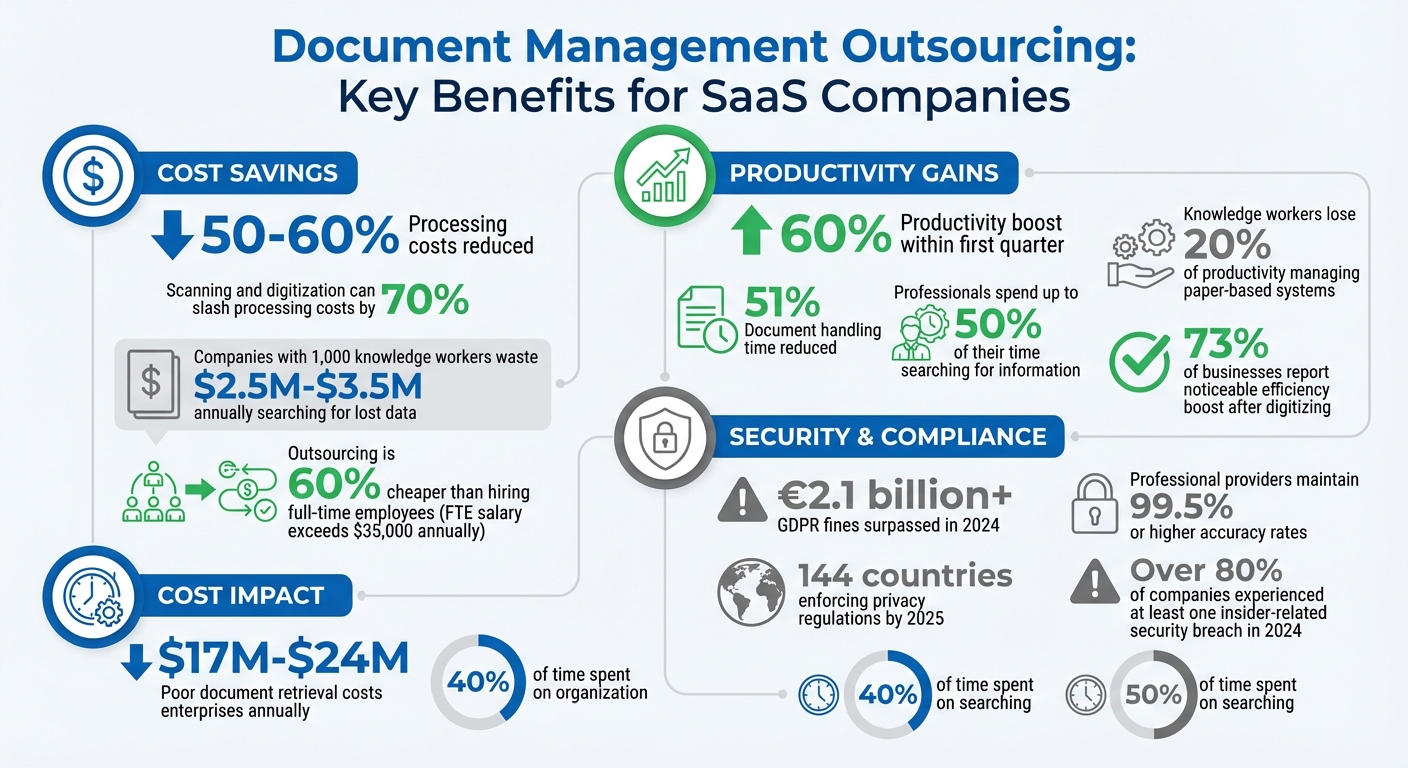
Document Management Outsourcing Benefits: Cost Savings, Productivity Gains, and Security Statistics for SaaS Companies
Benefits of Document Management Outsourcing for SaaS Companies
Cost Savings and Reduced Infrastructure
Outsourcing document management turns hefty fixed costs into a flexible, pay-as-you-go model, so you only pay for what you actually need. Instead of sinking money into physical storage or IT infrastructure, you can channel those resources into activities that drive revenue. To put it into perspective, companies with 1,000 knowledge workers waste between $2.5 million and $3.5 million annually just searching for lost data or recreating existing documents.
On top of that, outsourcing eliminates the need to hire and manage an in-house document management team. It also cuts down on office supply costs and printer upkeep. Many providers include disaster recovery and backup systems in their service packages, saving you from having to invest separately in redundancy measures.
"Outsourcing allows organizations to convert fixed costs into variable costs, paying only for the services they require." – Ash Conversions
Another smart cost-saving option is scan-on-demand services. Instead of digitizing all your records at once, you can convert only the files you need, when you need them. This approach keeps upfront costs low while giving you quick access to important documents.
And while cost reduction is a big win, outsourcing also strengthens your security and compliance efforts.
Better Security and Compliance
Professional document management providers bring advanced security features that are often out of reach for in-house teams. These include strict chain-of-custody protocols and document-level audit trails, which are critical during regulatory audits or legal disputes.
With GDPR fines surpassing €2.1 billion in 2024 and 144 countries enforcing privacy regulations by 2025, staying compliant is no longer optional. Outsourcing providers stay up-to-date with laws like GDPR, CCPA, and HIPAA, helping you avoid costly penalties. They also manage the entire document lifecycle securely, from digitization to NAID-certified shredding with certificates of destruction.
Considering that over 80% of companies experienced at least one insider-related security breach in 2024, these providers address human error by training their staff on phishing risks and secure data handling. Off-site storage facilities add another layer of protection with 24/7 security, fire-proofing, climate control, and digital backups. When choosing a provider, check for certifications like ISO 27001, SOC 2, and AAA NAID, and ask for recent penetration testing reports.
Scalability and Flexibility in Digital Transformation
Outsourcing also gives you the agility to adapt to changing business needs. With usage-based scalability, you can increase or decrease your document management capacity without investing in new hardware or hiring more staff. Hosted solutions can be up and running within weeks, compared to months for in-house systems, speeding up your digital transformation efforts.
"Hosted document management solutions offer a usage-based cost model that allows you to pay only for the services you need and the volume you process." – Iron Mountain
Providers also give you immediate access to advanced tools like OCR, automated metadata tagging, and cloud-based Enterprise Content Management – tools that might be too costly to develop in-house. They handle all software and hardware updates, ensuring you’re always using the latest technology without additional capital expenses. With cost and security concerns addressed, scaling your digital transformation becomes much smoother. Hybrid models allow you to digitize records gradually, keeping physical documents in off-site storage until they’re needed.
sbb-itb-8132e49
Core Services in Document Management Outsourcing
Scanning and Digitization
Outsourcing providers leverage high-speed imaging tools and Optical Character Recognition (OCR) to convert paper documents into searchable digital files. Advanced AI-driven systems, like Intelligent Document Conversion, go a step further by extracting critical data – such as identifying the "Total Due" on invoices – and seamlessly integrating it into your accounting software without manual input. For SaaS companies managing extensive records like contracts, service agreements, and compliance documents, this process can slash processing costs by 70% and cut document handling time by 51%. These efficiencies speed up customer onboarding and reduce operational burdens. To ensure long-term accessibility, standardize your digital files in PDF/A format, which remains compatible even as software evolves.
Once digitized, cloud storage solutions make these documents instantly accessible while maintaining their security.
Cloud-Based Storage
Cloud storage eliminates the clutter of physical filing systems and scattered digital repositories by centralizing all files. This setup allows instant access from any device, whether your team is in San Francisco or working remotely across the globe. Security is a top priority, with features like encryption (both at rest and in transit), multi-factor authentication, and continuous monitoring.
To optimize costs and performance, consider a multi-tiered storage strategy: keep active files in high-speed systems and archive less frequently accessed documents in budget-friendly tiers. This approach ensures compliance with retention policies while balancing operational needs. Given that 73% of businesses report a noticeable boost in efficiency after digitizing document processes, cloud storage has become a cornerstone of modern operations.
Workflow Automation and Integration
After digitizing and securely storing your documents, automation takes efficiency to the next level. Automated workflows ensure files reach the right people at the right time, using triggers based on metadata and pre-set business rules. These workflows integrate seamlessly with tools like Salesforce, Microsoft 365, and other CRM or ERP platforms, creating a smooth data flow across systems. From contract approvals to invoice processing, automation streamlines tasks and provides real-time tracking to quickly identify and resolve bottlenecks.
"Workflow automation ensures that documents move to the right people at the right time." – M-Files
Paper-based systems are notorious for wasting time; knowledge workers lose 20% of their productivity managing them, while professionals may spend up to 50% of their time searching for information. AI-driven data capture and Robotic Process Automation (RPA) significantly reduce errors and eliminate the need for repetitive manual data entry in high-volume processes. Prioritize automating tasks like accounts payable, accounts receivable, and HR onboarding to see the quickest return on investment.
How to Choose the Right Document Management Outsourcing Provider
Selection Criteria for Providers
When it comes to picking the right outsourcing partner, security and compliance certifications should be at the top of your checklist. Look for providers with credentials like ISO 27001 for information security and SOC 2 Type II, which confirms that their security measures are not just theoretical but actively implemented over time. If your business handles sensitive data, certifications like HIPAA or PCI DSS are also essential. For added assurance, ask for the full SOC 2 report under an NDA to verify their controls in detail.
Scalability and flexibility are equally important, especially if your SaaS company experiences fluctuating workloads. A suitable provider should quickly adjust their team size to match your seasonal demands or growth spurts. Don’t overlook their tech stack – features like AI automation, OCR (optical character recognition), and seamless integration with your current CRM or ERP systems can streamline operations significantly.
Operational transparency is a must. Tools like audit trails and real-time tracking not only ensure data integrity but also help resolve disputes more effectively. You’ll also want to check their disaster recovery plans – encrypted backups stored in geographically separate locations are crucial for preventing data loss. If secure document destruction is part of your needs, confirm they hold AAA NAID certification, which sets the global standard for information destruction.
"The right provider will provide an unbroken chain of custody throughout the entire lifecycle of all your documents." – John Mancini, Past President, AIIM
To make an informed choice, use a scoring grid (0–3) to evaluate providers on security, scalability, technology, and support. Start with a small pilot project, such as updating a product catalog, to test their accuracy and communication before committing to a larger rollout.
Provider Feature Comparison
Here’s a quick comparison grid to help you weigh your options:
| Evaluation Criterion | Key Requirement | Importance for SaaS |
|---|---|---|
| Security | ISO 27001, SOC 2 Type II, PCI DSS | High (Data Protection) |
| Scalability | Rapid team ramp-up/down | High (Growth/Seasonality) |
| Technology | AI, Automation, CRM Integration | Medium (Efficiency) |
| Compliance | Audit Trails, GDPR/HIPAA | High (Legal/Regulatory) |
| Support | Omnichannel, 24/7 availability | Medium (Customer Experience) |
When evaluating providers, consider their staffing models. Dedicated staffing means agents focus exclusively on your account, which is ideal for high-volume or complex workflows. Shared staffing, on the other hand, involves agents working across multiple clients, which might suit smaller or less demanding projects. Also, clarify whether the provider offers a fully managed solution (where they handle everything) or a co-managed one (involving collaboration with your team).
Transparent pricing is another critical factor. Most providers offer pay-as-you-go or consumption-based models, allowing you to pay only for what you use. Outsourcing can cut costs significantly – professional services are typically 60% cheaper than hiring a full-time employee, whose annual salary (plus benefits and equipment) can exceed $35,000. Be sure to get a clear breakdown of costs upfront to avoid hidden fees.
Free Onboarding and Customization
Once you’ve compared features, focus on how the provider handles the initial setup. Free onboarding can make the transition smoother by covering setup, training, and workflow configuration without extra charges. This lets you test the partnership without a major financial commitment. Additionally, customization is key – your document management needs are unique, and cookie-cutter solutions rarely deliver the best results.
Check if the provider operates during your business hours and can handle urgent requests within 2–4 hours. Run a 2–3 week pilot alongside your current process to assess their performance and communication. Establish clear SLAs (service level agreements) upfront, specifying turnaround times (e.g., 24 hours) and accuracy benchmarks (e.g., 99.5% or higher).
"Successful outsourcing is built on communication, collaboration, and shared objectives." – Sainna Christian, Author, Hugo
Finally, ensure that any subcontractors the provider uses meet the same security and compliance standards. Your contract should clearly outline data ownership, liability for breaches, audit rights, and protocols for data deletion or return at the end of the partnership. These safeguards help protect your business and ensure you retain control over sensitive information.
Steps to Implement Outsourced Document Management
Assess Current Workflows and Needs
Before engaging with any providers, take a close look at your current document workflows. Review your standard operating procedures (SOPs) to map out how files are created, processed, stored, shared, and eventually deleted. This step is crucial because inefficiencies in document handling can lead to significant operational costs. For instance, poor document retrieval processes alone can cost enterprises anywhere from $17 million to $24 million annually.
Identify common bottlenecks – like duplicated efforts caused by misplaced files or inconsistent, ad hoc solutions. Pinpoint which types of documents (e.g., Word files, PDFs, spreadsheets) consume the most time and resources. Additionally, assess your data volume, as many providers charge based on storage size (per GB). Don’t overlook sensitive files that may require encryption or compliance with regulations like GDPR or HIPAA. To minimize risks, consider piloting outsourcing with a specific document type before scaling up. Once you’ve identified inefficiencies and outlined your needs, you’ll be better equipped to partner with the right provider.
Partner with a Provider
After selecting a provider that meets your requirements, assemble a transition team to manage the process. This team should include a project manager and a technical lead to handle data migration, user training, and CRM/ERP system integration. Develop a detailed timeline that covers every stage of the transition, including configuration, migration, training, and the official go-live date.
During onboarding, set up user accounts with strong authorization protocols and implement metadata tagging to simplify document searches. A phased migration approach works best – start with critical document types and run a 2–3 week parallel process to test the provider’s performance. Hands-on workshops can help employees get comfortable with new processes like metadata tagging, file retrieval, and security measures. These efforts often pay off quickly, as companies outsourcing document management typically report a 60% boost in team productivity within the first quarter. By taking a gradual approach, you can ensure a smooth transition without compromising security or consistency.
Monitor and Improve Continuously
Once the system is up and running, shift your focus to performance monitoring. Use monthly scorecards to track key metrics like accuracy, speed, and issue resolution. Many professional providers maintain impressive accuracy rates – often 99.5% or higher – so it’s essential to set clear benchmarks from the start. Implement 24/7 monitoring and conduct regular audits to maintain these standards.
Keep a detailed audit trail for every document accessed, edited, or shared to ensure accountability and compliance. Schedule quarterly internal audits and annual external audits to identify any weak points or security concerns. Regularly review user permissions to ensure sensitive files are only accessible to authorized personnel. Automated notifications can also help by alerting your team when documents need approvals or updates.
Finally, analyze your monitoring data to calculate storage costs per GB and adjust your usage as needed. This allows you to control spending while maintaining high performance levels. By consistently fine-tuning your workflows based on real data, you’ll get the most out of your outsourced document management system.
Conclusion
Key Takeaways for SaaS Companies
Outsourcing document management offers more than just cost savings – it brings improved security, compliance, and operational flexibility. By converting fixed costs into variable expenses, companies can achieve savings of up to 60%, all while maintaining accuracy rates as high as 99.5%. This pay-per-use model not only reduces overhead but also frees up capital to invest in growth opportunities.
The benefits go beyond finances. Scalability is another huge advantage, allowing businesses to adapt seamlessly to changing demands. Administrative inefficiencies – like spending 40% of time on organization and 50% on searching – can be redirected toward growth-focused activities, boosting productivity by 60% within the first quarter. Whether managing 500 transactions a month or scaling up to 5,000, outsourced teams can handle the shift instantly, without the delays of hiring and training.
"The question isn’t whether to outsource – it’s finding the right partner who understands your business and delivers consistent results." – Contalents Writers
The real challenge lies in selecting a partner that aligns with your goals and consistently delivers results. Start your journey by piloting outsourced processes and establishing clear service level agreements. With the right provider, you’ll gain top-tier security, regulatory compliance, and the ability to focus on what truly drives your business forward.
10 best practices for stress-free document management
FAQs
What should I outsource first?
To kick things off, consider outsourcing document management tasks like scanning and imaging to convert physical documents into digital formats. This makes your files easier to access, cuts down on storage space, and simplifies retrieval processes. Focus on data entry and indexing to keep your digital files well-organized and easy to locate. These steps not only improve accuracy and reduce costs but also lay the groundwork for advanced services like secure storage and retention management – especially useful in remote or hybrid work environments.
How do I verify a provider’s security claims?
To evaluate a provider’s security claims, start by looking for third-party audits and compliance certifications such as SOC 2 or ISO 27001. These certifications indicate that the provider meets established security standards. It’s also important to ask about their security policies, practices, and whether they undergo regular independent audits. Lastly, take a close look at their track record with security breaches, including how they handled past incidents. These actions can give you confidence that the provider prioritizes strong security measures and aligns with industry standards.
What hidden costs should I watch for?
Outsourcing document management might seem like a cost-effective solution at first glance, but hidden expenses can quickly add up. Transition costs, such as migrating systems or training staff, often catch businesses off guard. Then, there’s the ongoing need for quality management to ensure standards are met, as well as administrative overhead for managing vendor relationships. On top of that, unexpected challenges – like scope changes or the need for additional training – can lead to further financial strain.
Another major factor to consider is the risk of manual processing errors. These can result in compliance violations or productivity losses, both of which can significantly inflate costs over time.
To keep these risks in check, it’s important to:
- Set clear expectations upfront to avoid misunderstandings.
- Vet vendors thoroughly to ensure they align with your needs.
- Plan for potential setbacks, including delays or quality concerns.
- Maintain ongoing oversight to address issues before they escalate.
By taking these precautions, you can better manage the hidden costs of outsourcing and protect your bottom line.