

Effective escalation management is critical for SaaS teams to resolve complex issues, retain customers, and meet SLA standards. Without clear processes, teams risk delays, inefficiencies, and customer frustration. Here’s a quick breakdown of key practices and challenges:
- Support Tiers: Issues are categorized into Tier 0 (self-service) through Tier 4 (external/third-party support), ensuring the right expertise handles each case.
- Escalation Triggers: Functional and hierarchical escalations depend on issue complexity, urgency, and SLA risks.
- Escalation Matrix: A structured matrix assigns ownership, timelines, and communication protocols for smooth handoffs.
- AI & Automation: Tools like sentiment analysis and automated routing optimize workflows, predict SLA breaches, and enhance customer experience.
- Key Metrics: Track escalation rate, handoff delay, bounceback rate, and SLA breach rate to identify bottlenecks and improve processes.
- Customer Communication: Regular updates, clear ownership, and complete context transfer are essential during escalations.
Outsourcing with Aidey: For overwhelmed teams, Aidey offers 24/7 escalation management with trained teams to handle complex issues, freeing internal resources for strategic work.
Escalation management isn’t just about fixing problems – it’s about creating systems that prevent them from escalating further.
Support Tiers and Escalation Levels Explained
Understanding Support Tiers in SaaS
SaaS companies often structure their support teams into tiers, aligning the complexity of issues with the expertise required to resolve them. At the base is Tier 0 (Self-Service), where customers independently address simple problems using tools like knowledge bases, FAQs, or AI-driven chatbots. This tier is perfect for repetitive queries and basic setup concerns, completely removing the need for human intervention.
Tier 1 (Frontline Support) is the first point of human contact. These agents handle straightforward tasks like troubleshooting common issues, resetting passwords, resolving billing inquiries, and addressing problems with known solutions. Their goal is to resolve high-volume, low-complexity cases quickly and efficiently.
When issues demand deeper technical understanding, Tier 2 (Technical Support) takes over. This level manages complex configurations, integration issues, or unexpected product behaviors that go beyond documented solutions. These specialists have access to backend tools and systems not available to frontline agents.
For the most critical scenarios, Tier 3 (Expert-Level Support) steps in. This tier involves senior engineers, product managers, or even executives to address major risks, such as system-wide outages, high-impact feature failures, or urgent account-related crises.
Finally, Tier 4 (External/Third-Party Support) comes into play when the root cause lies outside the company’s control, such as issues stemming from third-party APIs or integration partners.
With this tiered setup, escalation processes ensure that issues reach the right level of expertise promptly.
When to Escalate Between Tiers
Defining clear escalation criteria is essential for routing issues to the appropriate team. Functional escalation happens when an issue exceeds an agent’s technical abilities – like a Tier 1 agent encountering a backend data issue requiring database access. On the other hand, hierarchical escalation is used when managerial intervention is needed, such as when a VIP account is at risk, a customer threatens to leave, or a policy exception is required.
Escalations also occur automatically when SLAs (Service Level Agreements) are at risk of being breached. If a ticket nears its response deadline, the system flags it for immediate attention by the next tier. Customer sentiment is another critical factor – 52% of support professionals report that customers prefer human-only interactions during escalations. To streamline the process, companies often set monetary thresholds, like allowing Tier 1 agents to authorize refunds up to $100, minimizing unnecessary escalations.
| Priority Level | Scenario | Action |
|---|---|---|
| Critical | System-wide outage affecting all users | Skip frontline; notify senior engineers and IT leadership immediately. |
| High | Security breach or data leak | Escalate to the security team and senior management; initiate mitigation steps. |
| Medium | Billing errors affecting multiple customers | Forward to the finance/billing team; communicate resolution timelines to affected users. |
| Low | Non-critical bug or minor feature request | Log the issue for the product backlog; address during routine support cycles. |
The priority of an issue is determined by its impact and urgency. For example, a minor bug affecting a single user can remain at Tier 1, whereas a critical issue delaying a major product launch for enterprise clients may be escalated directly to Tier 3. Matching the right level of expertise and authority to each issue ensures smoother workflows and reduces delays.
Escalation Matrix Guide: Incident Management Essentials
How to Build an Escalation Matrix
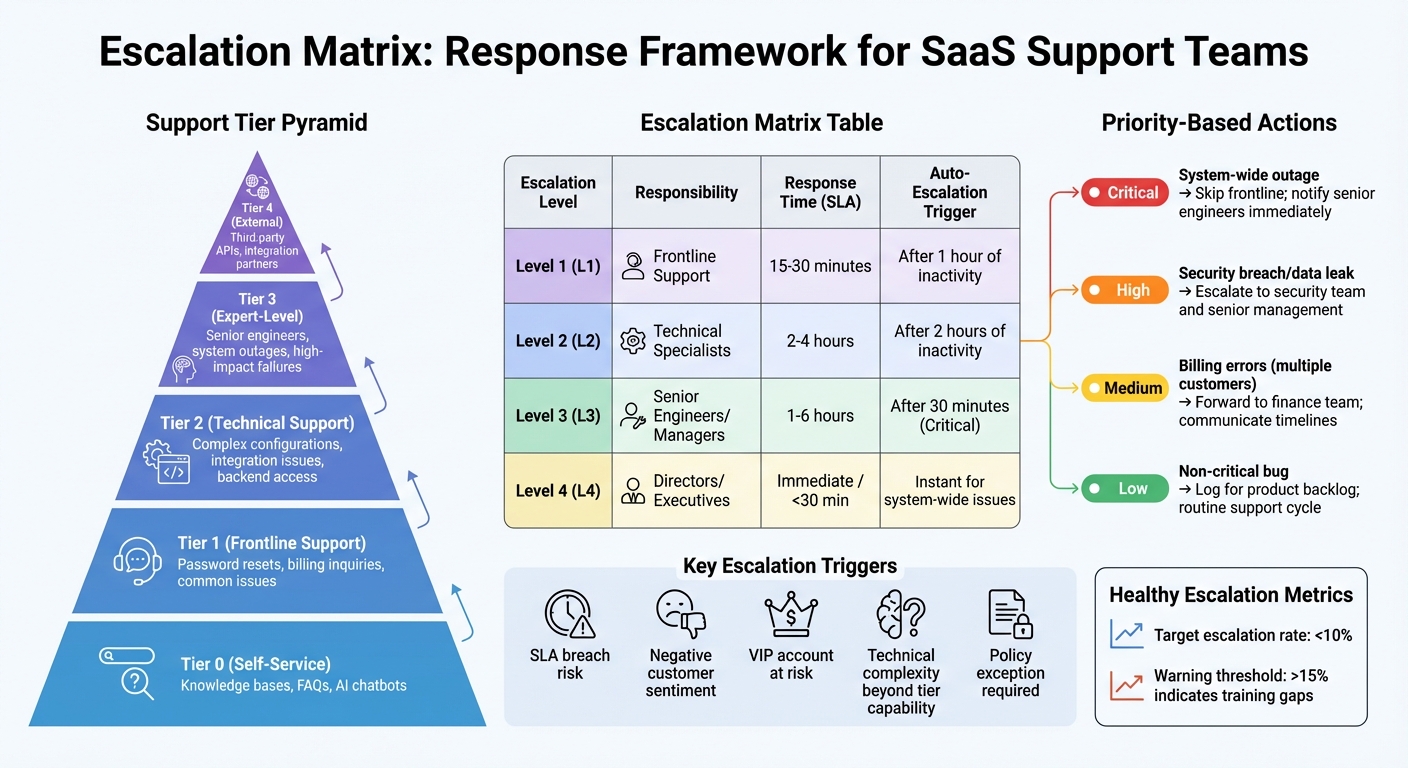
SaaS Support Escalation Matrix: Tiers, Response Times, and Triggers
Building on the idea of structured escalation, an escalation matrix provides clarity on who handles what and when, ensuring smoother workflows and faster resolutions.
What to Include in an Escalation Matrix
An escalation matrix helps route support tickets based on how severe the issue is – Critical, High, Medium, or Low – so teams always know the next steps. For instance, a system-wide outage affecting all users requires a completely different response than a minor feature request.
To make your matrix effective, include clear escalation triggers. These triggers guide agents on when to escalate a ticket, taking the guesswork out of the process. Examples of triggers include SLA breaches, unresolved tickets sitting idle for too long, negative feedback from customers, or cases requiring specialized expertise.
At its core, a matrix must focus on ownership assignment. Every tier in the escalation process should have a designated ticket owner, complete with their name, role, and contact information. For example, if a billing issue escalates, the matrix should point directly to the finance team lead, saving time and avoiding confusion. It’s also wise to include backup contacts to avoid SLA violations when primary owners are unavailable.
Response and resolution timelines are another essential piece. For example, a P1 issue could auto-escalate after 30 minutes of no activity, while a P3 might escalate after 8 hours. These timelines should align with your SLA commitments to customers.
Lastly, include communication protocols for seamless internal handoffs. Agents should pass along complete conversation histories and set up scheduled updates for customers. Adding preset resolution playbooks to your matrix ensures consistent handling of issues across the team.
| Escalation Level | Responsibility | Response Time (SLA) | Auto-Escalation Trigger |
|---|---|---|---|
| Level 1 (L1) | Frontline Support | 15–30 minutes | After 1 hour of inactivity |
| Level 2 (L2) | Technical Specialists | 2–4 hours | After 2 hours of inactivity |
| Level 3 (L3) | Senior Engineers/Managers | 1–6 hours | After 30 minutes (Critical) |
| Level 4 (L4) | Directors/Executives | Immediate / <30 min | Instant for system-wide issues |
This structured approach ensures every team member knows their role, creating a solid foundation for improving support outcomes.
Why Escalation Matrices Work
Escalation matrices streamline the support process by removing uncertainty. Tickets are routed quickly to the right people, avoiding bottlenecks. For example, when agents know who handles policy exceptions or technical bugs, issues move through the system more efficiently. This clarity minimizes operational downtime and ensures urgent problems, like security breaches, are prioritized immediately.
Explicit ownership also boosts accountability. Instead of tickets bouncing around aimlessly, the matrix assigns responsibility at every stage. Ideally, a healthy escalation rate is below 10%. If it exceeds 15%, it often indicates gaps in frontline training – something a well-built matrix can help identify.
The matrix also enhances collaboration by maintaining context during handoffs. Specialists receive a complete conversation history, so customers don’t have to repeat themselves when their case moves up a tier. This is crucial because 78% of customers are more forgiving of mistakes when service quality remains high.
Giving frontline agents clear decision-making limits – like allowing them to authorize refunds up to $100 – also reduces unnecessary escalations. The matrix helps agents understand when they can solve issues on their own and when they need management’s input, speeding up resolutions while maintaining proper oversight.
Using AI and Automation for Escalations
AI and automation are changing the game for managing escalations in SaaS teams. By building on structured escalation frameworks, these tools bring both speed and accuracy to the process. Instead of relying on manual triggers, AI systems can pick up on early warning signs that might otherwise go unnoticed – like negative sentiment, repeated customer complaints, or high-risk keywords such as "legal", "cancel", or "outage". This proactive detection allows teams to address potential problems before they spiral into serious risks, such as SLA breaches or customer churn.
AI tools work hand-in-hand with existing escalation systems, enhancing their ability to prevent issues from escalating further. By identifying problems early, teams can act swiftly, ensuring smoother operations and better outcomes.
Intelligent Routing for Better Customer Support
AI-powered routing takes escalation management a step further. By analyzing factors like issue complexity, agent expertise, and account value, these tools ensure that high-priority customers are matched with the right specialists. For instance, if an enterprise client faces an API integration failure, the system can automatically route the case to a senior technical expert.
As Ameya Deshmukh, VP of Customer Support at EverWorker, puts it:
"The goal isn’t ‘AI or humans,’ but reliable routing plus a high-quality handoff that reduces customer effort and protects outcomes".
This combination of smart routing and seamless handoffs minimizes customer frustration and ensures faster resolution.
AI-Powered Ticket Routing and Workflows
Natural language processing (NLP) enables AI to analyze support tickets in real time, considering urgency, topic, and complexity. It goes beyond basic keyword matching by factoring in the customer’s history, emotional tone, and contextual details, leading to smarter routing decisions.
A great example of this in action comes from James Villas, a holiday rental company. During the COVID-19 pandemic, they used SentiSum‘s AI-based ticket triage to handle a surge in support requests. By prioritizing highly frustrated customers, they cut response times for urgent cases by 46% and boosted their CSAT score by 11%.
AI doesn’t just stop at routing – it also automates workflows. These systems can create internal tasks, open bug tickets, or even launch incident-specific communication channels. According to Gartner, by 2029, agentic AI is expected to autonomously resolve 80% of common customer service issues, potentially cutting operational costs by 30%. This multi-signal approach makes decision-making more reliable and efficient.
Automating SLA Tracking and Alerts
Automation transforms SLA tracking from a reactive process into a proactive one. Instead of discovering SLA breaches after they’ve occurred, AI monitors ticket queues in real time, assessing factors like workload and ticket age to predict potential breaches. This allows teams to act before SLAs are violated.
Best practices for automation include setting tiered SLA thresholds based on customer value. For example, enterprise accounts might get a 30-minute response guarantee, while smaller accounts might have a two-hour window. Escalation paths can also be structured to ensure timely action – such as escalating a P0 issue to technical support after one hour and to on-call engineers after three hours.
To ensure visibility, alerts should integrate with tools teams already use, like Slack, Microsoft Teams, or email. Automation tools must also preserve the entire conversation history and account context during handoffs, sparing customers from having to repeat themselves.
Starting with basic time-based triggers and gradually adding more complex criteria – such as sentiment analysis or account value – can help fine-tune escalation processes. Regular testing with sample scenarios ensures that alerts reach the right people and that thresholds remain effective. This iterative approach keeps the system sharp and responsive.
sbb-itb-8132e49
Communication and Feedback During Escalations
While AI can help streamline escalation workflows, clear and transparent communication is key to keeping customers satisfied. When issues escalate, how a company communicates can mean the difference between keeping a loyal customer or losing them. In the U.S., 59% of customers are willing to abandon a brand they love after several bad experiences, and 17% will leave after just one. On the bright side, 78% of customers are willing to forgive mistakes if the service they receive is excellent.
Keeping Customers Informed During Escalations
Every escalation needs a dedicated lead who takes responsibility for communication and progress, ensuring customers don’t feel like they’re being passed around between teams. Start by setting clear expectations through written Service Level Agreements (SLAs), which outline response times – like responding to emails within 20 minutes. When paired with a structured escalation matrix, proactive updates make communication as effective as issue resolution. Even if there’s no solution yet, keep customers informed with realistic, proactive updates on timelines.
It’s also essential to ensure that conversation histories and context are fully transferred between teams. This prevents customers from having to repeat themselves and adds consistency to the process. By focusing on these practices, companies can set the groundwork for gathering and using feedback to improve escalation processes.
Using Team and Customer Feedback to Improve
Feedback from both customers and support teams is invaluable for identifying where escalation processes fall short. This can be gathered through tools like Customer Effort Score (CES) surveys or simple email check-ins. Additionally, holding monthly incident reviews of escalated cases can help pinpoint where communication broke down or where frontline agents may have lacked the necessary tools or training.
Cross-functional reviews that include support, engineering, and product teams can also provide insights into improving workflows. Conducting root cause analyses can help uncover recurring issues, such as product bugs or unclear policies, which often lead to unnecessary escalations. Addressing these systemic problems can reduce SLA breaches and improve customer satisfaction (CSAT) scores. For example, in February 2026, a global SaaS provider introduced an AI-powered escalation matrix during a 25% spike in high-priority tickets. As a result, dropped escalations fell by 50%, and their CSAT scores improved from 82% to 91%.
Metrics for Measuring Escalation Performance
Once you’ve established a solid escalation framework, the next step is measuring how well it’s working. Metrics offer insights that turn reactive support into proactive problem-solving. While basic metrics like ticket volume or resolution time provide a starting point, they can miss deeper issues like delays between teams or repeated requests for the same information. To get a clearer picture, it’s essential to track both outcome metrics (what happened) and diagnostic metrics (why it happened).
Key Metrics to Track
Here are some of the most important metrics to evaluate the effectiveness of your escalation process:
- Escalation Rate: This tracks the percentage of tickets that are escalated beyond the frontline team. For context, mature service desks often report escalation rates between 15–20%. For example, SaaS companies with early-stage self-serve models might see rates of 8–15%, while healthcare technology companies – due to their complexity and compliance needs – could experience rates as high as 18–28%.
- Handoff Delay Time: This measures how long tickets remain unassigned after escalation. It highlights issues like inefficient routing or notification delays, rather than just workload problems. High-performing teams aim to keep handoff delays under 30 minutes for high-priority tickets.
- Escalation Bounceback Rate: This metric shows how often escalated tickets are returned to lower-tier support for additional clarification. A healthy range is 5–10%, while rates exceeding 20% can indicate unclear escalation guidelines or inadequate training at the frontline level.
- Customer Re-contact Rate: This tracks how often customers need to follow up due to communication breakdowns during the escalation process. High rates here can signal gaps in internal coordination or customer updates.
Other useful metrics include Context Loss Incidents – cases where engineers have to re-collect information that was already provided. These should stay below 10%. Similarly, the SLA Breach Rate on Escalated Tickets should be within 5% of the overall SLA breach rate to ensure the escalation process itself isn’t causing delays.
By keeping an eye on these metrics, teams can identify issues like unclear escalation paths or delays in routing before they start affecting customer satisfaction.
Performance Benchmarks for SaaS Teams
To understand where your team stands, compare your metrics against industry benchmarks. Here are some targets observed among high-performing SaaS teams:
| Metric | High-Performance Benchmark |
|---|---|
| Escalation Rate (Mature B2B SaaS) | 6–12% |
| Handoff Delay (High Priority) | < 30 minutes |
| Handoff Delay (Medium Priority) | < 2 hours |
| Bounceback Rate | 5–10% |
| Repeat Escalation Rate | < 5% |
| Customer Re-contact Rate | < 15% |
| Context Loss Incidents | < 10% |
| Manual Update Time | < 2 hours per person/week |
A well-managed escalation process can lead to impressive outcomes. For example, teams that excel in these areas often achieve a 90% customer retention rate. Additionally, 89% of customers say they’re more likely to make repeat purchases after a positive support experience. By tracking these metrics, you can uncover and address bottlenecks – like notification delays or unclear escalation criteria – before they harm customer loyalty.
Outsourcing Escalation Management with Aidey
Managing escalation in-house can quietly drain your resources. Senior engineers often get pulled away from their core work to tackle urgent customer issues. Product managers might find themselves tied up troubleshooting unusual edge cases. Even executives can end up spending their time putting out fires instead of focusing on strategy. These disruptions not only slow down product development but can also lead to inconsistent customer experiences when teams are forced to improvise. By outsourcing these challenges, you free up your internal team to focus on what they do best – driving your business forward.
Why Partner with Aidey
Aidey offers a smarter way to handle these disruptions. Their 24/7 support infrastructure acts as a dedicated escalation layer, keeping your internal resources focused on strategic priorities. Instead of scrambling to address high-stakes issues like system outages or launch blockers, you can rely on Aidey’s remote teams, who are specifically trained to match your SaaS workflows. Plus, Aidey takes care of recruitment, training, and system setup during onboarding – at no cost – so you can build escalation capacity without upfront expenses.
The benefits of Aidey’s approach become especially clear during surge periods. Whether it’s a product launch, a system outage, or seasonal spikes in demand, their scalable teams absorb the extra workload while ensuring routine support tasks stay on track. This means your customers always receive consistent service, even when stakes are high. With native English-speaking representatives, Aidey ensures clear communication during tense situations – a critical factor in effective de-escalation. Their tiered escalation system not only protects your internal teams but also guarantees a structured, reliable approach to managing issues.
How Aidey Handles Complex Escalations
Aidey uses a tiered escalation model to handle issues based on their complexity and the level of authority required. For functional escalations – like technical bugs, billing disputes, or security concerns – cases are routed to specialized teams while maintaining full context. When it comes to hierarchical escalations, such as VIP concerns or potential churn risks, these are handled by support managers or customer success leaders following carefully defined protocols.
Their system ensures accountability and context are preserved at every step. Automated triggers monitor key indicators like SLA breaches, negative sentiment, or stalled conversations, allowing proactive intervention before issues escalate further. For critical incidents, Aidey conducts thorough Root Cause Analyses using methods like the "5 Whys" to uncover and address underlying product issues, preventing repeat problems. Each case is assigned a dedicated point-person responsible for progress and communication across teams, so customers never have to repeat their concerns as the issue moves through different levels of support.
Conclusion
Managing escalations effectively isn’t just about responding quickly – it’s about designing systems that stop problems from spiraling out of control. The top SaaS teams don’t see escalations as one-off emergencies. Instead, they create engineered workflows with structured support tiers, clear escalation paths, and seamless handoffs to ensure every issue is handled properly. This kind of preparation is what drives consistent results.
The stats back this up: 78% of customers are willing to forgive mistakes if they receive excellent service, and 75% are likely to spend more with companies that deliver standout experiences. Tools like AI-powered routing and sentiment analysis can flag high-risk situations early, while automated SLA tracking ensures deadlines are met before they become critical. At the same time, many customers still value human interaction, making empathy and active listening essential skills for handling escalations effectively.
For many SaaS teams, the obstacle isn’t knowing how to manage escalations – it’s having the resources and expertise to do it consistently. Structured workflows and smart AI tools can help, but during busy times, internal teams can still get overwhelmed. Senior engineers might have to step away from product development, and executives could find themselves firefighting instead of focusing on strategy. That’s where outsourcing with Aidey can make a difference. With their 24/7 support infrastructure, tiered escalation models, and native English-speaking representatives, they handle complex escalations so your team can stay focused on driving growth.
FAQs
What should count as an escalation trigger?
When an issue can’t be resolved at the first level of support, it becomes an escalation trigger. These triggers often include situations like potential SLA breaches, critical incidents requiring urgent action, unresolved problems stuck in lower support tiers, or negative feedback from customers. Each of these signals that the problem demands quick intervention or expertise from a more advanced support level.
How do I set escalation SLAs for each tier?
Setting clear response and resolution time targets for different issue tiers is essential for effective prioritization and team efficiency. Here’s how you can structure these targets based on issue severity or priority:
- Critical Issues (P1): These are high-priority problems that demand immediate attention. For example, a system outage affecting all users might require a response within minutes and a resolution within a few hours.
- High-Priority Issues (P2): These issues, while not as urgent as P1, still need prompt attention. A response time of 1-2 hours and resolution within the same business day might be appropriate.
- Moderate Issues (P3): These are less urgent and might involve minor inconveniences or isolated incidents. A response time within 4-8 hours and resolution within 1-2 business days could suffice.
Clearly documenting these Service Level Agreements (SLAs) ensures your team knows how to prioritize tasks effectively. Additionally, aligning expectations with the complexity and severity of each case helps streamline the escalation process and improve overall service delivery.
Which escalation metrics matter most first?
When starting out, two metrics stand out as the most important: resolution times and customer satisfaction scores.
- Resolution Times: This measures how quickly your team can resolve escalated issues. Faster resolution often means happier customers and a more efficient support process.
- Customer Satisfaction Scores (CSAT): These scores offer direct insight into how customers feel about their experience. High scores usually indicate that your team is meeting or exceeding customer expectations.
Focusing on these two metrics ensures your team delivers timely solutions while maintaining a positive customer experience.