

Scalable help desk software is designed to handle growing customer demands efficiently. Unlike traditional systems that require more staff as customer volume increases, scalable platforms use AI, self-service tools, and automation to manage higher workloads without proportional cost increases. Here’s why it’s essential for businesses in 2026:
- Cost Efficiency: Self-service costs about $2.93 per ticket, compared to $13.50–$35 for live support.
- AI-Powered Automation: Handles 60–80% of routine queries, reducing manual workload.
- Unified Knowledge Base: Ensures consistent information for both agents and customers.
- Omnichannel Support: Combines all communication channels (email, chat, phone, etc.) into one system.
- Customer Expectations: By 2026, 82% of customers expect immediate responses.
Key benefits include faster ticket resolution, reduced operational costs, and improved customer satisfaction. This guide explains the features, implementation steps, and pricing models to help you choose the right solution.
Key Features of Scalable Help Desk Software
Omnichannel Support and Ticketing
Scalable help desk software brings all customer interactions – whether via email, chat, social media, WhatsApp, or phone – into a single workspace. This eliminates the hassle of switching between tabs or risking duplicate responses.
One standout feature is how it preserves the context of conversations. For instance, if a customer starts a query on Twitter and continues it via email, agents can easily access the entire interaction history under one customer record. This seamless experience matters: businesses with strong omnichannel strategies retain 89% of their customers, while those with disconnected systems retain only 33%. Many platforms also include tools like collision detection, which notify agents in real time if a ticket is already being handled by someone else.
"Omnichannel communication is a strategy where every message, on every channel, ties back to one shared customer record and one coherent customer journey." – Emily Carter, Help Desk Expert
In addition to unifying communication, many systems use AI to automate routine tasks, further boosting efficiency.
AI-Driven Automation and Workflows
Scaling customer support with AI automation is a game-changer for handling repetitive tasks. It can take care of 70–80% of routine queries, such as password resets, order tracking, and billing inquiries, without requiring human input. For more complex cases, AI copilots assist agents by summarizing lengthy conversations, drafting replies, and even adjusting tone to align with your brand voice.
Automated workflows streamline operations by routing and categorizing tickets based on preset rules, ensuring consistent service quality. Tools like Hiver have reported a 36% increase in team productivity thanks to their AI capabilities, while Intercom’s "Fin" AI agent boasts a 67% resolution rate, with monthly improvements of about 1%. With the average service desk employee staying in their role for just two and a half years, these AI tools are invaluable for reducing onboarding time and maintaining service standards amid staff changes.
Customizable Dashboards and Reporting
Real-time dashboards in scalable help desk software provide visibility into key metrics like First Response Time, Average Handle Time, and customer satisfaction scores. Managers can keep an eye on SLA compliance, while agents can track their own performance metrics.
Advanced reporting tools, often powered by AI, help identify bottlenecks and predict future resource needs based on ticket trends. This data-driven insight allows businesses to make smarter decisions about staffing, training, and process improvements. By addressing potential issues early, companies can prevent small inefficiencies from growing into major problems as they scale.
sbb-itb-8132e49
Steps to Implement Scalable Help Desk Software
Assessing Current and Future Needs
Start by analyzing the past 90 days of support data to pinpoint the top 10–20 recurring issues. Break these down by root cause, such as documentation gaps, UX challenges, or product bugs. This review will highlight where your current system struggles and what features are essential for improvement.
Use swimlane diagrams to map workflows and uncover bottlenecks before introducing automation. As help desk expert Emily Carter wisely notes:
"Automating a broken process only makes the problem faster".
Next, identify the most critical communication channels based on user preferences. For example, 42% of users prefer live chat, while 72% favor self-service options. To ensure efficiency, calculate your resource needs with a target utilization rate of 70–80% – this avoids long queues (above 80%) or underused resources (below 60%).
Establish clear Service Level Agreements (SLAs) for different priorities. For example, P1 critical issues, like system outages, should receive responses within 15–30 minutes, while P4 low-priority requests can wait up to one business day. Lastly, ensure the software you choose can handle growth – scaling from 5 to 50 users without performance issues is key.
Once your needs are clear, validate them by testing software in real-world scenarios.
Testing Features with Free Trials
After defining your requirements, test potential systems through targeted free trials. Use real data, workflows, and team members for at least one week. Integrate tools like your CRM and billing systems to confirm that customer details and back office data sync seamlessly. Simulate real support scenarios – like password resets or order tracking – to ensure automation works as intended.
Evaluate the cost per ticket, as pricing often depends on team size and ticket volume. Test every channel (email, chat, phone) and all automation rules to confirm tickets are routed correctly. Pay close attention to the user interface – it should be easy for both agents and administrators to navigate. Companies using unified help desk systems resolve tickets 23% faster than those relying on separate tools for each channel, so prioritize integration quality over sheer feature count.
Onboarding, Training, and Monitoring
Once the software meets your expectations, roll it out gradually to minimize disruptions. Start with a soft launch by routing one product line or channel to the new system. This phased approach helps identify and resolve issues before full deployment. As the Softabase team wisely advises:
"A delayed launch that goes smoothly beats an early launch that creates months of cleanup work".
Provide role-specific training and sandbox environments with realistic data so agents can practice macros, knowledge base usage, and configurations without affecting live customers. Structured training programs can improve help desk performance by 20–25%. Additionally, create an internal knowledge base for agents, complete with troubleshooting guides and escalation pathways, to reduce mental strain.
After the system goes live, monitor performance metrics closely. Review 5–10% of tickets per agent weekly to ensure quality. Track SLA compliance rates – aim for 95% – and configure timers to pause when waiting on customer responses. Revisit ticket routing rules every quarter to address new bottlenecks. Even small improvements matter: a 1% boost in First Contact Resolution can reduce operational costs by 1%.
Top Helpdesk Ticketing Software for 2026
Cost Considerations and Pricing Models for Help Desk Software in 2026
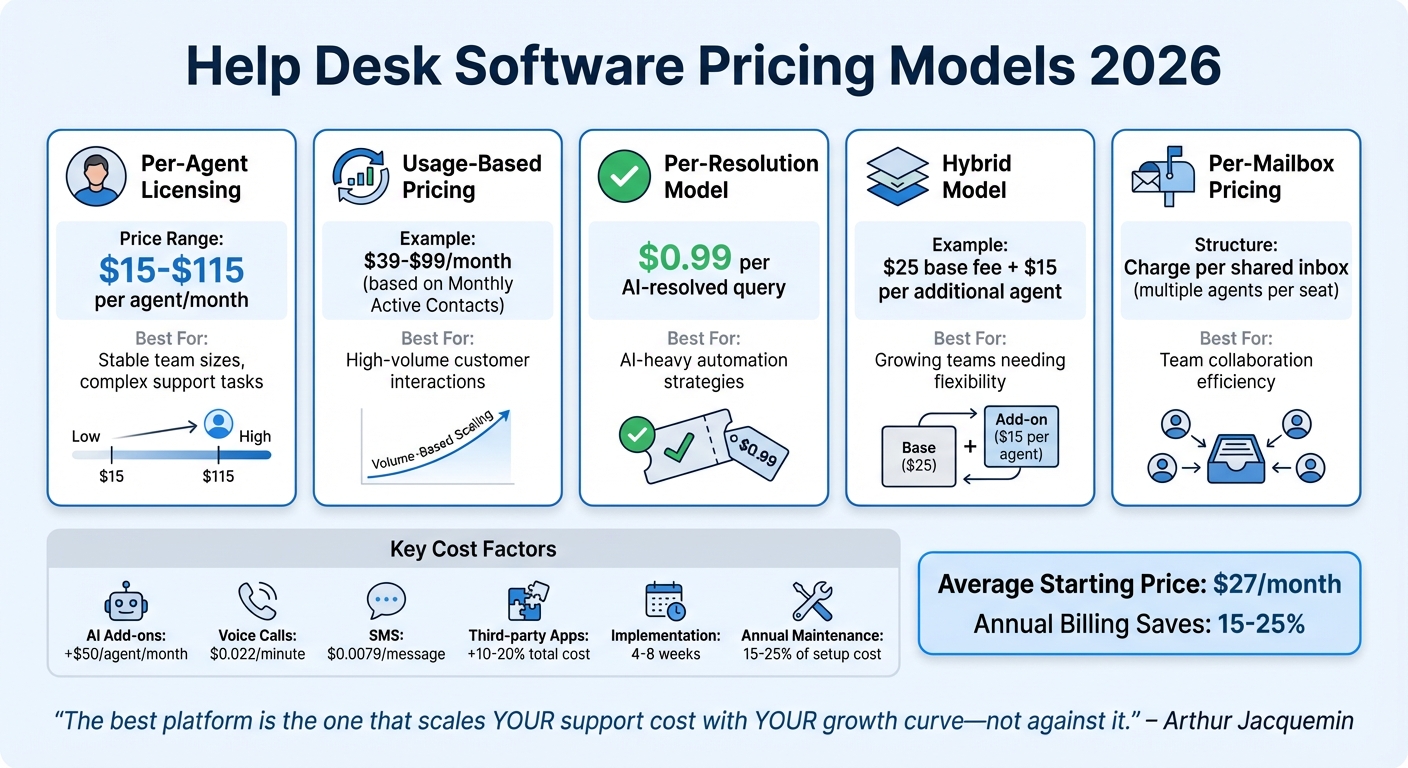
Help Desk Software Pricing Models Comparison 2026
Common Pricing Models
When it comes to help desk software in 2026, pricing models vary widely to suit different business needs. The per-agent licensing model remains a popular choice, where businesses pay a monthly fee for each support team member. Prices typically range from $15 to $115 per agent. This approach works best for companies with stable team sizes that handle more personalized, complex support tasks.
Another option is usage-based pricing, which charges based on customer interactions rather than the number of agents. For example, Intercom offers plans ranging from $39 to $99 per month, depending on Monthly Active Contacts (MACs). This model is ideal for businesses managing high volumes of customer interactions. Similarly, the per-resolution model charges only for successfully resolved queries, costing around $0.99 per AI-resolved query. As Arthur Jacquemin, Founder of CompareTiers, emphasizes:
"The best platform is the one that scales your support cost with your growth curve – not against it."
There are also hybrid models, which combine a fixed base fee with lower per-agent costs. For instance, Crisp charges $25 as a base fee, plus $15 for each additional agent. Meanwhile, per-mailbox pricing bills businesses based on shared inboxes rather than individual users, allowing multiple agents to use a single seat. Across all models, the average starting price is approximately $27 per month, although adding essential features can significantly increase costs.
Understanding these pricing structures is crucial, as additional factors often drive up the final cost.
Factors Affecting Total Cost
The base subscription fee is just the starting point. Additional costs can accumulate from various factors, such as AI add-ons, which often increase costs by $50 per agent per month. Usage fees for services like voice calls ($0.022 per minute) and SMS ($0.0079 per message) can also add up quickly. On top of that, third-party apps to fill functionality gaps may raise costs by an additional 10%–20%.
Implementation and onboarding outsourced support can also impact your budget. These processes typically take 4–8 weeks and may temporarily lower productivity by 20%–30%. After implementation, annual maintenance costs usually range from 15%–25% of the initial setup expense. For mid-sized teams of 10–50 agents, a dedicated administrator is often necessary, spending 15–25 hours weekly on workflow management and system maintenance.
To manage costs effectively, focus on calculating your cost per resolved ticket rather than just looking at monthly subscription fees. Opting for annual billing can save 15%–25% compared to monthly plans. Additionally, negotiating during the final two weeks of a sales quarter often secures better deals.
How Aidey Can Support Your Scalable Help Desk Needs
Overview of Aidey’s Services
Aidey provides round-the-clock, omnichannel support tailored for businesses in SaaS, startups, e-commerce, and hospitality. With over seven years of experience in the global startup ecosystem, Aidey takes care of everything from start to finish – including recruitment, training, system setup, and ongoing process management. It’s designed to integrate effortlessly with your existing help desk tools, ensuring a smooth transition.
Their remote teams, which include native English speakers for worldwide coverage, offer both shared and dedicated team structures. This flexibility allows businesses to scale support operations in line with growing ticket volumes. The implementation process is mapped out in a structured 60-day timeline, ensuring clarity and efficiency:
- Day 1: Needs assessment
- Day 2: Agreements finalized
- Day 7: Agent recruitment begins
- Days 10–30: Service launch
- Day 60: Comprehensive evaluation
Tatiana Ozanikova, Head of Global Operations at Shiji Guest Solutions, shared her experience with Aidey:
"We found Aidey to be a highly suitable supplier for our unique requirements and I would highly recommend its services for SaaS companies that are looking to scale up."
This end-to-end service model supports the scalable operations businesses need to grow.
Key Benefits of Choosing Aidey
Aidey’s services come with several advantages that simplify scaling your support operations. For starters, their free onboarding and 21-day trial allow you to experience their efficient, high-quality support without any upfront commitment.
Shlomit Kugler, CEO of MyCheck, highlighted the impact of Aidey’s services:
"Aidey managed to cut the cost of our customer service significantly while providing high quality & consistent level of support."
Aidey’s agents are equipped to handle complex SaaS challenges, whether it’s troubleshooting software bugs or resolving payment issues. This expertise becomes increasingly valuable as businesses scale, dealing with more channels, products, and stakeholders. Their focus on technical proficiency, combined with consistently earning "Excellent" ratings from client reviews, ensures faster setups, hands-on management, and noticeable improvements in customer satisfaction.
Conclusion: Choosing the Right Scalable Help Desk Solution
When selecting help desk software, focus on three key factors: scalability, essential features, and total cost of ownership. A unified omnichannel system is a must-have. Combining email, chat, social media, and phone into a single inbox allows companies to resolve tickets 23% faster compared to managing separate tools. Additionally, leveraging AI-driven automation can significantly improve efficiency, with modern platforms resolving 60% to 80% of routine conversations before involving a human agent.
Be mindful of the full cost. Beyond initial pricing, consider per-agent fees, ticket surcharges, AI add-ons, and implementation expenses. For instance, a tool advertised at $20 per month can quickly become much pricier once you factor in necessary features. Use free trials to test platforms with your actual workflows – this will help you understand the learning curve and uncover any hidden costs.
Scalability is another critical consideration. Confirm that the platform can grow with your business by reviewing the vendor’s enterprise customer list and pricing tiers. Ensure it remains reliable and cost-effective as your team expands from 5 to 50 users or more. Seamless integration with tools like your CRM, billing systems, and communication platforms is just as important.
For businesses needing more than just software, an end-to-end service can be a game-changer. Providers like Aidey offer a comprehensive solution that includes recruitment, training, system setup, and ongoing management. This approach eliminates the need to build an in-house team, making it easier to scale support operations. Plus, with free onboarding, you can try their services without upfront risk and adjust as your needs change.
The best help desk solution is one that aligns with your current operations while preparing you for future growth. Look for platforms that combine advanced automation, seamless integrations, and transparent pricing. By choosing wisely, you’ll set up a support system that not only meets today’s challenges but also lays the groundwork for long-term success.
FAQs
How do I know if my help desk is truly scalable?
A scalable help desk is all about managing growth effectively without driving up costs or compromising the quality of service. By leveraging automation, AI, and streamlined workflows, it can handle a growing number of tickets while keeping response times short and customers happy.
Key elements of scalability include the ability to integrate new tools seamlessly, closely monitoring metrics like First Response Time (FRT) and Customer Satisfaction (CSAT), and ensuring that increased ticket volumes don’t automatically require more staff or infrastructure. It’s about working smarter, not harder.
What should I test in a free trial before committing?
During a free trial, explore essential features such as ticket management, channel integration, and automation to see if the software aligns with your requirements. Pay close attention to its user-friendliness, reporting tools, and whether it can grow alongside your business. Assess how smoothly it fits into your existing workflows and whether it has the flexibility to adapt to future needs. This way, you can make an informed decision before moving to a paid plan.
What costs get overlooked in help desk pricing?
When it comes to help desk pricing, there are often hidden costs that businesses might not initially account for. One surprising example is password resets, which can run as high as $87 per reset. Over a year, this adds up to about $795 per employee – an expense that quickly escalates with larger teams.
Beyond password resets, there are other overlooked costs to consider. These include charges for advanced features, integrations, and add-ons that aren’t part of the standard pricing. As support teams grow, businesses may also face additional expenses for scaling, multichannel integration, training, and maintaining infrastructure.
Outsourcing help desk services can bring its own set of variable costs. Depending on the ticket volume and level of support required, prices can range from $6 to $40 per ticket. These costs can add up quickly, especially for companies with high support demands.