

Good documentation can make or break SaaS onboarding. Poorly organized or incomplete resources frustrate users, increase support tickets, and delay the time it takes for users to see value in your product. On the flip side, clear, accessible documentation boosts user satisfaction, speeds up adoption, and reduces churn.
Here are the key takeaways:
- 47% higher customer satisfaction is reported by companies with solid documentation.
- 67% of users prefer self-service options over contacting support.
- Poor onboarding leads to 75% of users abandoning a product in the first week.
- Effective documentation can cut support tickets by 30–75%, saving companies thousands.
Want to reduce churn, lower support costs, and improve user retention? Start by investing in better documentation. You should also train your teams for SaaS onboarding to ensure they can effectively guide users through these resources.
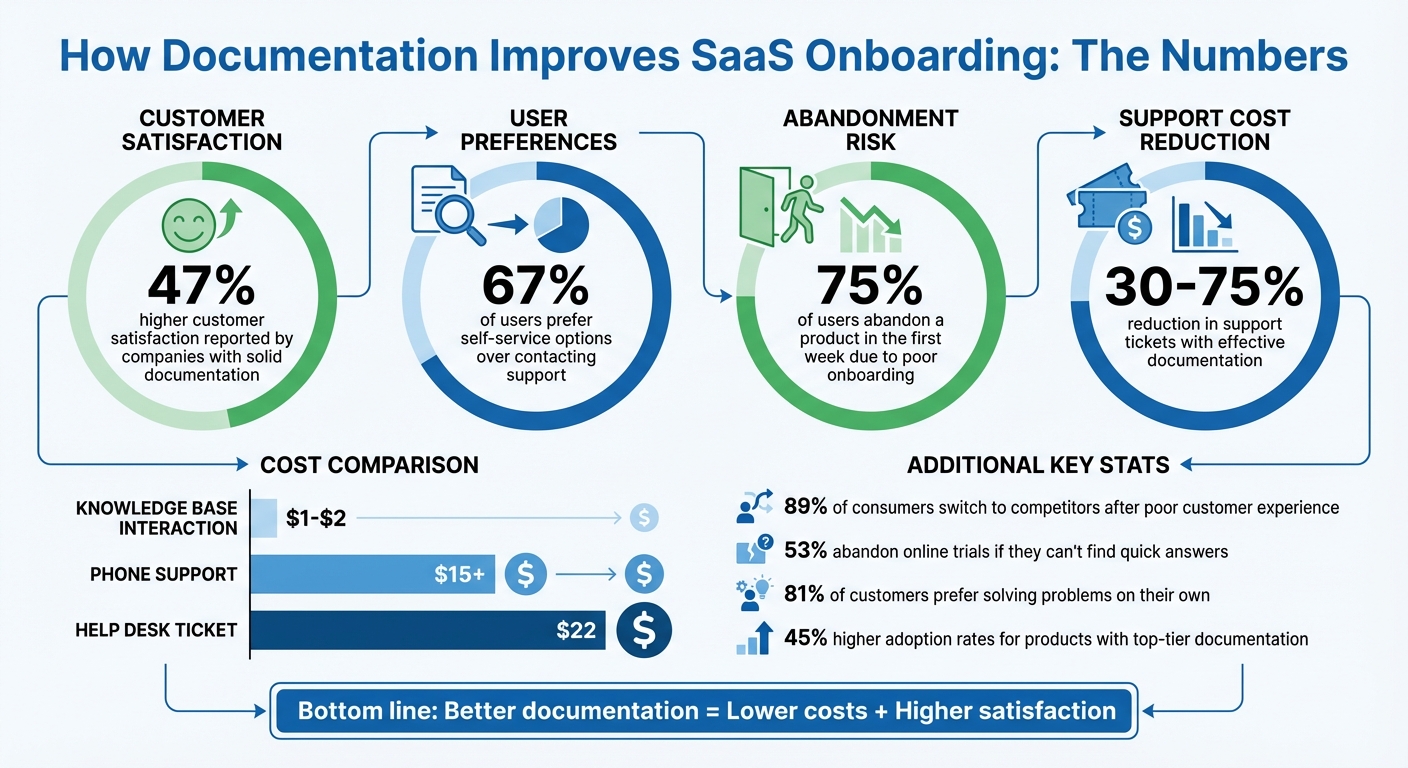
How Documentation Impacts SaaS Onboarding: Key Statistics
5 Best Practices for Better SaaS User Onboarding
Effective documentation is a cornerstone for those looking to scale SaaS customer support efficiently.
sbb-itb-8132e49
Common SaaS Onboarding Problems Without Good Documentation
Poor documentation can derail onboarding entirely. Users hit roadblocks they can’t overcome, while support teams get bogged down with repetitive questions. This not only delays users from seeing the product’s value but also creates frustration that can lead to churn. Let’s break down how these issues manifest and why proper documentation is critical.
User Confusion and Drop-Offs
When documentation is scattered or incomplete, users are left piecing together fragmented information from multiple sources. This “treasure hunt” for answers leads to frustration. For example, users might know what button to click but fail to understand why a specific setting matters. The result? Poor decisions and setup errors.
The stats paint a clear picture: 75% of users abandon a product within the first week if onboarding is confusing, and 74% will switch to a competitor if the process feels overly complicated. Each step in a setup process represents a decision point. Without clear documentation to explain the implications of those decisions, users can experience decision fatigue or even give up entirely.
Trying to showcase every feature at once – often through an overwhelming checklist – only makes things worse. Users typically sign up to solve one specific problem, and bombarding them with unrelated features creates confusion. This mistake, sometimes called the "Big Bang" approach, leads to analysis paralysis.
"Customers won’t care about any particular technology unless it solves a particular problem in a superior way." – Peter Thiel, Co-Founder, PayPal
A real-world example of this problem is CloudSync Pro. Despite raising $12 million in Series A funding in 2019, the company failed within a year. Why? Users couldn’t figure out how to use the product. The only documentation available was a basic 10-page PDF, which left customers confused and overwhelmed support teams with tickets. Negative word-of-mouth followed, sealing the company’s fate.
Higher Support Ticket Volume
Confusion stemming from poor documentation doesn’t just frustrate users – it overwhelms support teams. When product updates aren’t paired with updated documentation, users encounter mismatched interfaces, which often result in support tickets.
Consider this: 60% of support teams report rising ticket volumes, and each IT help desk ticket in North America costs about $22 to resolve, though outsourcing reduces support costs significantly. In contrast, a self-service knowledge base interaction costs just $1 to $2.
The problem is compounded by terminology mismatches. For example, a user might search for “project” while the software refers to the same concept as “workspace.” This disconnect makes self-service tools ineffective, forcing users to turn to support. And while 81% of customers prefer solving problems on their own, many give up if they can’t find an answer within three clicks.
Some companies have turned this around. DataCamp, for instance, introduced a robust documentation system and an "Answer Bot" for self-service. The result? A 66% drop in support tickets within six months. Similarly, Canopy, a digital safety app, reduced its support ticket volume by 75% after launching a dedicated user documentation platform that guided users to self-service resources.
Slower Time-to-Value
Without clear guidance, users take longer to reach their "aha" moment – the point where they truly understand the product’s value. This delay increases the likelihood of abandonment. In fact, 53% of customers are likely to quit an online trial or purchase if they can’t quickly find answers to their questions.
"Churn doesn’t start when a customer cancels, it starts the moment they get stuck." – HelpSite
Another issue is that users often miss out on advanced features that could enhance their experience. When these features aren’t properly explained in the documentation, the product’s value diminishes in their eyes. Poor resources also mean that every new user becomes a potential support ticket, forcing companies to scale their support teams as their user base grows.
On the flip side, effective documentation can help users achieve initial success in just 10 minutes, compared to 30 minutes of frustration without it. But outdated resources – like screenshots that no longer match the product – erode trust. In fact, 90% of customers consider accurate content essential to their experience. By addressing these gaps, companies can speed up user success and reinforce the product’s overall value.
How Documentation Solves SaaS Onboarding Problems
Good documentation doesn’t just fix onboarding issues – it highlights the product’s value. Instead of users getting stuck and overwhelming support teams, they can find answers independently. The secret lies in creating resources that meet users wherever they are, whether they need a quick tip or an in-depth guide.
Self-Service Tutorials and Guides
Step-by-step tutorials allow users to learn at their own speed. Unlike rigid checklists, self-service tools let users bypass what they don’t need and focus on solving their immediate challenges. In fact, 67% of customers prefer self-service options over contacting support.
Interactive features like tooltips and walkthroughs make a huge difference. For example, Litmus used Appcues to implement these tools, resulting in a 2,100% increase in feature adoption and 62% of engaged users becoming active users. This approach works because users learn by doing, rather than wading through static manuals.
GrowthMentor took a simpler route with a pop-up checklist guiding users through their first tasks. This small change reduced onboarding-related support tickets from 25–30 per day to just 1 or 2. The takeaway? When users can guide themselves, they succeed faster, and support teams can focus on more complex issues, often managed through a customer support outsourcing checklist. These self-guided tools are essential to a larger, well-organized support system.
Centralized Knowledge Bases
A centralized knowledge base acts like a round-the-clock help desk. Instead of digging through scattered resources, users can find everything they need in one searchable hub. This is crucial because 82% of customers at companies like Activision prefer self-service help portals over traditional support channels like phone or social media.
"It’s an incredible change. We’re reducing costs and increasing satisfaction at the same time." – Tim Rondeau, Senior Director of Customer Care, Activision
The cost savings are undeniable. Resolving an issue through a knowledge base costs $1–$2, compared to $15 or more for phone support. But the benefits extend beyond saving money. Modern knowledge bases move from simply solving problems to educating users, helping them uncover advanced features they might otherwise overlook.
You Need a Budget (YNAB) provides a great example. Their help center features a prominent search bar and a “How to get started” section right on the homepage. They combine written guides with videos to walk users through their unique zero-based budgeting method. This design ensures users can find answers in under three clicks, avoiding the frustration of endless searching. While centralized resources serve everyone, tailoring documentation to specific roles makes the experience even better.
Role-Specific Documentation
Different users have different needs. An admin handling billing and integrations requires entirely different information compared to an end-user learning daily workflows. Role-specific documentation eliminates unnecessary clutter by focusing only on what’s relevant.
This targeted approach helps users achieve their goals more quickly. When documentation feels tailored to their needs, users reach their "aha moment" faster and gain confidence in the product.
| User Group | Focus of Documentation | Primary Goal |
|---|---|---|
| Admins/Buyers | Account setup, billing, integrations, team management | Strategic oversight and system setup |
| End-Users | Feature tutorials, daily task guides, troubleshooting | Streamlined workflows and task efficiency |
| Returning Users | New feature updates, advanced workflows, refresher content | Expanded product knowledge and mastery |
The process is simple: use short onboarding surveys during login to identify each user’s role and goals. Then, provide documentation paths that skip irrelevant steps. This avoids information overload and ensures users focus on tools that deliver immediate value.
"Customer onboarding only works when it helps people reach their desired outcomes. If you don’t know those outcomes, you can’t guide them to value." – Lara Stiris, Userflow
Benefits of Good Documentation for SaaS Companies
Good documentation isn’t just a user-friendly feature – it’s a strategic asset that can directly influence a company’s growth and profitability. Beyond enhancing onboarding and engagement, it cuts costs and drives efficiency.
Fewer Support Tickets
Every time a support ticket gets deflected, companies save between $20 and $22. When users can troubleshoot on their own, support teams avoid handling repetitive inquiries like "How do I reset my password?" or "Where’s my billing history?"
For example, Buffer saw a 26% drop in ticket volume after redesigning their help center to improve navigation and clarity. Similarly, DataCamp leveraged expanded documentation and an "Answer Bot" to save $15–$20 per deflected ticket, creating significant savings across thousands of interactions each month. With 81% of customers preferring self-service options over contacting support, solid documentation aligns perfectly with user preferences.
Lower ticket volumes also mean faster onboarding, as users don’t have to wait in line for answers.
Faster User Onboarding and Adoption
Clear documentation removes obstacles that slow down new users. Instead of waiting for support or scheduling onboarding calls, users can dive into setup at their own pace. This speeds up the time-to-value – that critical moment when users experience the real benefits of your product.
Take Notion, for instance. By reorganizing their help center around tasks and adding GIF animations, they reduced support tickets by 40% while helping users quickly find solutions.
The Wix Partner Program took it a step further by tailoring onboarding paths for different user groups like designers, developers, and marketers. Combined with interactive in-app tooltips, they achieved a 30% drop in support tickets. The lesson? Users don’t want to learn everything – they want to learn what’s relevant to them, right when they need it.
Better Retention and User Satisfaction
When users encounter unresolved issues, churn becomes a real risk. Studies show that 89% of consumers have switched to a competitor after a poor customer experience, and 53% are likely to abandon an online purchase if they can’t find quick answers. In subscription-based businesses, this principle applies just as much to renewals.
Effective documentation provides instant resolutions, boosting user confidence and keeping engagement high. Activision, for example, found that 82% of their customers preferred using their self-service help portal over traditional support like phone or social media. Tim Rondeau, Senior Director of Customer Care at Activision, summed it up well:
"It’s an incredible change. We’re reducing costs and increasing satisfaction at the same time." – Tim Rondeau, Senior Director of Customer Care, Activision
When documentation is done right, it’s a win-win – users get the answers they need immediately, and companies build loyalty without adding extra staff.
How Outsourced Support Improves Documentation: Aidey‘s Approach
Even the best documentation can fall short when it comes to keeping up with evolving user needs. Users often phrase questions in unexpected ways, products can change faster than guides are updated, and new features sometimes create confusion before the documentation catches up. This is where outsourced support steps in, bridging these gaps and transforming static guides into dynamic, real-time solutions.
Free Onboarding Setup and Knowledge Base Training
Aidey’s free onboarding process addresses a problem many SaaS companies face: scattered information. Key instructions often end up spread across platforms like Google Docs, Slack, and email, leading to onboarding headaches for both users and support teams.
Aidey solves this by consolidating all those scattered resources into one centralized, searchable hub. Their team is trained to identify gaps in documentation using a straightforward rule: if a new hire asks the same question twice in their first week, it’s not a training issue – it’s a documentation gap. This strategy turns every support interaction into an opportunity to improve. Common questions are tagged, and AI workflows transform ticket responses into clear, step-by-step knowledge base articles.
This process doesn’t just streamline documentation – it also protects your internal team from constant interruptions. Research shows that frequent interruptions can cost senior agents an entire workday for every five interruptions per hour. By outsourcing documentation upkeep, your team can focus on higher-value tasks while maintaining consistent support quality around the clock.
24/7 Support for Documentation Gaps
Even the most thorough guides can’t cover every scenario, especially during onboarding. That’s why Aidey provides 24/7/365 support, ensuring users always have access to help when they need it most. This immediate assistance prevents frustration and reduces the chance of users abandoning your product.
These interactions also act as a content creation engine. When users escalate issues, it highlights areas where documentation is missing, unclear, or hard to find. Aidey’s team captures the exact language users use when seeking help, creating a continuous feedback loop that refines and updates your knowledge base.
Scalability and Cost Efficiency
From a cost perspective, the numbers speak for themselves: a self-service knowledge base interaction costs around $1–$2, while phone support can cost $15 or more, and email support typically ranges from $5–$10 per ticket. While 67% of customers prefer self-service options, a significant portion still needs direct assistance. Aidey bridges this gap by handling human support while simultaneously reducing its necessity through better documentation.
As your user base grows, strong documentation allows you to scale without needing to hire more support staff at the same rate. Aidey’s remote teams can adjust to meet demand, ramping up during product launches or seasonal spikes and scaling back during quieter periods. Their standardized training ensures every agent delivers consistent support, no matter the time of day. These efficiencies free up resources that can be reinvested into improving documentation quality.
Conclusion
Effective documentation isn’t just a helpful tool – it’s a key driver of profitability. A well-organized knowledge base costs significantly less than traditional support channels. However, even the best documentation can’t predict every user question, especially during critical onboarding stages when confusion can lead to churn.
Pairing self-service documentation with round-the-clock outsourced support creates a powerful feedback loop. Support interactions reveal gaps in your documentation, and addressing those gaps can lower future ticket volumes by 30–50%.
"Strong onboarding isn’t about training harder. It’s about documenting smarter." – HelpSite
Aidey takes this concept further by using real-time feedback to refine documentation continuously. Their team identifies recurring pain points, consolidates scattered information into easily searchable hubs, and ensures 24/7 support quality. This approach transforms every support interaction into an opportunity to enhance your knowledge base, amplifying its value over time.
Products supported by top-tier documentation achieve 45% higher adoption rates. Plus, businesses can scale their user base without needing to scale their support team proportionally. By investing in thorough documentation and onboarding SaaS outsourced customer support, you’re not just cutting costs – you’re speeding up onboarding, improving user satisfaction, and setting the stage for long-term growth.
FAQs
What should I document first to speed up onboarding?
Helping users get started smoothly is all about providing clear, step-by-step guidance. Start by creating quick start guides or environment setup documentation that focus on the essentials. Here’s what to prioritize:
- Account Configuration: Walk users through creating and configuring their accounts. Include steps like setting up profiles, adjusting preferences, and linking necessary integrations.
- Environment Setup: Provide instructions for setting up the necessary tools, software, or platforms. Whether it’s installing an app, configuring a workspace, or connecting devices, make sure the process is straightforward.
- Core Features: Highlight the key features users need to know about right away. Show them how to perform basic tasks or access the most important tools.
By keeping your onboarding content clear and to the point, you’ll help users hit the ground running. This reduces confusion, speeds up the learning curve, and ensures they see value in your product or service right from the start.
How do I measure if documentation is reducing churn?
To see if documentation helps lower churn, start by tracking metrics such as support ticket volume and costs. A drop in tickets usually means users are finding answers on their own. For ROI, compare the savings – like fewer support tickets or better team efficiency – against the costs of creating and maintaining the documentation.
You should also keep an eye on churn rates and customer satisfaction scores. If churn decreases or customers leave positive feedback about your self-service resources, it’s a good sign that your documentation is playing a role in keeping users around.
How often should SaaS onboarding docs be updated?
Keeping SaaS onboarding documentation current is crucial for accuracy and effectiveness. The ideal update frequency depends on how often your product evolves, but for fast-paced SaaS teams, weekly or monthly reviews work best. Regular updates ensure your onboarding materials stay relevant and prevent outdated information from confusing users or impacting support efforts. Even setting aside just 30 minutes for routine updates can make a big difference, especially when dealing with tight resources or quick release cycles.