

Outsourcing gaming customer support can help studios handle high ticket volumes, provide 24/7 assistance, and maintain quality without overburdening in-house teams. By partnering with experienced providers, you can scale support during game launches, manage player communities, and offer multilingual service – all while reducing costs. Here’s how to do it:
- Assess your readiness: Identify challenges like ticket surges, technical issues, or community moderation gaps.
- Choose Tasks to Outsource: Start with Tier 1 support (password resets, FAQs) and consider technical troubleshooting or multilingual support.
- Find the Right Partner: Look for gaming experience, scalability, and the ability to handle platforms like Discord, Twitch, and Steam.
- Set Goals and SLAs: Define metrics like response time, resolution rates, and customer satisfaction.
- Onboard and Train Teams: Ensure agents understand your game, brand voice, and workflows.
- Monitor Performance: Track KPIs, conduct quality reviews, and adjust processes as needed.
Outsourcing lets you focus on game development while ensuring players receive consistent, high-quality support.
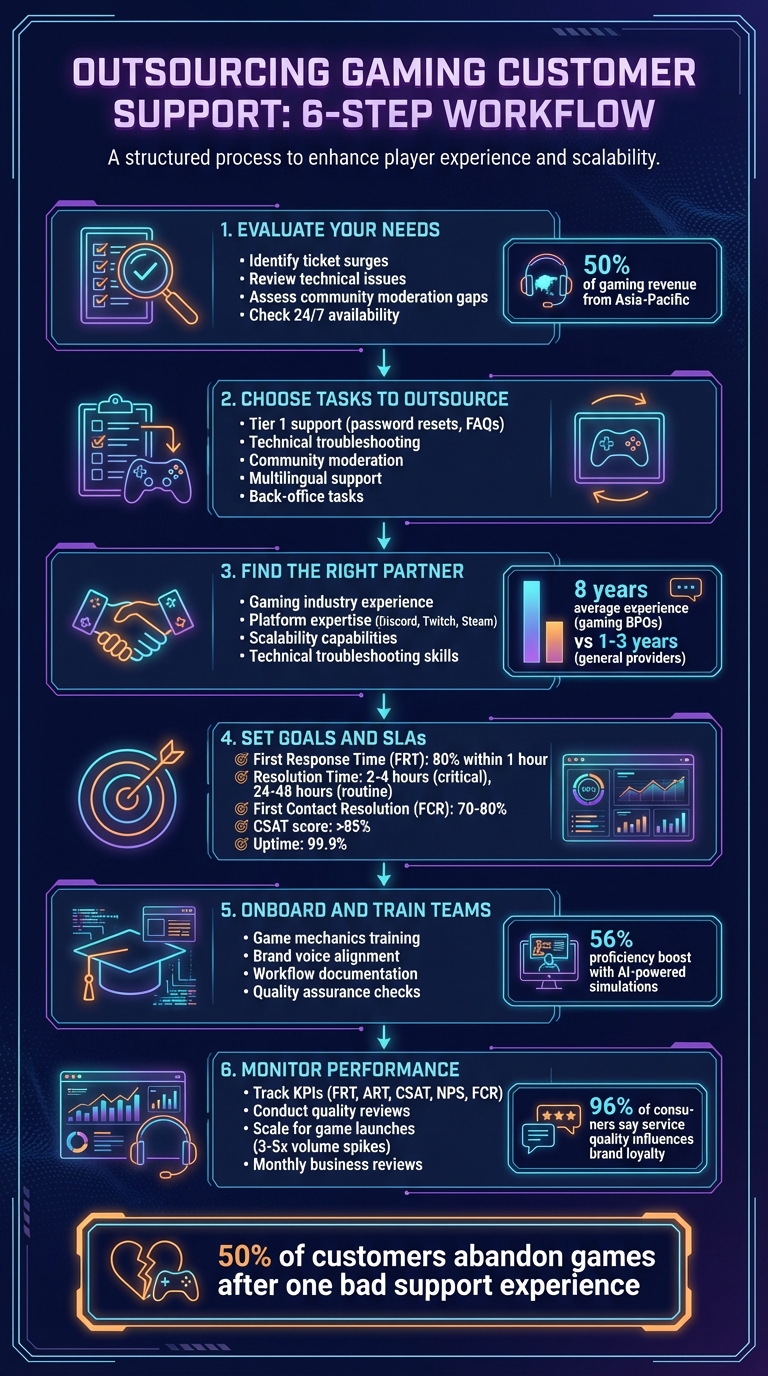
6-Step Process for Outsourcing Gaming Customer Support
Assess Your Customer Support Needs
Before diving into outsourcing, take a close look at your current support setup and identify where improvements are needed. Supporting gamers is no walk in the park – it’s far more complex than standard customer service. Gamers expect quick, accurate answers about intricate game mechanics, and they won’t tolerate agents who lack a solid grasp of the game’s details.
Review Current Support Challenges
Start by pinpointing your biggest support challenges. Are ticket volumes spiking during game launches or major updates? That’s often a sign your team is struggling to keep up. If routine tasks like password resets are eating up too much time while critical bug reports go unresolved, it could indicate issues with prioritization. Also, check if your support is available 24/7 – gaming never sleeps, and your players expect round-the-clock help. With 50% of gaming revenue coming from Asia-Pacific and 19% from Europe, it’s essential to serve international players without delay.
Gaming support also requires agents with technical expertise. They need to understand game logic, troubleshoot software problems, and provide solutions that make sense to players. Without this, players may quickly lose trust. Another area to evaluate is your community management workload. Platforms like Discord, Reddit, and Steam require constant moderation to handle toxic behavior and prevent fraud. Neglecting these spaces can harm your game’s reputation.
Once you’ve identified your challenges, decide which tasks can be outsourced to lighten your team’s load.
Decide Which Functions to Outsource
Some tasks are perfect for outsourcing. Tier 1 support – like handling password resets, FAQs, and account recovery – is a great place to start. This frees up your internal team to focus on complex issues and high-priority players.
Outsourcing technical troubleshooting can also be a smart move, especially if you partner with teams that include gamers who understand the ins and outs of UI problems, gameplay mechanics, and bug reporting. For community moderation, specialists can manage platforms like Discord, Twitch, and Reddit, ensuring toxic behavior is kept in check and policies are enforced. If you’re expanding globally, multilingual support is another area to consider. Outsourced teams can provide native-language assistance or use AI-powered translation tools to cover multiple regions efficiently. Back-office tasks like data entry and new user verification are also commonly outsourced, allowing your internal team to stay focused on game development.
Set Clear Goals and Metrics
Before signing any contracts, define what success looks like. Set measurable goals that align with what your players care about. For example, prioritize metrics like First Contact Resolution (FCR) rather than focusing too much on Average Handle Time (AHT). Keep an eye on community sentiment, too – monitoring platforms like Reddit and Steam can offer valuable insights into how players feel. With 50% of customers likely to abandon your game after a single bad support experience, tracking the right metrics is critical.
sbb-itb-8132e49
Select an Outsourcing Partner
Once you’ve outlined the scope of your outsourcing needs, the next step is finding a partner who aligns with your standards. This decision will have a lasting impact on your player support quality, so it’s worth investing time to evaluate your options. Picking the wrong partner can lead to unhappy players, a tarnished reputation, and wasted resources. The right partner, however, will feel like an extension of your own team.
Find Gaming Industry Experience
Player support isn’t your average customer service – it’s more demanding and specialized. That’s why it’s essential to choose a partner with a strong background in gaming, not just a generic call center that might specialize in retail or banking. Ideally, their agents should be gamers themselves, familiar with game mechanics, terminology, and the nuances of player culture. For context, gaming-specific BPOs often have agents with an average of 8 years of experience in the industry, compared to the 1–3 years typical of general providers.
Why does this matter? Agents who game themselves can connect with players on a deeper level. They’ll know why a server rollback is frustrating, understand terms like "meta", and resolve UI bugs without relying on rigid scripts. They’ll also be sensitive to community dynamics, such as identifying the spread of toxicity on Discord or handling ban appeals with care.
Review Service Capabilities
Your outsourcing partner should be able to support every channel your players use – email, chat, voice, and even gaming-specific platforms like Discord, Twitch, Steam, and Reddit. Multilingual support is another must-have. Whether through native-speaking agents or AI translation tools, they should efficiently serve players across multiple regions.
Technical troubleshooting is another area to scrutinize. Can the provider handle both Tier 1 issues like password resets and Tier 2 challenges like debugging latency problems or resolving synchronization errors?. In-game support is equally important, so check for features like in-game ticketing APIs, purchase assistance, and real-time help during tournaments or live events.
Community management and moderation are just as critical. Your partner should be equipped to moderate platforms like Discord and Twitch while addressing trust and safety concerns such as harassment, toxicity, and anti-cheat enforcement.
"What’s the ROI for player support? Well, stop doing it for six months, and you’ll find out." – Rich Weil, CXO, ModSquad
After confirming service capabilities, focus on whether the partner can scale and adjust to your needs.
Confirm Scalability and Flexibility
Game launches, seasonal updates, and viral trends can cause support volumes to spike by 3–5 times within 48–72 hours. Your partner must be able to scale quickly – some providers can ramp up a team in just one week and add up to 150 agents weekly. Ask for examples of how they’ve handled similar surges in the past.
Equally important is the ability to scale down once demand stabilizes. Avoid providers that lock you into inflexible, long-term commitments or impose high fees for scaling adjustments. Some providers require a minimum of 25 agents, which might not be ideal for smaller studios, while others offer more flexible terms with short notice periods for changes.
Customization is another key factor. Whether you’re managing LiveOps for a live-service game, catering to VIP players, or supporting Web3 digital assets, your partner should tailor their solutions to your needs – not force you into a rigid, one-size-fits-all approach.
Providers like Aidey specialize in scalable and customizable solutions, adapting seamlessly to game launches, seasonal events, and shifting player demands. Once you’ve confirmed your partner’s ability to scale and adapt, the next step is formalizing SLAs and team structures.
Set Up SLAs and Team Structure
Once you’ve partnered with the right team, the next step is to establish clear performance expectations and define roles. This ensures everyone is on the same page, minimizes misunderstandings, and maintains consistent service quality.
Define SLA Requirements
Set measurable goals that align with what your players expect. For instance, aim for a First Response Time (FRT) where 80% of tickets get an initial reply within one hour, and calls are answered in under 20 seconds. For Resolution Time, prioritize critical issues (like payment failures) to be resolved in 2–4 hours, while less urgent requests can take 24–48 hours.
Another key metric is First Contact Resolution (FCR), which tracks how often issues are resolved during the first interaction. High-performing teams typically hit FCR rates of 70%–80%, which reduces repeat tickets and keeps players happy. Additionally, aim for a Customer Satisfaction (CSAT) score above 85%, and ensure your support system has a 99.9% uptime.
"Timeliness and speed have a direct correlation with satisfaction. A first response perceived as fast can set you on the right track for a positive first impression."
– Luis Hernandez, VP of Customer Success, Geckoboard
Keep your SLA targets realistic. They should reflect your team’s capacity, tools, and size. A tiered SLA might be a smart move – offering faster response times for VIP players or premium subscribers. Review these agreements quarterly to adapt to new game launches, seasonal events, or content updates.
Build the Right Team
Your team structure should match the types of player requests you expect. For instance, technical support specialists are vital for resolving UI bugs, network issues, or hardware compatibility problems. Community managers can connect with players on platforms like Discord, Steam forums, Twitch, and Reddit. Multilingual agents are also essential for supporting a global player base across different time zones.
Consider a tiered support model that divides responsibilities:
- Tier 1: Handles about 80% of inquiries, such as password resets or basic FAQs.
- Tier 2: Takes on more complex cases requiring intermediate troubleshooting or detailed support, covering 15%–20% of requests.
- Tier 3: Focuses on highly technical or intricate issues, often escalating directly to developers who know the game inside out.
For delicate issues – like fraud, bans, or harassment reports – dedicated trust and safety specialists are a good idea. You’ll also need to decide between a dedicated team (agents focused solely on your game), a shared model (agents working across multiple clients), or even a hybrid approach. This setup ensures smooth escalations and keeps feedback flowing efficiently.
Create Escalation and Feedback Systems
Develop clear workflows to ensure complex issues get escalated quickly. For example, set up your ticketing system to trigger automatic escalations if an SLA is at risk – like when a ticket is unresolved for two hours or includes sensitive keywords like "refund" or "legal". Limit Tier 1 escalations to one hour to avoid bottlenecks.
For high-value players, create specialized escalation paths to protect revenue and boost retention. Sensitive cases, such as ban appeals or harassment reports, should have documented workflows that balance speed with thoroughness. Use these cases to fine-tune your processes for the future.
Assign a Service Delivery Manager (SDM) as the go-to person for your studio. They’ll monitor performance data, advocate for your needs, and suggest improvements. Schedule quality reviews – weekly during the first month and monthly once things settle – to catch and address any performance gaps before they grow into bigger problems.
Onboard Teams and Set Up Communication
Once you’ve finalized your outsourcing partner and defined your SLAs, the next step is onboarding and integrating the new team. A smooth onboarding process ensures agents quickly grasp your game mechanics, player base, and brand voice.
Implement Onboarding Procedures
Kick off with a structured, multi-phase training program that covers the essentials: technical game mechanics, troubleshooting protocols, your company’s culture, and how to communicate in your brand’s voice. Involve internal product managers and marketing experts to give agents a deeper understanding of what makes your game and player community unique.
Using AI-powered simulations can speed up the onboarding process – boosting new hire proficiency by 56% compared to traditional methods. A "train the trainer" approach works well here. Train your first BPO agent thoroughly, and then have them take charge of onboarding the rest of the team. This method not only saves time but also supports scalability.
Before agents begin interacting with players, review their draft responses. This quality check helps to identify and address any issues early on, ensuring the team is ready to meet your standards. The ultimate goal? Players should never feel like they’re speaking to an outsourced representative.
"The best-outsourced teams are indistinguishable from in-house staff; customers should never realize they’re speaking with a third-party representative".
Some BPO providers, like Aidey, even offer free onboarding services, including recruitment, training, and system setup. This can significantly reduce both time-to-launch and upfront costs.
Establish Communication Channels
Effective communication tools are critical for keeping workflows smooth and teams aligned. Platforms like Slack or Microsoft Teams work well for real-time updates and troubleshooting. Ensure your outsourced team has access to tools like Zendesk or Helpshift for ticketing, Trello for project management, and gaming hubs like Discord or Steam forums.
| Communication Level | Frequency | Primary Purpose | Recommended Tools |
|---|---|---|---|
| Daily Operational | Real-time | Troubleshooting, quick questions, urgent updates | Slack, Microsoft Teams |
| Tactical/Calibration | Weekly/Bi-weekly | Quality reviews, feedback, process alignment | Zoom, Google Meet, CRM dashboards |
| Strategic Review | Monthly (MBR) | KPI analysis, trend reviews, scaling plans | BI tools, project management platforms |
| Knowledge Sharing | Ongoing | Product updates, FAQs, training materials | Trello, Google Workspace, internal wiki |
Assign a dedicated vendor manager to oversee the relationship with your BPO partner. This person acts as the bridge between your in-house leadership and the outsourced team, ensuring alignment and avoiding mixed messages. Begin with weekly calibration sessions in the first month, then transition to bi-weekly or monthly check-ins. Early coordination with your IT team is also crucial, as granting access to internal systems can sometimes be a lengthy process.
Strong communication channels are the backbone of a unified workflow, ensuring everyone is on the same page.
Build a Collaborative Workflow
To maintain consistency and meet performance goals, treat your outsourced team as an extension of your in-house staff. Collaboration is key.
"The company you work with is going to be responsible for how your players see your brand".
Develop shared style guides and quality assurance frameworks to ensure a seamless player experience across platforms like Discord, Steam, and in-game chat. Use unified dashboards to give both in-house and outsourced teams real-time access to performance metrics, ticket volumes, and player feedback. These tools help eliminate silos and keep everyone focused on shared objectives, such as meeting SLA targets for response times and resolution rates.
Start with a kick-off meeting to set milestones, define workflows, and establish expectations. Schedule Monthly Business Reviews (MBRs) to track KPIs like resolution rates, average handling times, and CSAT scores. These regular check-ins allow you to spot trends, address gaps, and plan for scaling during busy periods like game launches or seasonal events.
Monitor and Improve Performance
Once your outsourced team is onboarded, the work doesn’t stop there. Gaming support is a fast-moving environment where player expectations evolve with every patch, event, and content release. By tracking performance and making ongoing adjustments, you ensure your team consistently meets player needs and stays prepared for the game’s ever-changing lifecycle.
Track Performance Metrics
Keep an eye on key performance indicators (KPIs) that directly impact the player experience. These include First Response Time (FRT), Average Resolution Time (ART), Customer Satisfaction (CSAT) scores, Net Promoter Score (NPS), and First Contact Resolution (FCR) – a metric that measures how often issues are resolved without needing follow-ups. According to research, 96% of consumers say the quality of service influences their loyalty to a brand.
It’s important to balance speed-focused metrics with indicators of quality. For example, Average Handle Time (AHT) can give a false sense of efficiency if agents are rushing through tickets to meet time targets but failing to provide thorough solutions. Pair AHT data with CSAT and FCR to ensure players are getting complete and effective responses, not just quick ones. In gaming support, also track how your team handles specific tasks like ban appeals, moderation of toxic behavior, and VIP player support.
Keep an eye on abandonment rates, as high drop-off rates in queues may signal staffing shortages or technical issues. To maintain service standards, establish tiered Service Level Agreements (SLAs) for response times and consider offering prioritized support for VIP players.
Conduct Quality Reviews
Metrics alone don’t tell the whole story. Regular quality reviews ensure your team reflects your brand values and delivers the level of service players expect. Use a QA scorecard (typically scored out of 100) to evaluate areas like brand voice consistency, grammar, adherence to processes, and technical accuracy. For basic oversight, audit at least five tickets per agent each month; for high-volume teams, this could increase to 15 audits per agent daily.
A dedicated QA analyst team can provide unbiased reviews. Their effectiveness isn’t just about identifying mistakes – it’s about making sure their evaluations align with your standards. During audits, confirm that agents are offering technically accurate solutions, not just responses that “sound good” to the player. For gaming, pay extra attention to tasks like proper tagging of in-game tickets and handling ban appeals with empathy.
Regular calibration sessions between your internal team and your outsourcing partner are crucial. These sessions help align everyone on the definition of “quality” and ensure consistency. Reviewing agent responses during the onboarding phase can catch early misunderstandings and protect your brand image. You can also leverage AI-powered sentiment analysis to flag tickets with negative tones, allowing you to step in before small issues grow into bigger problems.
Once quality reviews are in place, the next focus is preparing for the fluctuating demands of game lifecycle events.
Scale for Game Lifecycle Events
Demand for gaming support isn’t steady – it spikes during game launches, major updates, and promotional events. Your outsourcing partner should be ready to scale up quickly during these peak times and scale down as activity returns to normal. Pre-launch preparation is key to avoiding backlogs and ensuring agents are fully trained and ready.
Collaborate with your partner to create a scaling playbook for predictable events. Use Tier 1 agents to handle basic queries while routing more complex issues to in-house specialists. This approach prevents bottlenecks during high-demand periods.
Maintaining quality during scale-ups is just as important as handling the increased volume. Even a small improvement in customer retention – just 5% – can lead to a profit increase of 25% to 95%. Use monthly business reviews to look back at past performance, identify what worked well, and refine your scaling strategies for future events. The flexibility to expand and contract your support team without internal layoffs is a major advantage of outsourcing – make sure to use this flexibility wisely.
Conclusion
Outsourcing gaming customer support creates a scalable solution that keeps players happy while letting your team concentrate on developing the game itself. By following the steps in this guide, you can choose the right partner, set clear performance benchmarks, and ensure consistent, high-quality support that evolves with your game’s needs.
Think of your outsourcing partner as an extension of your team, not just another vendor. A thorough onboarding process is essential to help them represent your brand effectively. This is a critical step when you build a remote customer support team to ensure global coverage. Regular monitoring and quality reviews will keep the support experience aligned with your brand’s standards and ensure quick resolution of player concerns. This partnership not only simplifies support management but also enhances the overall player experience.
"Outsourcing gaming support offers a comprehensive, cost-efficient solution for game studios aiming to balance high-quality game development with exceptional player support." – John Pompei, SVP of Gaming, Arise
Companies like Aidey excel at providing around-the-clock support with adaptable teams that scale up during game launches and scale down during slower periods. They bring the technical expertise to handle everything from routine tickets to VIP player needs – without the expense or complexity of building an in-house team.
FAQs
How much does outsourced gaming support cost?
Outsourcing gaming support comes with a range of costs, influenced by factors like team location, the complexity of services, and the pricing structure. Here’s a quick breakdown:
- Offshore teams (e.g., India, Philippines): Typically cost between $8–$18/hour.
- Nearshore teams (e.g., Latin America): Rates range from $11–$25/hour.
- Onshore teams (e.g., U.S.): Expect to pay $40–$80/hour.
For more specialized gaming support, prices can vary widely, from $6–$50/hour, depending on the expertise required. Some providers also offer pay-per-minute pricing, which could reduce costs by 30–40%. Ultimately, your final expenses will hinge on your specific requirements and the provider you choose.
How do I keep outsourced agents on-brand and accurate?
To keep outsourced agents aligned with your brand and accurate in their work, start by offering clear style guides and brand-specific training. This ensures they fully grasp your voice, tone, and values. Regular quality checks are essential to monitor their performance and address any inconsistencies. You can also involve your team in the recruitment process to handpick agents who naturally align with your brand’s personality. Finally, maintain open communication so agents stay updated on any changes to your brand, enabling them to deliver consistent and on-brand support.
What data security should I require from a support partner?
When you’re outsourcing gaming customer support, it’s crucial to prioritize data security. Make sure your partner follows strict security protocols, including compliance with regulations like GDPR or HIPAA, uses data encryption, implements secure access controls, and conducts regular security audits.
Check that they have measures in place to protect sensitive information, such as personal data and payment details. Additionally, ensure they have a solid incident response plan to handle potential breaches. These precautions not only protect your customers’ trust and your brand’s reputation but also keep you on the right side of legal requirements if a security issue arises.