

Outsourcing customer support can save businesses 30–50% in costs while improving service efficiency and scaling operations. However, it comes with risks like quality concerns and potential brand harm. To ensure success, follow this step-by-step guide:
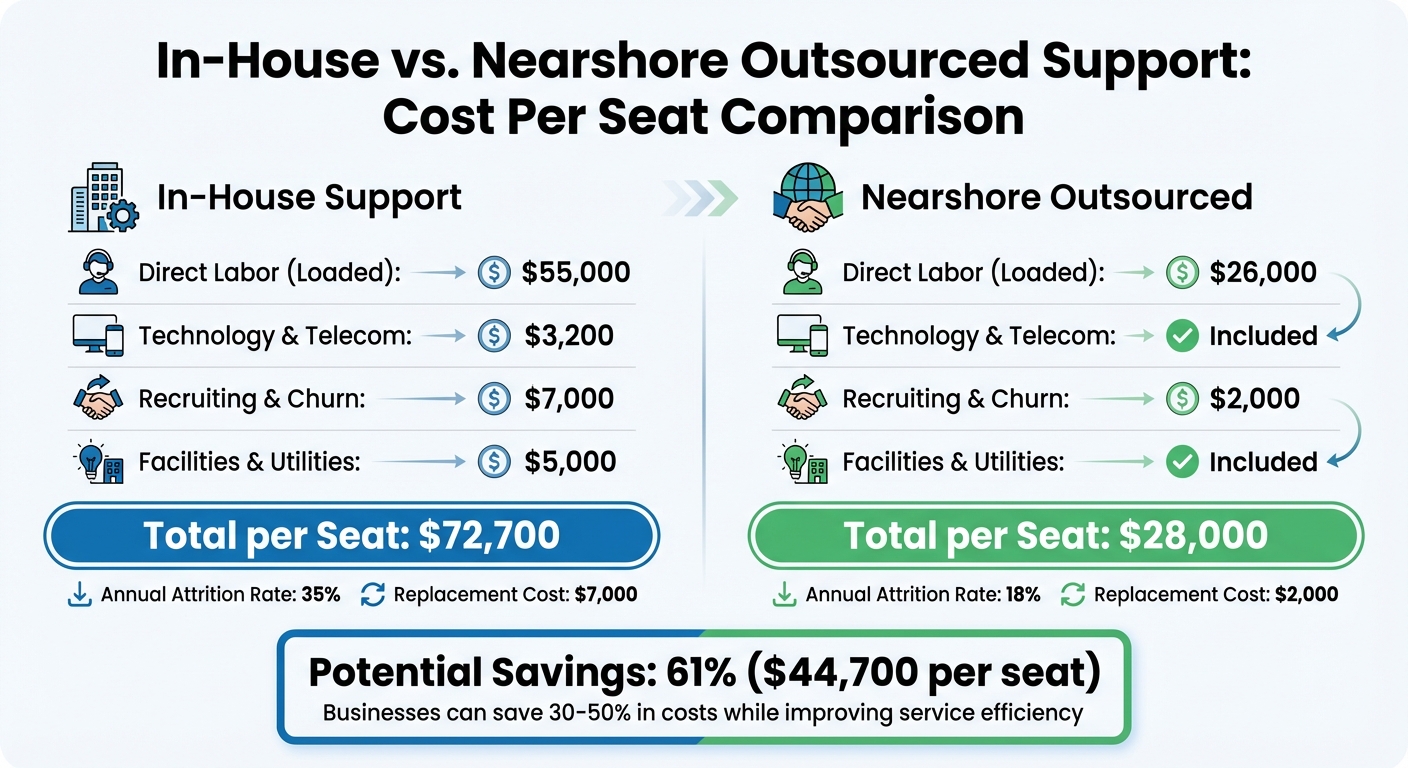
- Assess Readiness: Analyze metrics like response time and satisfaction scores to identify gaps. Compare in-house costs (~$72,700/seat) with how outsourcing reduces support costs (~$28,000/seat).
- Secure Leadership Buy-In: Present a cost-benefit analysis and propose a pilot program to test outsourcing.
- Define SLAs: Set measurable goals for response time, resolution rates, and satisfaction. Include escalation protocols and penalties for unmet targets.
- Choose the Right Partner: Evaluate experience, tech integration, security measures, and pricing models. Start with a small trial team.
- Train and Transfer Knowledge: Build a centralized knowledge hub, teach brand voice, and provide ongoing product updates.
- Monitor and Improve: Track KPIs like CSAT, FCR, and resolution time. Conduct regular reviews and QA checks to maintain quality.
Outsourcing done right can drive growth, reduce churn, and enhance customer satisfaction. Start small, track results, and choose a partner who aligns with your goals.
How to Make Outsourcing Actually Work for Your SaaS Team
sbb-itb-8132e49
Assess Your Business Readiness
In-House vs Outsourced Customer Support Cost Comparison
Before diving into outsourcing, take a close look at your current support operations to ensure that it’s the right solution for your business challenges.
Identify Weak Spots in Your Support System
Start by analyzing your baseline performance metrics. Key indicators like First Response Time (FRT), Average Handle Time (AHT), and Customer Satisfaction Score (CSAT) can reveal whether you’re struggling with capacity or simply facing a temporary surge in demand.
Some common warning signs include:
- Coverage gaps, such as no weekend or after-hours support.
- Scalability issues during product launches.
- Poor resource allocation, like developers or founders spending over 20% of their time on basic support tasks instead of focusing on product development.
Considering that nearly 82% of customers want quick resolutions, any delays in response times are a clear sign of a support gap.
Here’s a real-world example: In May 2025, Texas Hill Country Olive Co. partnered with Ethos Support after noticing their average response time had ballooned to 31.6 hours. By bringing in an outsourced team, they cut it down to just 4.12 hours – an 87% improvement. This allowed their internal team to focus on higher-level business strategies.
To identify areas ripe for outsourcing, log repetitive tasks like password resets or order tracking. Then, compare your current support costs to the potential savings using a customer support cost calculator outsourcing could offer.
Weigh Costs Against Benefits
Create a Total Cost of Ownership (TCO) analysis to understand the financial impact of onshore vs offshore support costs versus keeping support in-house. Include all relevant expenses, such as:
- Salaries and benefits.
- Payroll taxes.
- Recruitment costs (typically $4,000–$7,000 per hire in the U.S.).
- Technology licenses.
- Training expenses (about $1,300 per user annually).
- Management overhead.
For context, the annual cost of an in-house support seat in North America averages $72,700, while a nearshore outsourced seat comes in at around $28,000.
| Cost Component | In-House (North America) | Nearshore Outsourced |
|---|---|---|
| Direct Labor (Loaded) | $55,000 | $26,000 |
| Technology & Telecom | $3,200 | Included |
| Recruiting & Churn | $7,000 | $2,000 |
| Facilities & Utilities | $5,000 | Included |
| Total per Seat | ~$72,700 | ~$28,000 |
Don’t forget to account for hidden costs like employee turnover. North American in-house teams face an annual attrition rate of 35%, compared to 18% for nearshore providers. Replacing an in-house employee can cost around $7,000, while outsourcing replacements average just $2,000.
To evaluate your return on investment (ROI), use this formula:
(Revenue Gained or Retained – Support Cost) ÷ Support Cost.
If your support costs exceed 7% of your total revenue, especially for a SaaS business, it may be time to reconsider your approach.
Share these findings with internal stakeholders to build a strong case for outsourcing.
Secure Leadership Support
With performance data and cost comparisons in hand, present a compelling argument to leadership. Tie outsourcing to strategic goals – like achieving 24/7 support coverage, scaling for growth, or freeing up internal teams to focus on product innovation. Use baseline KPIs, cost analyses, and a SWOT assessment to address concerns around quality, security, and maintaining your brand’s voice.
"Being able to define measurable success criteria and KPIs helps set up an outsourcing process for success, or setting up that partnership for success." – Mari Parker, COO, Boldr
To ease any hesitation, propose a pilot program. Start small by outsourcing weekend tickets or a specific product tier to test the waters before committing. This cautious approach can be reassuring, especially since 20% to 25% of outsourcing arrangements fail within the first two years.
Finally, create a weighted scorecard to objectively evaluate potential outsourcing partners. Consider factors like technical skills, alignment with your company values, and security certifications. Before launching, ensure your internal systems – like CRM and helpdesk tools – are ready for external access. This preparation will set the stage for a smooth transition.
Define Goals and Service Level Agreements
After securing leadership support and operational readiness, the next step is to turn your business needs into measurable standards. A Service Level Agreement (SLA) is your formal contract that outlines what you expect from your outsourcing partner. It covers everything from response times to quality benchmarks and even includes penalties or remedies if those targets aren’t met.
"SLAs are the guardrails of customer service excellence. They don’t just measure performance; they guide it, ensuring every customer interaction is consistent, reliable, and aligned with your brand promise." – Admin, CallZent
These standards form the backbone of your SLA and communication protocols, ensuring they align with your overall support strategy.
Set Performance Metrics and Targets
Start by examining 30 to 90 days of historical support data to establish realistic performance baselines. Your metrics should focus on three critical areas: speed (how quickly issues are addressed), quality (how effectively they’re resolved), and efficiency (overall operational health).
The key is to prioritize metrics that directly impact customer satisfaction. For example:
- First Response Time (FRT): Aim for under one hour for tickets and under 20 seconds for phone calls.
- First Contact Resolution (FCR): Target a range of 70% to 80%, ensuring most issues are solved in the initial interaction.
- Customer Satisfaction (CSAT): Strive for scores above 85%.
"Timeliness and speed have a direct correlation with satisfaction. A first response perceived as fast can set you on the right track for a positive first impression." – Luis Hernandez, VP of Customer Success, Geckoboard
The stakes are high. Research shows that 68% of customers switch providers due to slow or inconsistent support, costing U.S. businesses up to $75 billion annually. On the flip side, improving customer retention by just 5% can increase profits by 25% to 95%.
Response times should also vary by issue priority. For example, system outages might need resolution within 2 to 4 hours, while general inquiries could allow a 24 to 48-hour window. For uptime guarantees, a 99.9% target translates to only 44 minutes of downtime per month, whereas 99.5% permits over 3.5 hours.
It’s important to set achievable targets. Overly ambitious SLAs can lead to agent burnout and strain your relationship with the provider.
Create Your Service Level Agreement
When drafting your SLA, include these key elements: scope of service, performance metrics, reporting obligations, escalation procedures, penalties or remedies for breaches, and a review schedule.
- Scope of Service: Clearly define support hours (e.g., 24/7 or business hours) and exclusions, such as custom development or third-party issues.
- Escalation Procedures: Specify when a ticket should escalate from Tier 1 to higher levels, with maximum timeframes for each transition to avoid bottlenecks.
- Penalties for Breaches: Consider service credits or discounts if targets aren’t met. A common approach caps these at 10% to 15% of the monthly bill – enough to hold the provider accountable without jeopardizing their business. Repeated breaches might even allow for contract termination.
Be precise in your definitions. For instance, if you’re measuring "system uptime", clarify whether partial outages (e.g., one application failing while the operating system remains functional) count as downtime. This clarity avoids disputes later.
"A good service level is both within the supplier’s influence or control and an important measure of the success of the deal." – Brad Peterson, Partner, Mayer, Brown & Platt
Don’t forget to outline your responsibilities as the client, such as providing timely feedback, necessary tools, and access to product documentation. A one-sided SLA can create friction and harm the partnership.
Set Up Communication Guidelines
Once performance targets are set, establish clear communication channels to monitor and adjust your SLA.
- Use real-time dashboards for daily tracking, so you can address issues as they arise.
- Schedule weekly syncs (15–30 minutes) to review ticket trends and make quick adjustments.
- Plan monthly or quarterly reviews to ensure SLA targets align with your evolving business needs.
Assign a Service Delivery Manager (SDM) as your primary point of contact. This individual should have a deep understanding of your business and act as an advocate for your brand within the outsourced team. On your side, assign internal liaisons to streamline communication and escalation processes.
For urgent issues, such as critical problems affecting high-value customers, define clear escalation paths. Your team should know exactly who to contact and how quickly a response is expected. This minimizes the risk of sensitive cases slipping through the cracks and protects your brand reputation.
Incorporate brand adherence into your Quality Assurance (QA) scorecards. Regular audits should evaluate greeting quality, empathy, and how well agents maintain your brand’s tone and values. This ensures your team doesn’t just meet speed targets but also delivers the experience your customers expect.
Finally, schedule semi-annual or quarterly reviews to reassess performance targets as your business evolves. Avoid vague promises to "agree on metrics later." Providers lose the incentive to negotiate once the contract is signed. Instead, build flexibility into the SLA from the outset, allowing for adjustments without renegotiating the entire agreement.
Choose Your Outsourcing Partner
With your SLA framework established, the next critical step is choosing a partner capable of meeting those commitments. This decision affects customer experience, operational costs, and even your brand’s reputation. Did you know that around 20–25% of outsourcing relationships fail within the first two years, and nearly 50% fail within five years?. To avoid becoming part of these statistics, a strong evaluation framework is essential. It should align with your SLA goals and operational readiness to ensure success.
Check Industry Experience and Tech Integration
Your outsourcing partner must understand the nuances of subscription businesses, including trials, renewals, churn, and the differences between monthly recurring revenue (MRR) and annual contracts. Ask for case studies with measurable results – not just glowing testimonials. To dig deeper into their expertise, try a practical test: provide a complex, real-world ticket from your queue and ask them to draft a response in your brand’s voice. This will show you how well they grasp your product and communication style.
Technical capabilities are equally important, especially for SaaS companies. Look for a partner who can handle Level 2 technical support, such as API troubleshooting, integration issues, and even minor code fixes – not just basic customer inquiries. Verify their familiarity with your tech stack (e.g., Zendesk, Salesforce, or HubSpot) and check whether they’re part of these platforms’ partner ecosystems. An API-first approach should be non-negotiable to ensure seamless data syncing with your CRM.
Employee retention is another key factor. While the industry average for agent turnover is around 90%, top-performing providers manage to keep it between 44% and 60%. High turnover often leads to inconsistent service and repeated retraining. Check platforms like Glassdoor or Indeed for insights into the partner’s workplace culture and their commitment to quality.
Review Security and Compliance
Outsourcing doesn’t mean transferring legal responsibility for customer data – you remain accountable for its protection. For SaaS companies, particularly those targeting enterprise clients, strong compliance credentials are non-negotiable.
Ask for recent audit reports, certifications, and summaries of penetration tests. If your business operates in a regulated industry, verify compliance with standards like HIPAA for healthcare, PCI DSS for payment processing, and GDPR or CCPA for handling data from the EU and California, respectively.
The stakes are high: the global average cost of a data breach reached $4.88 million in 2024, and GDPR fines surpassed €2.1 billion in the same year. With over 80% of companies reporting insider-related security incidents, your partner must have robust measures in place. Look for end-to-end encryption, multi-factor authentication, and secure desktop practices. Ensure they train staff rigorously and maintain strict access controls.
"When you hand customer data to a third party, you’re not transferring risk, you’re multiplying it." – SupportYourApp
Additionally, confirm that agents use company-issued, centrally managed hardware. If they allow BYOD (Bring Your Own Device), make sure proper monitoring is in place. Review their incident response plan to understand reporting timelines and exposure management. If subcontractors are involved, verify that they meet the same security standards.
Review Pricing and Contract Terms
Pricing structures vary widely, and the lowest rate often doesn’t provide the best value. Offshore providers typically charge $11–$13 per hour, while nearshore options range from $15–$18 per hour. Per-ticket rates generally fall between $1.50 and $3.00, depending on complexity and language requirements.
When comparing quotes, request detailed breakdowns from at least three vendors. Be cautious of hidden costs like initial training, technology licensing, onboarding, recruiting, and management overhead. Setup fees alone can range from $0 to $5,000.
Focus on cost efficiency per resolved issue rather than simply chasing low hourly rates. Cheaper options can lead to higher error rates and poor retention, ultimately increasing your expenses. Companies that choose the right partner often save 30–40% compared to maintaining an in-house team.
For growth-stage businesses, flexibility is key. Look for month-to-month agreements or contracts that allow scaling without penalties. Increasingly, modern contracts tie compensation to outcomes – like net revenue retention (NRR), churn reduction, or successful renewals – rather than ticket volume. Ensure the contract includes clear provisions for data handover and termination, protecting your brand if the partnership doesn’t work out. Also, confirm that all necessary certifications (e.g., SOC 2, GDPR, PCI DSS) are current before signing.
To minimize risk, start with a pilot program. Engage a small team of 5–10 agents for 30–60 days to test performance and cultural fit before committing long-term.
| Pricing Model | Best For | Pros | Cons |
|---|---|---|---|
| Per-Hour | General support | Straightforward budgeting | May lead to slower resolutions |
| Per-Ticket | High-volume, simple queries | Aligns with efficiency | May encourage rushed interactions |
| Monthly Retainer | Complex SaaS/Enterprise | Predictable costs; dedicated focus | Requires accurate volume forecasting |
| Outcome-Based | Retention-focused SaaS | Aligns vendor incentives with revenue | Harder to measure and negotiate |
Prepare Training and Knowledge Transfer
Once you’ve chosen your outsourcing partner, the next step is ensuring a smooth and ongoing transfer of knowledge. Unlike traditional approaches that treat knowledge transfer as a one-time event, SaaS demands continuous updates. Your product evolves too quickly for a single onboarding session to be enough – agents need constant access to the latest information.
To address this, create a centralized knowledge hub where all essential resources – like product documentation, troubleshooting guides, and workarounds – are stored. Scattered information, whether in chat logs or ticket comments, leads to inconsistent responses and frustrated customers. This hub should include support-ready materials like feature guides that reflect the product’s UI, troubleshooting playbooks prioritized by likelihood and impact, and clear escalation procedures with detailed checklists (e.g., screenshots, reproduction steps).
Build Your Documentation Library
Your documentation shouldn’t just be for onboarding – it must support agents during live ticket resolution. Keep articles short, easy to search, and written in simple, customer-friendly language. For instance, replace jargon with terms like "Cannot connect integration" to make troubleshooting straightforward. Add annotated screenshots and simple diagrams to clarify complex processes, especially for distributed teams.
Key areas to cover include:
- Product knowledge: Feature guides and UI walkthroughs.
- Troubleshooting resources: Decision trees and integration runbooks.
- Operational guidelines: Escalation playbooks and SLA references.
Also, include a permissions and roles matrix to clarify who can access or modify specific data. Maintain a "known issues" page with active workarounds so agents can quickly address recurring problems.
To keep your documentation relevant, include "Last updated" timestamps and assign ownership for each page. This ensures someone is responsible for keeping the content up to date.
"If they’re excited about your company, they’ll communicate that to your customers. So think about how you’d onboard a new team member in your home office." – Hannah Clark Steiman, Chief Operating Officer at Peak Support.
With strong documentation in place, the next step is aligning your team with your brand’s identity.
Teach Brand Voice and Values
Accuracy is important, but so is consistency in tone and values. Provide clear guidelines on your company’s mission, vision, and core principles. Define your communication style – should agents be approachable and casual or more formal and authoritative?
A great way to teach this is by building a library of past tickets that showcase the ideal tone and process. Real examples often teach better than rigid scripts. Also, clarify agents’ decision-making limits, like refund policies, so they know when and how to act. Companies that successfully align outsourced teams with internal values often see a 25% higher satisfaction rate among both employees and customers.
For a deeper understanding, let agents experience the customer onboarding process firsthand. By walking through the same setup or purchase flow as new customers, agents gain empathy and a stronger connection to the product, which directly improves their support interactions.
Provide Product and Process Training
Keep agents in the loop with a weekly digest summarizing visible product changes, such as UI updates, new features, API adjustments, or bug fixes. This practice helps prevent knowledge gaps as your product evolves faster than training materials.
Here’s how to identify knowledge gaps using key support metrics:
| Metric | What It Signals About Knowledge Gaps |
|---|---|
| First Contact Resolution (FCR) | A drop in FCR often indicates incomplete diagnosis or outdated documentation. |
| Escalation Quality | Poor escalations (e.g., missing steps or IDs) suggest documentation issues, not staffing problems. |
| Reopen Rate | High reopen rates mean the initial fix missed the root cause or ignored a known issue. |
| Resolution Time | Longer resolution times may signal that agents lack the tools to quickly diagnose problems. |
To maintain quality, schedule monthly QA calibration sessions where both internal and outsourced teams review conversations together. This ensures consistent standards across the board. Additionally, let outsourced agents shadow internal specialists on complex cases. This hands-on experience builds deeper product context that even the best documentation can’t fully provide. Assign an internal liaison to oversee knowledge transfer and act as the primary point of contact for the partnership.
"Training without a loop is an event. Knowledge with a loop becomes a system." – SoftCircles.
Track Performance and Make Improvements
Once you’ve set up training and knowledge transfer, the next step is to focus on monitoring performance. This ensures that quality remains consistent and any potential issues are addressed before they impact customers. Training is just the starting point – the real challenge lies in building systems to continuously track and improve performance.
"Being able to define measurable success criteria and KPIs helps set up an outsourcing process for success, or setting up that partnership for success." – Mari Parker, COO, Boldr
Before you even begin your partnership, establish clear KPI baselines in your SLA. These baselines are essential for tracking trends and ensuring consistency in your support operations. Without them, it’s impossible to measure performance effectively.
Monitor Key Metrics
To get a full picture of how your team is performing, track metrics that reflect both customer sentiment and operational health. For example:
- Customer sentiment metrics include NPS, CSAT, and CES, which help measure satisfaction and loyalty.
- Operational metrics like FRT (First Response Time), ART (Average Resolution Time), and FCR (First Contact Resolution) reveal how efficiently your team is working. High-performing teams often achieve FCR rates above 70%.
Additionally, keep an eye on workforce stability. High agent attrition can signal trouble – it affects quality and increases training costs. Another important factor is your backlog. A healthy backlog for daily and weekly work should be around four to six weeks. Anything beyond that may indicate understaffing.
| Metric Category | Key KPIs to Monitor | Purpose |
|---|---|---|
| Customer Sentiment | CSAT, NPS, CES | Measures satisfaction and loyalty levels. |
| Resolution Quality | FCR, Escalation Rate | Tracks agent knowledge and problem-solving. |
| Speed of Service | FRT, ASA, ART | Evaluates responsiveness and efficiency. |
| Operational Health | Attrition, Occupancy | Identifies workforce stability and burnout. |
| Compliance | QA Score, SLA Compliance | Ensures adherence to brand standards. |
Run Quality Checks
While speed metrics are important, they don’t tell the whole story. That’s where Internal Quality Score (IQS) comes in. IQS tracks whether agents followed protocols and provided accurate information, even if the customer seemed satisfied.
"A customer may be satisfied with a conversation, but that doesn’t mean that the agent’s knowledge was accurate or that they followed protocol." – Grace Cartwright, Klaus
To dig deeper, manually review 5–6 interactions per agent each month, even if you’re using automation. Use structured QA scorecards that focus on 3–5 key areas, such as empathy, accuracy, and adherence to processes. Also, define "auto-fail" items – critical mistakes like security breaches or failing to verify account details – that result in an automatic zero for the interaction.
Focus on reviewing complex cases or those with low CSAT scores to uncover actionable insights. For instance, Rentman, a rental software company, implemented Zendesk QA in 2024 to review customer interactions. This targeted approach helped them maintain CSAT rates as high as 96%.
Schedule Regular Reviews and Training
Consistency is key, which is why regular reviews and training sessions are crucial. Set up weekly tactical syncs (15–30 minutes) to address immediate concerns and monthly or quarterly business reviews to analyze long-term trends and strategic goals. Always end these meetings with a documented action plan that outlines clear next steps and assigns responsibilities.
"Every meeting should close with clear next steps, so your partner knows exactly what to tackle before the next review." – Mercer Smith, PartnerHero
Calibration sessions are another valuable tool. During these sessions, internal and external reviewers score the same interactions together to eliminate bias and ensure consistency. If your outsourcing partner handles their own QA, conduct regular spot-checks to verify their evaluations align with your standards.
Insights from these reviews should feed directly into your processes. For example, if you notice recurring issues – like confusion around billing – update your knowledge base or FAQs immediately. Companies that prioritize regular employee training see 24% higher profits compared to those that don’t.
Conclusion
Outsourcing customer support can fuel growth and safeguard your brand – if done thoughtfully. It requires thorough planning, selecting the right partner, and maintaining strict quality control. The stakes are high: 20% to 25% of outsourcing relationships fail within two years, and 70% of companies list quality concerns as their top challenge. But when executed well, outsourcing can deliver 30–40% cost savings while boosting customer satisfaction. Plus, 73% of customers say they stay loyal to brands that provide excellent service.
"Selecting a support partner represents one of your most consequential business decisions."
- Daniel Kravchenko, Service Delivery Director, SupportYourApp
To ensure success, follow these key steps: evaluate your readiness, calculate the total cost of ownership, define KPIs and SLAs, choose a partner with proven expertise and strong security measures, invest in training, and implement regular governance practices. These practices include weekly tactical calls, monthly business reviews, and quarterly strategy sessions.
Before making a long-term commitment, test the waters with a pilot phase. Run a 30–60 day trial with 5–10 agents to assess performance. A strong partner will integrate smoothly, allowing you to scale efficiently while maintaining high service standards.
FAQs
What should we outsource first?
Outsourcing customer support functions is often a smart move for tasks that are easy to hand off and deliver quick results. Typical examples include help desk support, live chat, and technical support.
Focusing on these areas first gives businesses a chance to experiment with outsourcing, fine-tune processes, and ensure high-quality service. At the same time, it takes pressure off internal teams, letting them concentrate on more critical business goals. That’s why customer support is often the go-to starting point for SaaS companies and startups looking to streamline operations.
How do I prevent brand voice drift?
To keep your brand voice intact when outsourcing customer support, focus on maintaining consistent communication. Start by developing clear style guides that outline your tone, language preferences, and messaging standards. Offer brand-specific training to ensure agents fully understand your company’s personality and values.
Choose agents who naturally align with your brand’s ethos, and don’t skip regular quality checks to review how well they’re representing your business. Stay actively involved by fostering ongoing collaboration and offering feedback. This hands-on approach helps ensure your team communicates in a way that reflects your brand’s personality and meets your standards.
What should an SLA include?
An SLA should clearly define measurable performance metrics such as response times, resolution times, and quality standards. These benchmarks help set clear expectations for both parties involved.
It’s also crucial to outline remedies or penalties in case these metrics aren’t met. This ensures accountability and provides a framework for addressing any performance issues. Additionally, the agreement should clearly define roles and responsibilities, as well as establish escalation procedures for handling disputes or challenges.
By including these elements, an SLA helps align the outsourcing relationship with company goals, maintains service quality, and reduces the chances of misunderstandings.