

Onboarding your SaaS support team the right way can make or break your customer experience. In 2026, with rising customer expectations – 53% expecting more from support than two years ago – a structured onboarding process is crucial. Without it, bad habits can form in just 8-12 weeks, leading to poor service and higher churn rates. But with the right steps, companies can see 50% lower churn, faster response times, and better customer satisfaction.
Here’s how to build an effective onboarding process for SaaS support teams:
- 3 Phases of Onboarding:
- Orientation: Focus on company culture, expectations, and metrics like handle time.
- Activation: Hands-on training with tools, real scenarios, and shadowing experienced agents.
- Reinforcement: Continuous skill-building with updated resources and check-ins.
- Key Tools for Success:
- Ticketing & CRM systems: Centralize customer inquiries and automate workflows.
- Knowledge Base: Provide searchable content for both agents and customers.
- AI Tools: Use AI for routine tasks and real-time guidance during onboarding.
- Role-Specific Training: Tailor programs for general support reps, technical specialists, and team leaders to ensure clarity and efficiency.
- Measure Success: Track KPIs like time to first ticket resolution, 90-day retention rates, and role clarity scores to identify gaps and improve outcomes.
Investing in a structured onboarding framework not only boosts team performance but also strengthens customer loyalty and reduces churn. This foundation is essential when you need to scale customer support for SaaS growth without compromising quality.
3-Phase Onboarding Framework for SaaS Support Teams
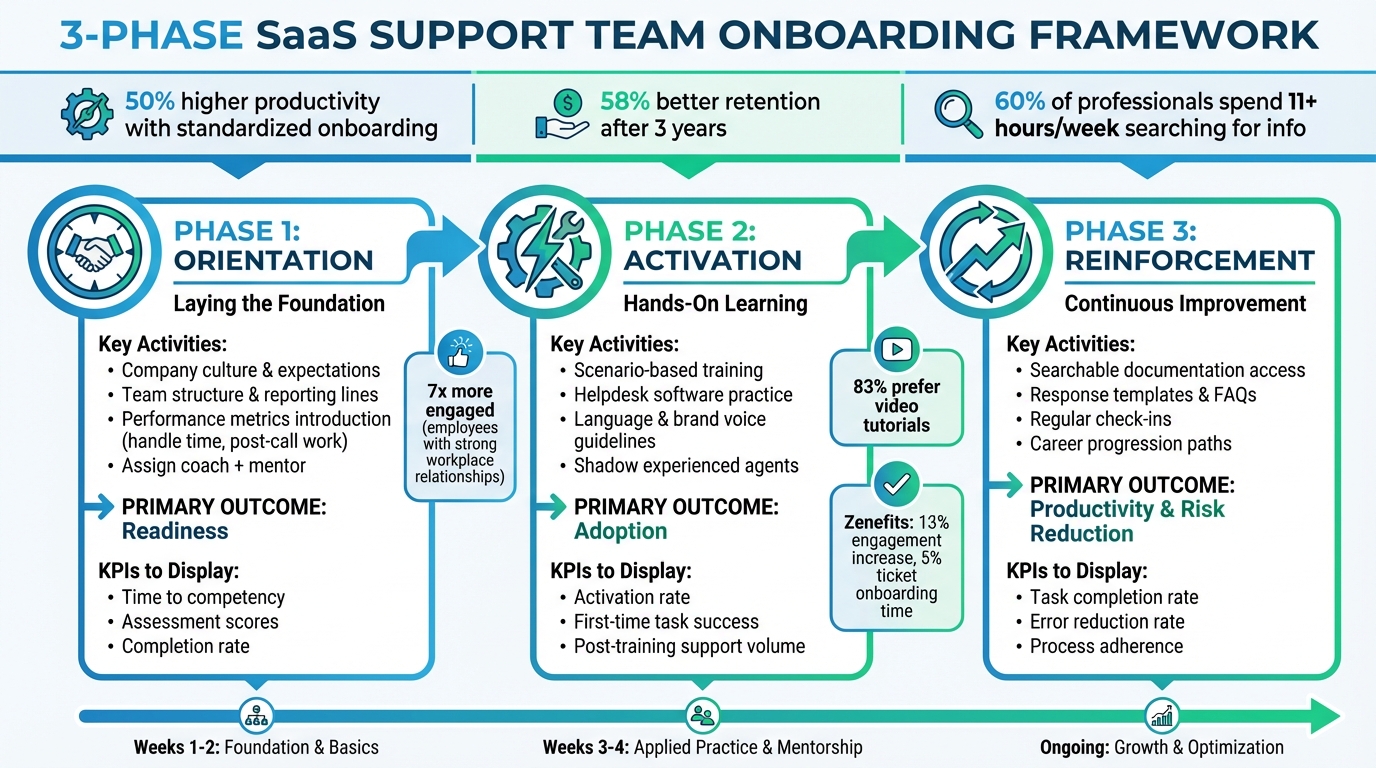
3-Phase SaaS Support Team Onboarding Framework with KPIs
A well-structured onboarding process can make all the difference for new hires. It not only prevents information overload but also builds confidence. Companies with standardized onboarding processes have reported 50% higher productivity and 58% better retention rates after three years.
Dividing onboarding into clear phases ensures new hires can absorb the essentials before moving on to more advanced tasks. This approach is especially important when you consider that nearly 60% of professionals in 2025 reported spending over 11 hours a week searching for information across disconnected tools. Let’s break down each phase and its goals.
Phase 1: Orientation
This phase lays the groundwork for new hires before they interact with customers. It’s all about understanding the company culture, recognizing how support contributes to customer success, and connecting their role to the business’s overall objectives.
During this stage, it’s vital to set clear expectations. Explain the team structure, reporting lines, decision-making processes, and introduce performance metrics like average handle time and post-call work time. Assigning both a coach for day-to-day guidance and a mentor for long-term growth can make a huge difference – employees with strong workplace relationships are seven times more likely to stay engaged.
To ease first-day jitters, send out legal documents, handbooks, and the first-week schedule ahead of time. Providing immediate access to tools and a roadmap for the initial week can also help new hires feel prepared.
Phase 2: Activation
Once the basics are covered, it’s time to put that knowledge into action. This phase focuses on hands-on learning and practical skills. Instead of just going through feature lists, use scenario-based training that covers typical customer personas and real-world support situations. Include practical sessions with helpdesk software, communication tools, and resources for looking up information.
Language guidelines are another key area – train new hires on your company’s brand voice and tone, as outlined in your style guide. Since 83% of employees prefer video tutorials, incorporate screen recordings, GIFs, and annotated screenshots to simplify complex workflows.
Shadowing experienced agents is invaluable at this stage. It allows new hires to observe live interactions and ask questions in real time. A useful metric here is the first-time task success rate, which tracks how quickly new hires can complete core tasks independently. For example, Zenefits used Skilljar to streamline onboarding, resulting in a 13% engagement increase and a 5% reduction in support tickets.
Phase 3: Reinforcement
After the Activation phase, Reinforcement ensures that skills are continuously refined to keep up with product updates and evolving customer needs. Equip your team with a robust support toolkit – this could include searchable documentation, response templates, product videos, and FAQs. Regular check-ins can help identify areas where additional training might be needed.
For remote teams, asynchronous tools like Slack and recorded videos are especially useful. Track metrics like task completion rates and error reduction rates to pinpoint where support is needed. A great example is Automox, which used Skilljar to create "Automox University." This on-demand training platform reduced manual onboarding time by 75% and tripled training enrollments shortly after launch.
Lastly, providing clear career progression paths can help agents feel supported as they tackle more complex challenges.
| Onboarding Phase | Primary Outcome | Key Performance Indicators (KPIs) |
|---|---|---|
| Phase 1: Orientation | Readiness | Time to competency, Assessment scores, Completion rate |
| Phase 2: Activation | Adoption | Activation rate, First-time task success, Post-training support volume |
| Phase 3: Reinforcement | Productivity & Risk Reduction | Task completion rate, Error reduction rate, Process adherence |
sbb-itb-8132e49
Required Tools for SaaS Support Team Onboarding
Having the right tools in place can dramatically cut down onboarding time and help new team members navigate their roles without the frustration of disconnected systems. Without a proper setup, agents often waste valuable time hunting for information, which can lead to repeated customer queries and missed tickets. Here’s a breakdown of the essential tools that lay the groundwork for a smooth onboarding process.
Ticketing and CRM Systems
A reliable ticketing system centralizes customer inquiries from multiple channels like email, Slack, WhatsApp, and in-app chat into one workspace. Features like collision controls are especially helpful during onboarding, as they show when a ticket is already being handled, reducing the chance of duplicate responses – a common rookie mistake.
Pairing a ticketing system with a CRM gives agents instant access to critical customer details like subscription plans, usage statistics, and billing history. This minimizes back-and-forth questions and allows agents to respond more efficiently. Automated ticket routing further simplifies the process by assigning inquiries based on agent skills or availability, ensuring every ticket has a clear owner from day one.
For example, in 2026, Craftgate, a payment platform, saved over 130 hours each month by using Hiver to automate ticket triage and workflows. Automation becomes increasingly essential as teams scale to handle between 500 and 1,000 monthly tickets. Typically, support operations managers are brought in when ticket volumes hit 3,000 or teams expand to 6–8 agents.
Knowledge Base and Documentation Platforms
A well-organized knowledge base acts as the go-to resource for both customers and support agents. It powers self-service portals and provides AI assistants with reliable, accurate information. However, before deploying AI tools, auditing the knowledge base is crucial because the quality of documentation directly impacts the effectiveness of AI.
For new agents, searchable content, response templates, and FAQs are lifelines. These tools help them deliver consistent answers while they’re still learning the ropes. Features like canned responses and macros also enable new hires to provide high-quality support from the start.
SaaS companies that use documentation-trained AI chatbots report a 55% ticket deflection rate, significantly reducing the number of basic queries that new agents need to handle. When combined with AI and automation tools, these platforms streamline routine queries even further.
AI and Automation Tools
AI tools are game-changers for handling routine Tier-1 queries, such as password resets and billing updates, without human intervention. Autonomous AI agents can resolve 70–80% of these types of inquiries in real time, while AI-first helpdesks manage 60–80% of conversations before escalating them to a human agent.
AI Copilots are particularly useful for onboarding, as they provide real-time guidance by identifying ticket topics and surfacing relevant procedures. This reduces the time new agents spend searching for context. For instance, AI Copilot features have shown an 89% success rate in drafting accurate responses for password reset requests, saving about 8 minutes per ticket.
"AI-driven onboarding reduces time-to-productivity by 50%, getting agents customer-ready faster while maintaining quality standards." – Deloitte
Advanced tools like Comm100 AI Training enhance the onboarding process further. They offer a "Chat Simulation" environment where AI generates realistic customer questions based on your company’s knowledge base. This setup provides instant scoring, helping new agents build confidence before they start handling live tickets.
At Aidey, we specialize in integrating these essential tools to set your SaaS support team up for success. Our scalable and cost-efficient solutions ensure your team is prepared to deliver exceptional customer service from day one. Want to learn more? Visit Aidey to explore how we can help streamline your support team’s onboarding process. With the right tools, your team can hit the ground running, ready to provide seamless support from the start.
Role-Specific Training During Onboarding
Once a standardized onboarding framework is in place, tailoring training to specific roles takes team efficiency to the next level. This step is crucial because different roles demand different skill sets. For instance, a customer support representative handling billing questions needs a completely different approach than a technical specialist troubleshooting API issues, which is why many companies outsource to reduce support costs while maintaining specialized expertise. Without a clear understanding of their individual responsibilities, new team members may feel lost, leading to inconsistent responses and a lack of professionalism when interacting with customers.
By building on the structured onboarding framework, role-specific training ensures every team member is equipped to excel in their unique responsibilities. This type of training helps clarify expectations and boosts confidence. For example, when agents practice with sample tickets or role-play scenarios, they can ease into their roles without the stress of live customer interactions. It also ensures that all team members work from a consistent "toolbox" of problem-solving methods, which leads to faster resolutions and consistent quality.
And the results speak for themselves. Companies that invest in structured training programs for support and customer success teams see a 5% drop in support tickets. Plus, 86% of customers are more likely to stay loyal to businesses that prioritize quality onboarding and training content. When team members know their goals and daily tasks, they feel more confident, morale improves, and burnout risks decrease.
Training for Customer Support Representatives
Customer support representatives are the first point of contact for many customers in a SaaS company. Their training focuses on two key outcomes: gaining confidence in handling core tasks independently and reducing the volume of initial support needs by driving user activation. This type of onboarding emphasizes brand voice consistency, handling general inquiries effectively, and developing soft skills like empathy and active listening.
Role-playing challenging customer interactions is a key part of this process. Take Zenefits as an example: in July 2024, they introduced a formal education initiative with 50 courses tailored for their Implementation, Customer Success, and Support Teams. This program led to 13% of users engaging with the training and a 5% reduction in overall support tickets.
Another essential tool is a communication style guide. These guides ensure consistency in brand-specific language, voice, and tone, covering details like US versus UK spelling, template usage, and even font preferences. Without this consistency, customers might receive mixed messages, which can damage trust.
To further support new hires, assign each customer support representative both a coach for daily skill-building and a mentor for long-term career guidance. This dual approach helps new team members master one skill at a time, avoiding the overwhelm that can come with too much information all at once.
Training for Technical Support Specialists
While general support representatives handle broad inquiries, technical specialists dive deep into product specifics. Their onboarding focuses on increasing productivity and reducing risks by honing expertise in troubleshooting, product integrations, and maintaining a strong knowledge base [4,29].
Hands-on practice is essential for these roles. Live product tests and real-world scenarios prepare specialists to tackle complex issues confidently. Tools like technical implementation checklists, API documentation, and sandbox environments are invaluable for training specialists to handle intricate integrations and data uploads effectively [16,32].
Automox offers a great example of how this works. In July 2024, they launched "Automox University", a platform for on-demand, role-specific training. This initiative cut manual onboarding time by 75%, freeing up engineers to focus on more complex discussions.
Scenario-based training is another effective strategy. By using real-world customer cases and buyer personas, technical specialists can anticipate potential problems and address them before they escalate.
Training for Support Team Leaders
Leadership training is just as important as technical or general support training when it comes to maintaining team performance and growth. Support team leaders need onboarding that focuses on overseeing team performance, tracking KPIs like churn and time-to-value (TTV), and managing the transition from sales to success [4,16].
Train-the-trainer materials, such as customizable decks and timelines, are key components of leadership training. These resources empower leaders to independently run training sessions for their teams. Leaders also need to understand the nuances of what makes a "good" ticket response, whether it’s for general representatives or technical specialists handling escalations.
"Onboarding is such a crucial time because it’s the first impression, right? It’s the first date. You’re going to decide if this is worth your time during onboarding." – Rachel Provan, Customer Success Leadership and Strategy Coach
In February 2026, Rachel Jennings-Keane, Global Head of Customer Success at Assignar, implemented standardized onboarding templates through Dock. These templates reduced kickoff call times by an average of 25 minutes and ensured a consistent experience across global teams.
Leaders also benefit from training focused on continuous feedback loops. These loops allow managers to address habits early – typically within the first 8–12 weeks – preventing long-term performance issues and maintaining high-quality standards.
How to Measure Onboarding Success
Once you’ve set up a structured onboarding plan and tailored training for specific roles, the next step is figuring out how to measure its success. Success here isn’t just about completing training modules – it’s about understanding whether new hires grasp their roles, feel prepared, and start contributing effectively. As Ameya Deshmukh, VP of Talent Acquisition, aptly put it:
"Onboarding is where your hiring wins either compound – or quietly unravel."
Key Performance Indicators
The best way to measure onboarding success is by focusing on results, not just activity. For example, metrics like "Time to First Independent Ticket Resolution" show when an employee can handle tasks on their own, while "Time to Quality Score Threshold" measures when they consistently meet expected standards.
One critical metric to watch is the 90-day retention rate. Around 30% of new hires leave within their first 90 days, and replacing them can cost six to nine months of their annual salary. To catch potential problems early, monitor role clarity at 30 days and manager confidence at 60 days. These metrics can highlight whether new employees fully understand their responsibilities. Other early warning signs include participation in optional meetings, peer recognition, and engagement in communications during the first 45 days. If someone becomes less involved, it might signal a need for intervention.
Here’s a breakdown of key metrics to track:
| KPI Category | Specific Metric | What It Reveals |
|---|---|---|
| Execution | Time to Day 1 Ready | How quickly new hires receive system access and equipment after accepting an offer |
| Productivity | Time to First Ticket | Time until the first independently resolved support ticket |
| Sentiment | Role Clarity Score | Percentage of hires who understand expectations within the first 30 days |
| Retention | 90-Day Retention Rate | Percentage of hires staying beyond three months |
| Quality | Exception Rate | Percentage of hires needing manual fixes due to provisioning errors |
Tracking and Analyzing Performance
Having real-time insights into onboarding progress is crucial. Without it, small issues can snowball into bigger problems. Yet, 62% of customer success and onboarding leaders admit they lack this visibility. Automating the tracking process through tools like a CRM or HRIS can help by logging timestamps for each onboarding step, reducing errors and saving time.
Pulse surveys at key points – like day 7 and day 30 – are also invaluable. These surveys can reveal whether employees feel clear about their roles and have the tools they need. As On&On Insights explained:
"Useful measurement creates intervention windows, not post-mortems."
Cohort analysis is another powerful tool. By comparing different groups of hires, such as those onboarded in Q1 versus Q3, you can identify patterns like seasonal challenges or how team workloads influence onboarding outcomes. For instance, in 2026, Textable introduced over 250 interactive guides for onboarding and FAQs. This change saved over 100 hours of support time per month and gave each agent back 10 hours a week.
To avoid delays, set a Service Level Agreement (SLA) for Day 1 readiness between HR, IT, and hiring managers. This ensures new hires have access to systems, equipment, and schedules when they start. Remember, 29% of employees decide if a job is the right fit within their first week, and 70% make that decision within the first month.
Metrics should be a starting point for conversations, not the final word. If performance trends slip, dig deeper. One-on-one discussions or focus groups can uncover whether unclear instructions, lack of coaching, or mismatched expectations are causing issues. As Onboard & Onward put it:
"The signal you’re looking for isn’t ‘did onboarding go well.’ It’s ‘what specifically went wrong, and for whom, and when’".
Conclusion
Throughout this guide, we’ve seen how structured onboarding plays a key role in creating high-performing SaaS support teams. It not only helps teams hit the ground running but also strengthens customer retention. When support teams become proficient quickly, they can resolve tickets independently, reduce escalations, and deliver faster results to customers. In fact, data shows that well-executed onboarding can increase 90-day retention rates by 50% and lower ticket volume by 44%.
Shifting to an outcome-focused onboarding approach addresses training gaps and aligns team performance with company goals. A defined framework ensures new hires hit critical milestones efficiently. Liz Jukovsky from Litmos put it best:
"SaaS teams don’t struggle with training because they lack content. They struggle because onboarding, education, and enablement are fragmented across tools, teams, and workflows that weren’t designed to scale together".
Streamlined onboarding also makes it easier to scale teams without adding unnecessary overhead. For SaaS companies experiencing growth, maintaining quality while scaling up is non-negotiable. Systems need to enable teams to operate faster and stay consistent as customer demands grow – without requiring additional headcount or layers of management. This is where scalable support solutions shine. For example, Aidey offers 24/7 customer support outsourcing with free onboarding services, covering recruitment, training, and system setup. Their model ensures remote teams are prepared to deliver reliable, SaaS-specific support from day one.
Effective onboarding does more than just train employees – it reduces churn, strengthens customer loyalty, and drives revenue growth. On the flip side, poor onboarding can lead to high churn rates and overburdened teams. The takeaway is simple: investing in structured onboarding today can save you from costly challenges tomorrow.
FAQs
How long should SaaS support onboarding take?
Setting up SaaS support usually takes around 14 to 22 minutes for the initial configuration. But the process doesn’t stop there. The first two weeks are critical, as continuous support during this time helps users integrate the product seamlessly into their workflows and ensures they’re comfortable using it. Early guidance can make all the difference in achieving smooth adoption.
What should a new agent handle in their first 30 days?
In the first 30 days, a new support agent’s priority should be getting comfortable with the company’s systems, processes, and their specific role. This foundation helps build confidence and ensures they can deliver quality support. Key tasks during this period include:
- Understanding their responsibilities: Knowing what’s expected of them is crucial for aligning with team goals.
- Getting familiar with tools and workflows: Learning how to navigate the tools and follow the workflows ensures they can work efficiently.
- Developing communication skills: Practicing clear and effective communication is vital for interacting with both customers and team members.
It’s also important to set clear expectations and encourage regular feedback. This helps create a smoother transition into the role and sets the stage for long-term success.
Which onboarding KPIs matter most early on?
When bringing new support team members on board, it’s important to focus on key onboarding KPIs like readiness, adoption, productivity, and risk reduction. These metrics give you a clear picture of how well new hires are adjusting and integrating into workflows. By keeping an eye on these indicators, you can identify what’s working in your onboarding process and spot areas that might need improvement.