

When your SaaS platform faces an emergency, every second counts. Whether it’s a server crash, a security breach, or a wave of customer complaints, how you respond can make or break your business. This guide outlines how to prepare, respond, and recover effectively from crises in SaaS support.
Key Takeaways:
- Preparation matters: Develop incident protocols, assign clear roles, and set up monitoring systems to catch issues early.
- Common crises to expect: System outages, security breaches, and customer dissatisfaction are the most frequent challenges.
- Communication is critical: Address issues promptly, provide regular updates, and use multiple channels to keep customers informed.
- Post-crisis improvement: Conduct root cause analyses, update your plans, and track metrics to refine your approach.
By planning ahead and focusing on clear communication, you can minimize damage, maintain trust, and recover stronger from any crisis.
Crisis Management Framework: Prepare for Any Situation
sbb-itb-8132e49
Common SaaS Support Crises
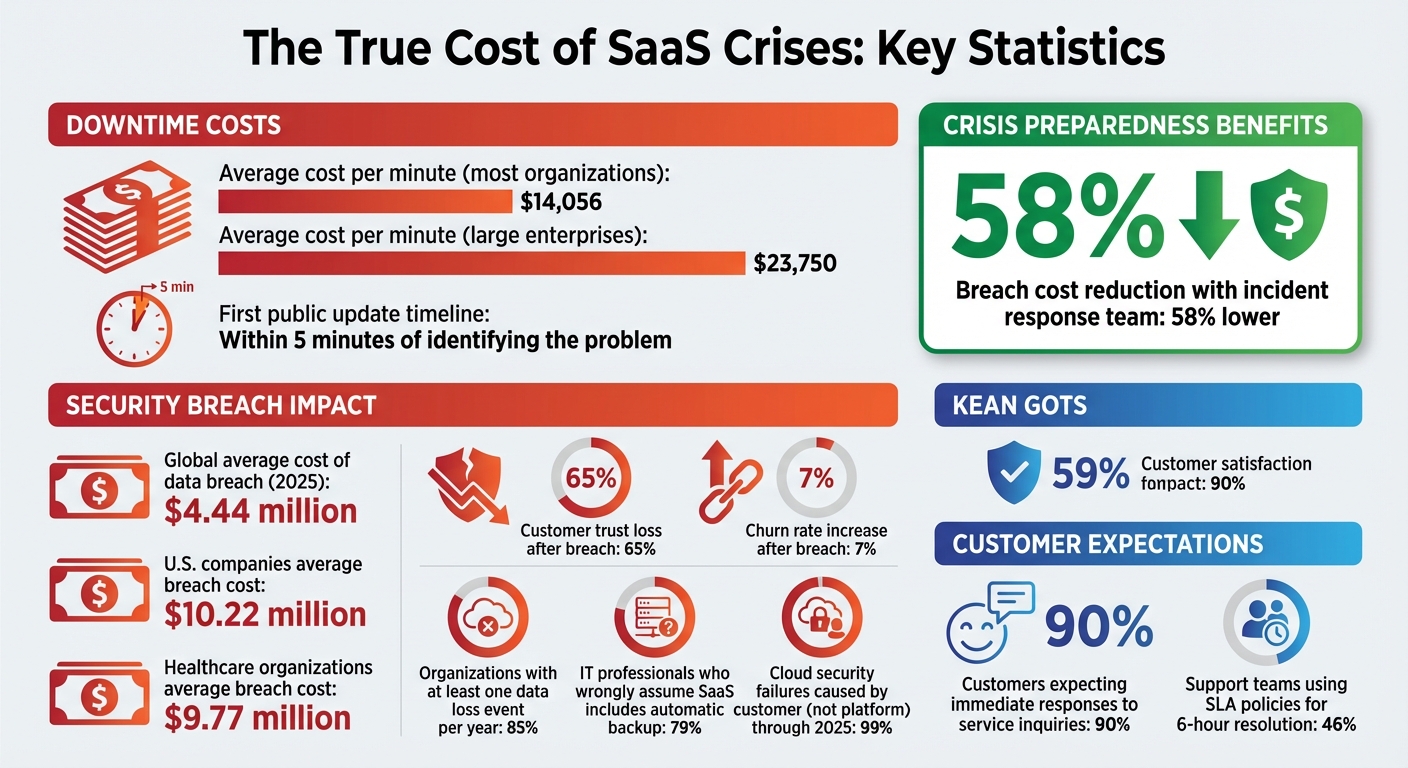
SaaS Crisis Management Statistics: Costs, Response Times, and Impact Metrics
SaaS companies often encounter three major types of crises that can disrupt operations and strain customer relationships. Anticipating these challenges and preparing in advance can make all the difference when issues arise.
System Downtime and Outages
Server failures and software crashes are inevitable in SaaS operations. When your platform goes offline, every second matters – not just for resolving the issue but for managing customer expectations. As PingPing puts it, "The real failure isn’t the outage. It’s being the last one to know". If customers discover the problem before you do, trust can erode almost instantly.
Unplanned downtime is expensive. The average cost is $14,056 per minute for most organizations, but for larger enterprises, it skyrockets to $23,750 per minute. A half-hour outage without any communication can flood support teams with more tickets than the engineering work needed to resolve the issue. This overload slows down responses and delays fixes.
Fast communication is critical. Your first public update should be issued within 5 minutes of identifying the problem. Even if you don’t have all the answers yet, acknowledging the issue shows customers you’re actively addressing it and helps prevent unnecessary panic.
Security Breaches and Data Incidents
Security breaches take SaaS crises to another level, transforming technical vulnerabilities into existential threats. In 2025, the global average cost of a data breach hit $4.44 million, but for U.S. companies, the figure was even higher at $10.22 million. Healthcare organizations were particularly hard-hit, with average costs of $9.77 million per breach.
The financial toll is only part of the damage. A staggering 65% of customers lose trust in a brand after a data breach, and churn rates can increase by 7% following such incidents. When CI/CD pipelines are compromised, attackers can gain access to sensitive data like API keys, cloud configurations, and years of intellectual property stored in code repositories.
There’s also a common misconception about responsibility. According to a survey, 79% of IT professionals wrongly assume that SaaS applications automatically include backup and recovery. In reality, 85% of organizations reported at least one data loss event within a year. Gartner predicts that "in 99% of cloud security failures through 2025, the customer – not the platform – will be at fault".
Negative Customer Sentiment
Beyond technical and security issues, customer perception can turn minor complaints into major crises. Unlike system bugs that can be patched, rebuilding trust takes time and consistent effort. Social media amplifies customer dissatisfaction quickly, turning isolated incidents into trending stories that can discourage potential customers before they even visit your site.
When customers feel ignored during a crisis, frustration often spills over onto public forums, review platforms, and social media. This ripple effect can tarnish your brand for the long haul. Companies with dedicated incident response teams and well-defined recovery plans experience breach costs 58% lower than those without, proving that preparation not only protects your reputation but also saves money in the long run.
Creating a Crisis Management Plan
A crisis management plan serves as your guide when things take an unexpected turn. For SaaS companies providing 24/7 support, having a well-structured plan can make all the difference between a smooth recovery and complete disarray.
Risk Assessment and Scenario Planning
Start by identifying every possible threat to your SaaS business. These could include anything from cyberattacks and system outages to financial instability or reputational setbacks. For each risk, assess both its likelihood and the potential damage it could cause – think customer churn, revenue loss, penalties, or harm to your brand. Once you’ve mapped out these risks, create contingency plans tailored to each scenario. Tools like RACI charts can clarify decision-making responsibilities, while annual tabletop exercises (with quarterly updates) can help expose any weak spots in your preparedness.
After understanding the risks and planning for scenarios, the next step is to assign roles and ensure smooth team coordination.
Role Assignment and Team Coordination
Build a crisis leadership team with clearly defined roles, including a Crisis Manager, Communications Lead, Operations Representative, Legal Counsel, HR Representative, and IT/Security Lead. Assign backups for each role to ensure round-the-clock coverage. For technical issues, allow frontline support staff to handle customer inquiries and gather data, leaving engineers free to focus on fixing the problem. A dedicated Communications Manager should oversee all messaging to avoid mixed signals. To prevent burnout, implement formal on-call rotations for engineers. Lastly, establish activation protocols based on specific business impact thresholds to trigger your crisis response. This system ensures your team is always ready to act, no matter the time or situation.
Setting Up Monitoring and Alert Systems
With roles in place, focus on real-time monitoring to catch early warning signs. Monitor all support channels – email, phone, and social media – and use ticket analytics to detect sudden spikes in issues that could indicate a larger problem. Nearly 46% of support teams rely on SLA policies to resolve issues within 6 hours, often using automated alerts to stay on track. Since 90% of customers expect immediate responses to service inquiries, early detection is crucial for maintaining trust and keeping operations steady. Also, maintain an up-to-date directory of contacts, including key personnel, law enforcement, and IT specialists, to ensure a swift response when needed.
| Crisis Plan Component | Purpose |
|---|---|
| Risk Analysis | Identifies and prioritizes potential threats based on probability |
| Crisis Trigger | Establishes thresholds for initiating the crisis response |
| Communication Strategy | Provides guidelines for external messaging to maintain trust |
| Post-Crisis Assessment | Captures lessons learned to improve future responses |
Communication During a Crisis
When a crisis strikes, how you communicate can make or break customer trust. While addressing the technical issue is vital, keeping customers informed is just as important. Customers may accept technical hiccups, but silence? That’s a dealbreaker.
"What separates the teams that keep customer trust from the ones that lose it isn’t uptime – it’s communication." – StatusRay
Here’s how to manage communication effectively during a crisis: acknowledge the problem promptly, use multiple channels to share updates, and follow up thoughtfully once the situation is resolved.
Acknowledging the Issue Immediately
The first step in crisis communication is to act fast. Ideally, your initial public update should go out within 5 minutes of identifying the issue. Even if you don’t have all the answers, acknowledge the problem right away. A simple framework like A-L-E-R-T can help guide your response:
- Acknowledge the issue
- List affected services
- Explain the impact
- Reassure users
- Tell them when to expect the next update
Pre-written templates for different scenarios – like partial disruptions or full outages – can save valuable time. Assigning a dedicated Communication Lead ensures that updates remain a priority throughout the crisis.
Here’s a quick guide to how often you should provide updates, based on the severity of the issue:
| Severity | Update Frequency |
|---|---|
| Critical (Full outage) | Every 15–30 minutes |
| Major (Degraded service) | Every 30–60 minutes |
| Minor (Partial impact) | Every 1–2 hours |
Multi-Channel Communication Strategies
Relying on a single communication channel during a crisis is risky. Use a third-party status page, like Statuspage.io or StatusRay, to ensure updates remain available even if your systems are down. In-app banners can alert active users, while SMS notifications are ideal for critical updates since they operate independently of your platform.
When crafting updates, avoid technical jargon. Customers don’t need to know the nitty-gritty of your internal metrics – they care about how the issue affects them. For instance, instead of saying, "Database replica lag exceeding threshold", explain, "Some users may see outdated data while we work on a fix". Stick to your update schedule, even if there’s no new information. Regular communication reassures users and prevents unnecessary panic.
"Radio silence for an hour feels like an eternity to someone who can’t access your service." – Sarel, Director of Digital Marketing, 5W Public Relations
Post-Crisis Follow-Ups
Fixing the issue is only part of the solution. Once the crisis is over, publish a detailed post-mortem within 24 to 48 hours. This report should outline the timeline of events, explain the root cause in simple terms, share the impact metrics, and list steps to prevent future occurrences.
Tailor your follow-up based on how severely customers were impacted. For those most affected, a personal email from a Customer Success Manager or executive can go a long way – possibly even offering a one-on-one call. For the broader audience, a message from your CEO linking to the post-mortem shows transparency and accountability. Offering service credits or extended trials for severe outages can also help repair relationships and reduce the risk of losing customers.
Tools and Services for Crisis Prevention
Stopping a crisis before it starts requires the right tools to monitor systems and ensure your infrastructure can handle emergencies effectively.
Monitoring and Performance Analytics
The key to effective monitoring is spotting issues before your customers notice. Tools like Prometheus, Datadog, and New Relic help track system health and performance metrics in real time. For API and endpoint monitoring, Qodex.ai performs checks every 30 seconds with multi-region confirmation, enabling teams to detect outages in just 60–90 seconds.
To avoid false alarms, it’s essential to set up smart alerts. For example:
- Require failures to be confirmed across at least two geographic regions before triggering an alert.
- Trigger alerts after 2–3 consecutive failures.
- Use a 15–30 minute cooldown between repeat alerts for the same issue.
"A monitor without good alerts is just a logging system. A monitor with bad alerts is worse: it trains your team to ignore notifications."
- Shreya Srivastava, Content Team, Qodex.ai
When incidents occur, platforms like PagerDuty, Opsgenie, and Rootly streamline response workflows and manage on-call rotations. For example, Motive achieves 99.99% reliability by using Rootly for incident management. These tools can integrate with your status page, ensuring customers stay informed while your technical team focuses on resolving the issue.
Here’s a quick guide to severity levels and response expectations:
| Severity Level | Recommended Channels | Target Response Time |
|---|---|---|
| Critical (Sev 1) | PagerDuty + Slack + SMS escalation | Under 5 minutes |
| High (Sev 2) | PagerDuty + Slack | Under 15 minutes |
| Medium (Sev 3) | Slack only | Under 1 hour |
| Low (Sev 4) | Email + Slack (non-urgent) | Next business day |
Once monitoring is in place, the next step is ensuring your support system can scale during emergencies.
Outsourcing Support for Scalability
During a crisis, small in-house teams can quickly become overwhelmed. For example, teams with just 2–5 agents often struggle to maintain a 4-hour response time, even during standard business hours. That’s where outsourcing becomes essential.
For SaaS companies, 24/7/365 support coverage is critical. Partners like Aidey provide immediate human acknowledgment during crises, meeting the industry standard of responding to Enterprise-tier customers within 30 minutes – a feat that’s nearly impossible for in-house teams alone. Outsourced teams also maintain consistent updates (every 4 hours for critical issues) during extended outages, helping to maintain customer trust.
Aidey offers scalable customer support without the overhead of building internal night or weekend shifts. Their free onboarding includes recruitment, training, and system setup, making it easier for SaaS companies to scale quickly.
To get the most out of outsourced support, establish clear escalation procedures. For instance:
- Define when outsourced teams should escalate issues to internal engineering (e.g., when 75% or 90% of an SLA timeframe has passed).
- Use priority-based SLAs to ensure critical outages are handled before less urgent issues.
"The most commonly overlooked SLA gap is between support and engineering. Define internal SLAs for every escalation path."
- Jonathan Bar, Founder, Corebee
Post-Crisis Analysis and Improvements
When the dust settles after a crisis, the focus shifts to learning and adapting. Post-crisis analysis turns a difficult experience into a stepping stone for future prevention. The aim here isn’t to assign blame – it’s about identifying and fixing the flaws in your system for good.
Conducting Root Cause Analysis
A post-mortem meeting should happen within 48 hours to ensure details are fresh. Top-performing SaaS teams prioritize a 100% post-mortem completion rate for SEV-1 and SEV-2 incidents, seeing every major issue as a chance to improve.
Start by creating a minute-by-minute timeline of the incident. This should include when the issue began, when it was detected, the fixes applied, and the time of full restoration. The incident commander should prepare this timeline beforehand so the meeting can focus on meaningful analysis rather than administrative tasks.
To dig deeper, apply the "5 Whys" technique. For instance, if a database crashes, don’t stop at "it ran out of memory." Ask why it ran out of memory, why monitoring didn’t catch it earlier, or why alert thresholds weren’t set correctly. Keep asking "why" until you uncover the root cause.
"Every human error is also a system design failure. If one person’s mistake can cause a major outage, that’s a system problem – not a people problem." – StatusRay
Maintain a blameless approach during these reviews. Instead of pointing fingers, frame issues around system gaps – like "a code change was deployed without proper testing due to missing CI checks". When people feel safe, they’re more likely to share insights that lead to real improvements.
End every post-mortem with actionable tasks. Avoid vague goals like "improve monitoring" and opt for specific assignments, such as "add an alert for database connection pool usage >80% on production." Assign clear owners, set priorities, and establish deadlines. A solid recovery process aims to complete over 80% of action items within 30 days.
These steps pave the way for fine-tuning your crisis management strategy.
Updating Crisis Management Plans
Your crisis management plan should evolve after every incident. Update your incident response playbooks and runbooks with any new technical steps or communication strategies uncovered during the crisis. For example, if the escalation process from support to engineering was unclear, define a threshold (e.g., 75% of SLA elapsed) and add it to the playbook.
Incorporate post-mortem action items into tools like Jira or Linear to ensure they’re prioritized alongside feature development. Review these tasks monthly to reassess their importance or address delays. Don’t forget to document successes – like monitoring catching an issue in 30 seconds – to reinforce what works and boost team morale.
Tracking Metrics for Continuous Improvement
Once your crisis management procedures are updated, tracking metrics helps ensure progress. Here are some key metrics to monitor:
| Metric | Target | Why It Matters |
|---|---|---|
| Post-mortem completion rate | 100% for SEV-1/SEV-2 | Ensures consistent learning from major failures |
| Time to publish | Within 48 hours | Captures accurate details before memories fade |
| Action item completion rate | >80% within 30 days | Measures follow-through on improvements |
| Repeat incident rate | Decreasing over time | Confirms that root cause fixes are effective |
In addition to technical metrics, use sentiment analysis and business data like churn rates and NPS to measure the broader impact of your crisis response. For example, Oracle Red Bull Racing faced a reputation crisis in February 2024 over allegations against its president. Through swift action and open communication, the team de-escalated the situation by March 3, 2024. Post-crisis analysis revealed a 41% drop in total mentions, a 3% rise in positive mentions, and a 10% decline in negative mentions compared to the crisis period. Tools with "Compare Periods" features can help analyze brand performance during and after the crisis.
"Measuring crisis performance refers to assessing how well you handled the issue to improve the overall quality of the process." – Brand24
Finally, share your post-mortem findings both internally and externally. Publish the full analysis on your internal wiki for team education, and create a simplified version for customers to rebuild trust through transparency.
Conclusion
Handling crises in SaaS support means staying prepared for the unexpected. Successful companies spot potential risks early, set clear responsibilities, and ensure their teams are well-trained ahead of time. When a crisis hits, there’s no room for hesitation.
What sets apart good crisis management from great crisis management is communication. As GoCardless highlights, how you communicate during a crisis can have long-lasting effects on your business – not just how quickly you restore service. During outages, security issues, or service disruptions, sending clear, timely updates across multiple channels and keeping status pages transparent can reassure customers and maintain their trust.
Once the storm has passed, post-crisis analysis is key to turning setbacks into opportunities for improvement. By conducting root cause analyses, updating crisis playbooks with lessons learned, and tracking metrics for progress, your company can bounce back stronger. Careful planning and learning from past challenges pave the way for quicker recoveries.
Your actions during a crisis leave a lasting impression. Regularly reviewing your plans, conducting cross-team training, and focusing on continuous improvement prepare your SaaS business for whatever comes next. A solid strategy includes robust monitoring systems, defined roles, and proactive communication at every step. With expert 24/7 support from Aidey, you can transform crises into moments of growth. Embrace these practices to turn uncertainty into opportunity.
FAQs
What should trigger a crisis response in a SaaS support team?
A crisis response kicks into action when events threaten the stability, security, or reputation of a service. Some common triggers include cyberattacks, technical failures like server outages or data breaches, and situations that damage a company’s reputation, such as negative publicity. Essentially, any incident that disrupts service continuity, jeopardizes security, or undermines customer trust should prompt the SaaS support team to activate their crisis response protocol.
What’s the minimum info to include in the first outage update?
When providing the first outage update, it’s crucial to acknowledge the issue clearly and confirm that an investigation is underway. This approach ensures transparency and helps build trust with your customers.
What crisis metrics are most important after an incident ends?
Key metrics to watch include the post-incident review completion rate, which measures how promptly and thoroughly incidents are documented and analyzed. Other key performance indicators (KPIs) focus on the time taken to acknowledge, resolve, and recover from incidents, along with how well lessons learned are implemented to avoid similar problems in the future.