

Managing time zones in remote teams is challenging but essential for smooth collaboration. Here’s how you can make it work:
- Map Time Zones: Use tools to track team members’ locations and working hours in UTC to avoid confusion.
- Identify Overlap Hours: Determine shared working hours for real-time collaboration (e.g., 08:00–10:00 UTC for global teams).
- Leverage Asynchronous Communication: Use tools like Slack, Notion, and Loom for updates and documentation to minimize delays.
- Set Clear Rules: Define response times, communication channels, and meeting schedules to respect everyone’s time.
- Use Scheduling Tools: Platforms like World Time Buddy or Calendly simplify timezone conversions and meeting setups.
- Rotate Meetings: Share the inconvenience of odd-hour meetings across regions to ensure fairness.
How to Manage Remote Teams Across Time Zones: Effective Strategies for Seamless Communication
sbb-itb-8132e49
Map Out Your Team’s Time Zones
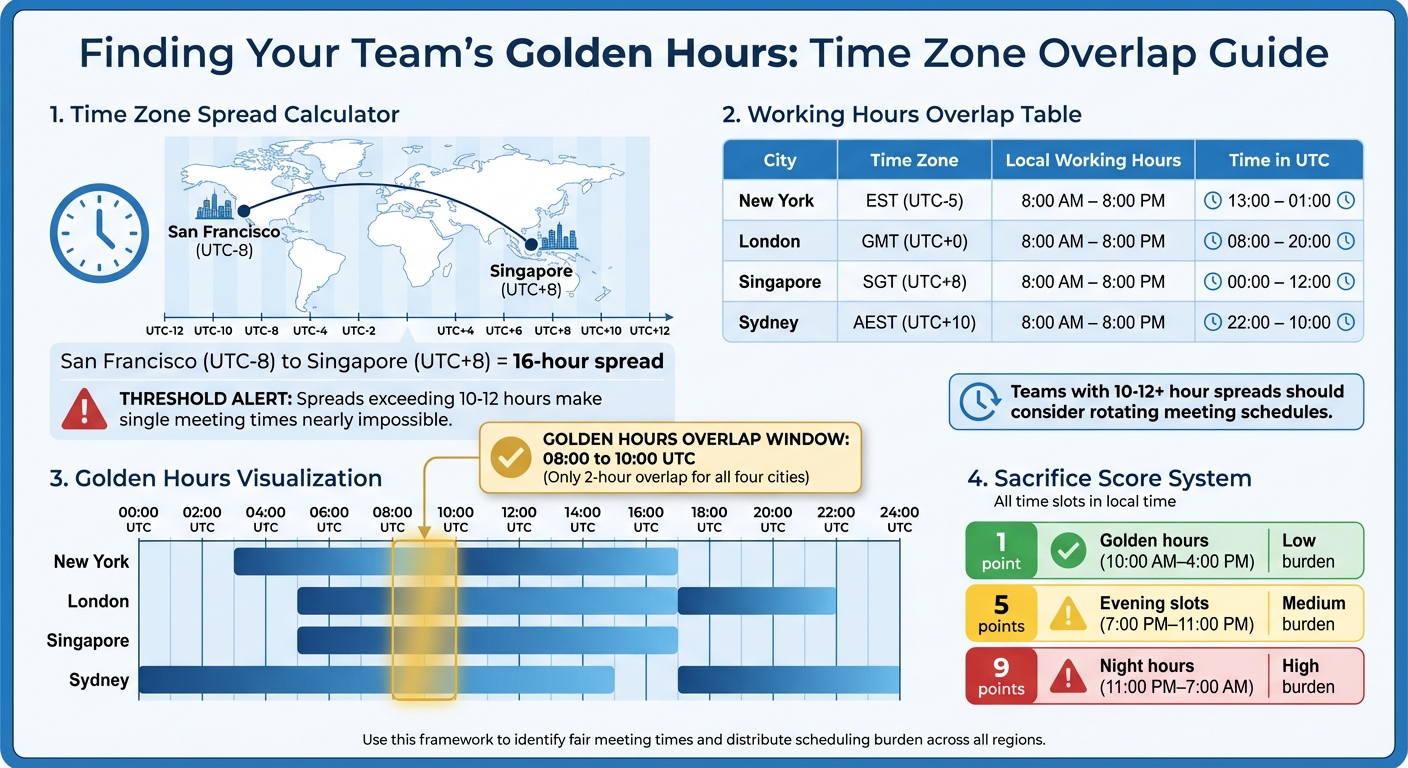
Time Zone Overlap Calculator: Finding Golden Hours for Global Remote Teams
Start by collecting accurate data on each team member’s time zone. Avoid guesswork – use verified information from your HR system or team management tools to ensure you’re working with the correct time zones for everyone. Record each member’s UTC offset, such as UTC-5 for New York or UTC+8 for Singapore, rather than relying on abbreviations like "PST", which can shift during daylight saving time.
Next, calculate your team’s timezone spread by determining the time difference between the earliest and latest zones. For instance, if your team spans San Francisco (UTC-8) and Singapore (UTC+8), you’re dealing with a 16-hour spread. If this spread exceeds 10-12 hours, it becomes nearly impossible to find a single meeting time that fits conveniently within everyone’s standard working hours of 8:00 AM to 6:00 PM. Once you’ve mapped this out, you’ll be better equipped to schedule effectively.
Create a Visual Time Zone Map
A visual map makes it easier to identify overlapping working hours. Create a chart that outlines each team member’s local working hours, but convert them into a single reference time, such as UTC. This eliminates the need for mental calculations and makes overlaps clear at a glance. Be specific when labeling time zones – use both the abbreviation and a major city, like "CST (Chicago)", to avoid confusion with other regions, such as China Standard Time. Always use the 24-hour format (e.g., 08:00 instead of 8:00 AM) to avoid AM/PM mix-ups in global scheduling.
If you’re using a shared calendar, set it to display multiple time zones at once. Google Calendar, for example, supports two time zones in its side view, but for larger teams, consider using extensions to handle unlimited time zones. Remember to update your documentation in March-April and October-November when daylight saving changes occur on different dates across various countries.
Find Overlapping Work Hours
Using your time zone chart, pinpoint when team members’ working hours overlap. A table like the one below can help identify these "golden hours" – the one-to-three-hour windows ideal for high-priority meetings:
| City | Local Working Hours | Time in UTC |
|---|---|---|
| New York (EST, UTC−5) | 8:00 AM – 8:00 PM | 13:00 – 01:00 |
| London (GMT, UTC+0) | 8:00 AM – 8:00 PM | 08:00 – 20:00 |
| Singapore (SGT, UTC+8) | 8:00 AM – 8:00 PM | 00:00 – 12:00 |
| Sydney (AEST, UTC+10) | 8:00 AM – 8:00 PM | 22:00 – 10:00 |
This team only has a four-way overlap from 08:00 to 10:00 UTC.
To ensure fairness, use a sacrifice score system to evaluate the burden of different meeting times. Assign scores based on inconvenience: 1 point for golden hours (10:00 AM–4:00 PM), 5 points for evening slots (7:00 PM–11:00 PM), and 9 points for night hours (11:00 PM–7:00 AM). This approach helps identify regions consistently shouldering the burden and highlights when rotating meeting times might be a better solution than sticking to a single slot.
Set Up Core Overlap Hours
Once you’ve pinpointed where your team’s working hours overlap, it’s time to establish core overlap hours. These are the "golden hours" – a block of one to four hours when most team members are online at the same time. This window becomes the foundation for real-time collaboration. Use this time wisely for activities that thrive on immediate interaction, like brainstorming sessions, one-on-one meetings, sensitive feedback discussions, or even casual conversations to strengthen team relationships.
Having structured overlap hours speeds up decision-making and reduces delays in critical tasks. By cutting down on the back-and-forth of asynchronous communication for time-sensitive matters, your team can tackle issues more efficiently while still enjoying the perks of remote flexibility.
Choose Specific Collaboration Times
Each team member should commit to a consistent four-hour collaboration block. This predictability ensures everyone knows when real-time responses are available versus when independent work is the focus. Don’t default to the time zone of your headquarters – find a window that serves all regions fairly. For example, if most of your team is split between the US and Europe, with a smaller group in Asia, factor in both clusters to make your decision.
To determine the best time slot, use a "sacrifice score" framework. This system helps you select the window with the least inconvenience for the majority of your team. For instance, if your team spans from New York to Singapore and the only overlap is from 08:00–10:00 UTC, you might choose that window – even if it means some New York team members start their day at 3:00 AM. If no single time works well for everyone, consider rotating meeting schedules to share the burden. A structured approach like this ensures a fair balance between collaborative and independent work.
Balance Structure with Flexibility
While core overlap hours bring much-needed structure, maintaining flexibility is just as important. Remote work thrives on adaptability, so aim for a mix of around 75% asynchronous and 25% synchronous communication. This means most tasks – like status updates, process documentation, or non-urgent questions – should happen outside of overlap hours through written messages, recorded videos, or shared documents.
"If a team is skilled at working asynchronously, presence becomes secondary to getting work done." – The Holloway Guide to Remote Work
Encourage team members to schedule deep work and personal commitments outside of core collaboration times. Many remote workers prefer split shifts, working during a morning overlap window, taking a midday break, and returning later to collaborate with colleagues in another region. Managers can lead by example by setting clear boundaries – logging off at consistent times and using "do-not-disturb" modes to protect personal time. The goal is predictable availability during core hours, rather than the complex requirements of setting up 24/7 support.
Use Asynchronous Communication
Asynchronous communication is essential for remote teams working across different time zones. It allows team members to operate on their own schedules, cutting out the chaos of scheduling meetings at odd hours like 2:00 AM or 6:00 AM. Without it, even a simple question sent at the end of the day could mean waiting 12–16 hours for a response. This method helps minimize time zone conflicts and ensures smoother collaboration.
One major advantage is enabling "follow-the-sun" productivity. Work can flow seamlessly from one region to another – Asia to Europe, Europe to the Americas – creating a continuous 24/7 workflow without anyone having to work overtime. For instance, in November 2025, Joanne Lin led a global product team spanning Taipei, Berlin, and New York. They successfully launched a new feature in just two weeks without a single lengthy meeting, relying instead on tools like Notion for documentation and Loom for walkthroughs. This approach helped them navigate a 13-hour time gap while exceeding expectations.
"Async communication actually demands higher communication quality, not lower." – Joanne Lin, Digital Nomad
Another benefit of async communication is the creation of a searchable institutional memory. Team members can easily catch up on decisions or updates they missed while offline. By following specific guidelines, teams can make their async communication more effective.
Write Clear Messages
When it comes to async communication, the clarity of your messages matters more than how quickly you respond. Since responses aren’t immediate, every message should stand on its own to avoid endless back-and-forth exchanges caused by time delays. One effective structure for clear communication is the ACRE format:
- Action: Specify what needs to be done.
- Context: Provide any necessary background.
- Reference: Include links to relevant documents or resources.
- Expectation: Define a deadline with time zone details.
For example, instead of saying, "Can you review the design?" write: "Please review the homepage redesign mockup (link) by Thursday at 4:00 PM EST / 9:00 PM GMT. We need approval before Friday’s development sprint starts. The mockup addresses the navigation concerns from last week’s feedback thread."
Sometimes, text alone isn’t enough to explain complex ideas. In those cases, video walkthroughs can be more effective. Tools like Loom let you record your screen and provide narration, which team members can watch at their convenience. Keep these videos short – under five minutes – and include timestamps to make them easier to follow.
It’s also helpful to establish communication tiers to set expectations for response times. For instance:
| Communication Tier | Tool Example | Expected Response Time | Use Case |
|---|---|---|---|
| Urgent | Phone/Text | Within 2 hours | System outages, contract issues (see how to scale SaaS customer support for urgent response strategies) |
| Same-day | Slack/Teams | Within own workday | Daily coordination, blockers |
| This week | Notion/Asana | 3–5 days | Deep thought, non-urgent tasks |
| FYI | Email/Newsletter | No response needed | General updates, company news |
To prevent misuse of "urgent" tags, limit them to three per person per week. This small change can reduce unnecessary interruptions by 90%.
Finally, use emoji reactions to acknowledge messages without cluttering threads. For example, a checkmark can mean "done", eyes can mean "reviewing", and a thumbs-up can mean "acknowledged". This keeps conversations focused and avoids unnecessary notifications.
Document Workflows and Expectations
Documentation is the foundation of asynchronous work. A communication playbook can help define which tools to use for specific tasks – like Slack for quick questions, email for formal updates, and Notion for back office content management. This eliminates confusion and ensures everyone is on the same page.
"In a distributed team, if a decision isn’t written down, it didn’t happen – because half the team was asleep when it was made." – iFormat
Maintain a decision log in a centralized tool like Notion. Record every decision along with the context, reasoning, and ownership. Don’t just document the outcome – explain why the decision was made and what alternatives were considered. This prevents redundant discussions and helps new team members understand the reasoning behind current processes.
Adopting a handover culture is another key practice. At the end of their shift, team members can share concise updates on progress, blockers, and pending questions for colleagues starting their workday in another region. For example: "Completed the API integration for user authentication. Blocked on database schema approval – needs sign-off from Sarah in London. Question for the morning team: Should we prioritize mobile responsiveness or desktop performance first?"
When setting deadlines, always include time zones to avoid confusion. Instead of saying "by Tuesday", specify "Tuesday at 4:00 PM EST / 9:00 PM GMT". Avoid ambiguous abbreviations like "CST" or "IST", as they can refer to multiple regions. Pair abbreviations with a city name or UTC offset for clarity.
Create Clear Communication Rules
Without clear guidelines, remote teams waste valuable time figuring out which tools to use, how quickly to respond, and how to prioritize urgent matters. A study published in Organizational Science in May 2024 analyzed over 12,000 employees at a multinational corporation and revealed that synchronous communication drops by 11% for every additional hour of time difference between colleagues. This highlights the need for explicit communication rules, especially when real-time conversations aren’t feasible.
By establishing clear rules, teams can strike the right balance between asynchronous and synchronous collaboration. The key is to document these expectations so everyone knows how and when to communicate effectively.
"Include specific details in your documented guidelines, such as expected response times, preferred communication channels, and dependence on collaboration tools."
– Deel Team, Global HR
Research backs this up: 73% of Dropbox employees say clear documentation is the most effective way to collaborate across time zones. Companies that adopt structured communication practices often see productivity gains of up to 25%. These rules not only improve time management but also make global teamwork more seamless.
Assign Tools to Communication Types
To minimize confusion, assign specific tools to different types of communication. Mixing urgent matters with casual updates in the same channel can create unnecessary noise, making it harder for team members to prioritize. Start by categorizing communication into four main types: synchronous, asynchronous, documentation, and task management.
| Communication Type | Recommended Channels | Best Used For |
|---|---|---|
| Synchronous (Sync) | Zoom, Google Meet, Slack Huddles | Brainstorming, 1-on-1s, sensitive feedback, team bonding |
| Asynchronous (Async) | Slack, Email, Loom, Threads | Status updates, non-urgent questions, process explanations |
| Documentation | Notion, Confluence, Google Docs | Project briefs, company policies, "Single Source of Truth" |
| Task Management | Asana, Trello, Jira, Monday.com | Assigning tasks, tracking deadlines, managing workflows |
Whenever possible, prioritize public channels over private messages. This approach ensures transparency and allows team members in different time zones to catch up on discussions when they start their workday. For example, a question posted in a public channel by someone in New York at 5:00 PM EST can be answered by a colleague in Tokyo the next morning at 9:00 AM JST, eliminating the need for anyone to stay up late.
GitLab, which operates across more than 65 countries, uses a public handbook that spans over 2,000 pages if printed. This serves as a "single source of truth", enabling employees to find answers to processes and decisions at any time without waiting for a colleague to respond. Similarly, Help Scout’s design team, spread across five time zones, replaced daily real-time standups with recorded video walkthroughs using Loom and Soapbox. This allowed team members to share ideas without requiring everyone to be online simultaneously.
In 2025, the remote team at Arc introduced standardized emoji reactions in Slack to simplify communication across time zones. These reactions allowed team members to confirm task completion or show agreement without sending additional messages, reducing unnecessary back-and-forth and keeping conversations focused.
Set Response Time Standards
Setting realistic response time expectations helps avoid frustration and respects individual boundaries. Research shows that each lost hour of overlap reduces real-time collaboration by 19%. To address this, teams should establish tiered response standards based on urgency and the communication channel used.
It’s important to define what constitutes an "emergency" to prevent unnecessary interruptions outside of work hours. Emergencies might include production outages, critical client issues, or pressing deadlines. For everything else, responses can wait until the recipient’s next working day.
| Communication Channel | Used For | Urgency Level | Expected Response |
|---|---|---|---|
| Live Meetings (Zoom) | Alignment, brainstorming | High | Immediate (real-time) |
| Slack/Teams | Critical updates, quick check-ins | High/Intermediate | Within a few hours during work hours |
| Project Tools (Jira) | Task updates, bug reporting | Intermediate | Within 24 hours |
| Email/Google Docs | Knowledge sharing, milestones | Low | 24–48 hours |
"You’ll have to set expectations and train people, especially managers, that they cannot expect answers instantaneously."
– Prithwiraj Choudhury, Associate Professor, Harvard Business School
Encourage team members to use "schedule send" features so messages arrive during the recipient’s local work hours. When assigning tasks, include specific deadlines and clarify whether a response is needed during the recipient’s current workday or by the next morning.
Research also shows that 43% of synchronous communication happens outside local business hours. Men in global remote teams spend about 14% of their communication time working after hours, compared to 9% for women, often due to caregiving responsibilities. By setting clear response time standards, teams can distribute this workload more fairly and create a healthier work environment.
Rotate Meeting Times and Honor Boundaries
Clear communication is essential, but fair meeting schedules are just as important for global teams. Without a system to rotate meeting times, the same people often end up sacrificing their personal hours repeatedly – leading to frustration and burnout. Research highlights that for teams spread across time zones with a 10–12 hour difference – like San Francisco and Singapore – there’s no "perfect" meeting time that fits standard working hours for everyone.
The answer? Rotate meeting times. Instead of defaulting to the headquarters’ time zone, set up a predictable rotation where the inconvenience is shared across all regions. This shows that the organization values everyone’s time equally, no matter where they’re located.
"Rotate meeting times so all team members equally experience favorable and less convenient slots."
– Owl Labs Staff
Alternate Meeting Schedules
Random scheduling doesn’t cut it. A structured rotation plan works much better. For instance, create a meeting matrix that outlines which weeks prioritize specific regions – Week 1 might cater to US time zones, Week 2 to EMEA, and Week 3 to APAC. This predictability helps team members plan their personal lives around work commitments.
For all-hands meetings, you can use the "double meeting" strategy: hold the same session twice at different times so no team has to attend during late-night hours. To pick the best time slots, use tools like the Sacrifice Score framework to calculate the overall impact on the team and select the option with the least disruption.
When someone can’t join a meeting due to time zone conflicts, assign a “regional buddy” to share updates and feedback. Recording meetings and providing summaries of key decisions and action items also ensures no one is left out.
Protect Personal Time
While rotating meeting times helps distribute the inconvenience, it’s equally important to protect personal time. Managers play a key role here by actively respecting boundaries. They can set the tone by logging off at consistent times and using "do-not-disturb" modes to show that off-hours are non-negotiable. Urgent messages? Save them for working hours.
Features like "schedule send" for emails and Slack messages can ensure communication lands during the recipient’s workday. Identify your team’s "golden hours" – those precious 1–4 hours of overlap across time zones – and reserve them for high-priority collaboration. Routine updates can wait for asynchronous channels.
Finally, encourage a handover culture. Team members should share end-of-day updates, covering progress and blockers, so colleagues in other time zones can pick up where they left off. By combining fair meeting rotations with clear boundaries, global teams can collaborate effectively while safeguarding everyone’s well-being.
Use Time Zone Management Tools
Manually calculating time zones can be a headache. It wastes time, introduces errors, and often leads to missed or early meetings. Fortunately, time zone management tools can take the guesswork out of scheduling. These tools handle conversions, highlight overlaps, and ensure everyone sees meeting times in their local time zone. They simplify coordination and make remote teamwork smoother.
Try Scheduling Software
Platforms like World Time Buddy and Whenest make it easy to compare time zones. They display multiple zones side-by-side, with color-coded hours to quickly identify overlaps. Whenest is free and doesn’t require an account, while Overlappr offers a 14-day trial. These tools let you search by city names like "Tokyo" or "Chicago", avoiding confusion caused by ambiguous abbreviations like "CST", which can refer to different zones.
"Timezone math is exhausting. The back-and-forth emails cause delays. And when you get it wrong, you either miss the meeting or show up an hour early looking confused."
– Rohit Chavane, Founder, Overlappr
Automated scheduling tools like Calendly and Cal.com take this a step further. They detect the recipient’s local time zone and show available meeting slots accordingly. This eliminates the need for endless email exchanges and reduces scheduling errors by up to 20%. For internal meetings, Google Calendar’s "Find a Time" feature is another lifesaver. It overlays participant availability when calendars are shared within your organization.
But scheduling is just one part of the equation. Collaboration tools can further improve how remote teams work across time zones.
Configure Collaboration Tools
Google Calendar offers helpful features like enabling secondary time zones and activating the "World Clock" for a quick glance at your teammates’ local times. Chrome extensions like Overlappr enhance Google Calendar by displaying unlimited time zones and even auto-detecting meeting times mentioned in emails.
For asynchronous communication, tools like Slack allow you to display each team member’s local time in their profile. You can also use the "schedule send" feature to ensure messages are delivered during their working hours. Other tools, such as Loom for video updates and Notion for documentation, help keep projects moving forward without requiring everyone to be online at the same time.
A great example of asynchronous success is GitLab, whose team spans over 65 countries. They maintain searchable company documentation – over 2,000 pages if printed – so team members can find answers without waiting for colleagues in another time zone.
Conclusion
Managing time zones effectively is key to improving communication within remote teams. By using strategies like mapping out time zones and setting clear communication rules, teams can tackle the unique challenges of working across different regions. The approaches discussed – such as establishing core overlap hours, embracing asynchronous workflows, setting clear guidelines, respecting personal boundaries, and leveraging the right tools – combine to create a more efficient and harmonious workflow. In fact, research shows that teams with at least three hours of overlap are 22% more likely to report higher productivity and engagement.
Adopting these strategies fosters a culture of consistent productivity. As the Holloway Guide to Remote Work explains:
"If a team is skilled at working asynchronously, presence becomes secondary to getting work done".
Structured workflows and rotating meeting schedules help prevent burnout while ensuring that important decisions are made without delay. This approach allows companies to tap into global talent pools without being restricted by geography.
At Aidey, these principles are central to how we operate. They enable our remote teams to provide seamless, around-the-clock support tailored to the evolving needs of SaaS companies and startups.
Considering that 59% of remote workers cite communication and collaboration struggles due to time zone differences, implementing these strategies not only improves productivity but also lays the groundwork for sustainable growth and a more cohesive work culture across borders.
FAQs
How do we choose core overlap hours fairly?
To set core overlap hours that work for everyone, start by mapping out each team member’s time zone and working hours. Look for a shared window during reasonable hours – like 8 AM to 8 PM – that allows everyone to collaborate effectively. To keep things fair, rotate meeting times regularly so no one is stuck with inconvenient hours all the time. These shared "golden hours" make communication smoother and help maintain fairness across time zones.
What should be handled async vs in meetings?
Tasks that demand immediate interaction – like live discussions, quick decisions, or urgent clarifications – are best suited for meetings. On the other hand, asynchronous communication shines when tasks require careful thought, deep focus, or aren’t time-sensitive. Examples include email updates, project documentation, or review processes. Striking the right balance between these two approaches can boost productivity while accommodating time zone differences and personal work styles.
How do we avoid daylight saving time mistakes?
Daylight saving time can throw a wrench into remote team operations if not handled carefully. To stay on track, consider these tips:
- Use tools that adjust for time changes: Rely on scheduling tools or apps that automatically account for daylight saving time. This ensures you’re always working with accurate local times.
- Plan meetings during overlapping work hours: Aim to schedule meetings during times when team members’ work hours overlap. This reduces disruption and keeps everyone engaged.
- Rotate meeting times fairly: If overlapping hours aren’t possible, rotate meeting times to share the inconvenience equally among team members in different time zones.
- Set clear communication expectations: Reduce the need for real-time communication by clearly outlining response times and priorities. This helps avoid unnecessary stress caused by time zone confusion.
- Regularly confirm local times: Double-check meeting times and deadlines with the team, especially around daylight saving transitions, to ensure everyone is on the same page.
These small adjustments can make a big difference in keeping your remote team aligned and productive, no matter where they’re located.