
Outsourcing data entry can save your business up to 70% in costs while improving accuracy and efficiency. Key benefits include:
- Cost Savings: Nearshore teams in Latin America can save $35,000+ per position annually.
- Scalability: Adjust team size as needed without hiring hassles.
- Accuracy: Outsourced teams deliver 99%+ accuracy rates.
- Faster Turnaround: Leverage time zone differences for overnight processing.
To successfully outsource, follow these steps:
- Evaluate Costs: Compare in-house vs. outsourcing expenses.
- Define Tasks: Identify repetitive, high-volume tasks to delegate.
- Choose Providers: Assess experience, security, and pricing transparency.
- Ensure Security: Verify encryption, compliance, and access controls.
- Plan Transition: Create workflows, set deadlines, and monitor performance.
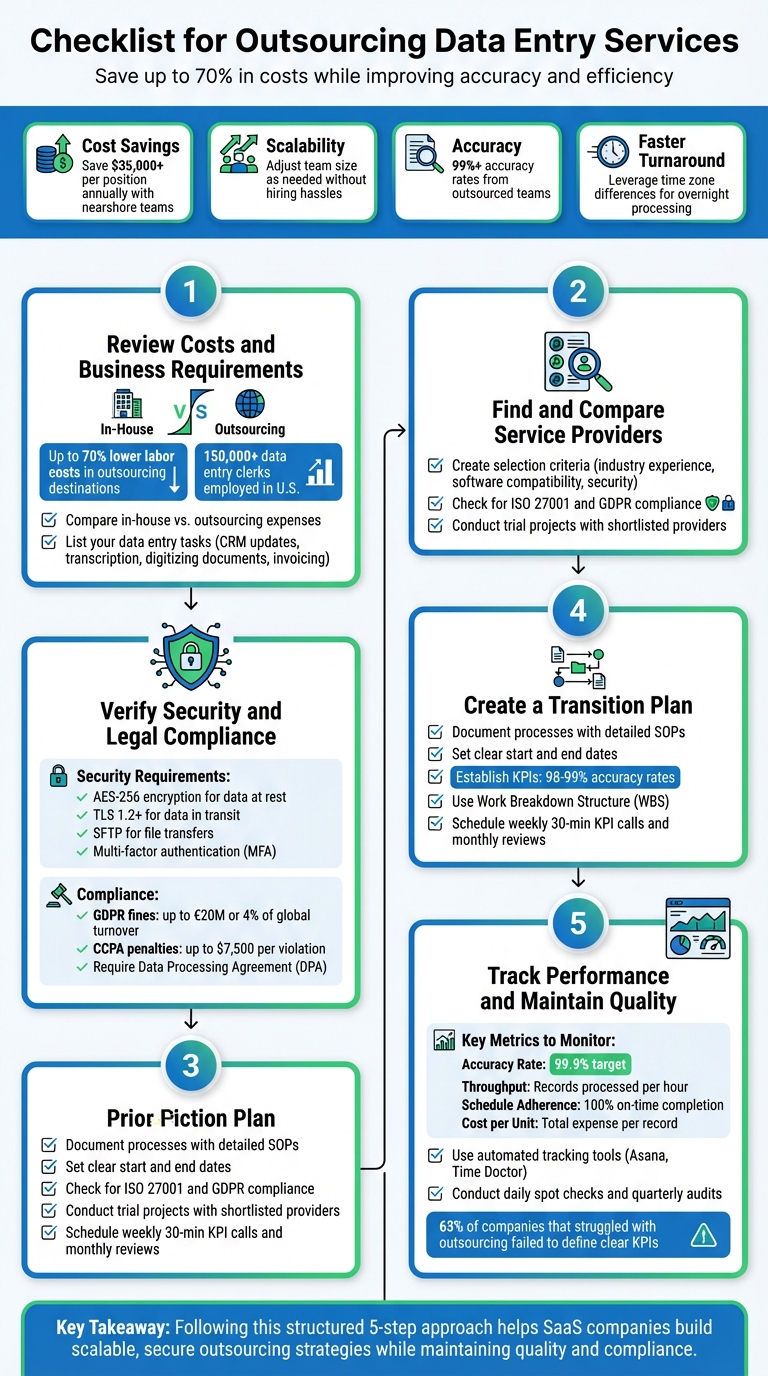
5-Step Checklist for Outsourcing Data Entry Services
Step 1: Review Costs and Business Requirements
Compare In-House vs. Outsourcing Costs
Managing data entry in-house comes with a long list of expenses: hiring, training, office space, computers, software licenses, and employee benefits. Outsourcing eliminates these costs since the provider takes care of infrastructure, technology, and management. For context, there are over 150,000 data entry clerks employed in the U.S., which adds up to significant overhead for companies operating domestically.
In contrast, labor costs in popular outsourcing destinations can be up to 70% lower than in Western countries. Nearshore options in Latin America – such as Mexico, Argentina, or Brazil – can reduce expenses by 30% to 70%, potentially saving more than $35,000 per position each year.
Sean Baker from MicroSourcing highlights: "Outsourcing to the Philippines can result in companies saving up to 70% on labor and operating costs compared to hiring locally – and all without sacrificing a high-quality output".
There’s also the matter of opportunity cost. When your in-house team spends time on repetitive tasks, you’re losing the chance to use their skills for strategic, revenue-generating work. Outsourced teams often deliver faster results with fewer mistakes, which reduces the need for rework and minimizes costly errors. Once the cost benefits are clear, the next step is to define exactly which data entry tasks you plan to outsource.
List Your Data Entry Tasks
Start by identifying and categorizing the data entry tasks you want to outsource. These might include updating CRM systems, transcribing audio files, digitizing paper documents, processing invoices, or entering orders. Be specific about your daily or weekly data volume, and note any special requirements such as complex formatting or tight deadlines. This level of detail makes it easier to communicate your needs to potential providers.
Focus on tasks that free up your team to concentrate on strategic priorities.
Hayden Cohen from Hire with Near explains: "Instead of burdening your team with mundane and time-consuming tasks, you can reallocate their talents and skills to more strategic, revenue-generating activities".
Outsourcing is especially effective for high-volume, repetitive tasks that demand accuracy and speed but don’t require in-depth knowledge of your company.
sbb-itb-8132e49
Step 2: Find and Compare Service Providers
Create Your Selection Criteria
Start by defining clear selection criteria tailored to your company’s needs. Industry experience is a major factor – providers who have worked with SaaS businesses will be more familiar with CRM systems, database maintenance, and typical data workflows. Make sure the provider offers the specific services you need, whether that’s transcription, invoice processing, or CRM updates.
Compatibility with your existing software is another must. The provider’s tools should integrate smoothly with your current platforms. Pay close attention to their data security measures, too. Verify adherence to standards like ISO 27001 and GDPR, and check for robust protocols such as firewalls, encryption, and regular security audits.
Pricing transparency is also essential. Review their pricing structure carefully and ask about any potential hidden costs. As Hayden Cohen explains, "Accurate data entry matters and it is instrumental in cutting down operational costs and improving efficiency". Find out if their pricing includes extras like revisions, special formatting, or customer support to avoid surprises down the line. Lastly, evaluate their scalability – can they handle increased workloads during busy periods or when your data needs grow? These steps will help you identify a provider that aligns with your quality and scalability expectations. Once you’ve established your criteria, move on to testing their practical performance.
Conduct Trial Projects with Shortlisted Providers
Once you’ve narrowed down your options, ask for a trial project that mirrors your usual data entry tasks. This might include database maintenance, transcription, or invoice processing. A trial allows you to evaluate their technical skills, turnaround time, and communication approach.
"It’s a good idea to get a sample of the company’s work before you commit to a contract. This trial reveals their work quality and turnaround time." – INSIDEA
Use this opportunity to assess their flexibility. Can they organize and store data according to your specific internal guidelines rather than defaulting to a generic template? Check whether they assign a dedicated customer service representative and how promptly they respond to inquiries or resolve issues. During the trial, also clarify pricing details – ensure you understand what’s included, such as revisions or custom formatting, to avoid unexpected costs later. This process will give you a clear picture of how well they align with your needs.
Step 3: Verify Security and Legal Compliance
Check Contracts and Security Measures
Before committing to any agreement, ensure the provider has strong technical safeguards in place. Look for AES-256 encryption for data at rest and TLS 1.2 or higher for data in transit. Secure file transfer protocols like SFTP are a must – providers relying on unsecured methods like standard email or basic uploads for sensitive data should be avoided.
Access control is another critical factor. The provider should adhere to the "least privilege" principle, meaning employees can only access data necessary for their specific roles. To further secure access, confirm the use of multi-factor authentication (MFA) and IP whitelisting. Physical security matters too – facilities should have restricted access, 24/7 surveillance, and comprehensive disaster recovery plans.
"In today’s digital age, data security is paramount. This is especially true for businesses that rely on data entry outsourcing to manage sensitive information." – Soulilution
Also, prioritize providers with certifications like ISO 27001 or SOC 2 Type II. Contracts should clearly outline data ownership, breach notification timelines (within 72 hours), and liability for any data loss. It’s equally important that all employees handling your data sign detailed non-disclosure agreements (NDAs) to maintain confidentiality.
Once you’ve confirmed these security measures, shift your attention to legal and regulatory compliance.
Confirm Regulatory Requirements
After verifying security protocols, examine the legal frameworks for data handling. If you’re working under GDPR, a Data Processing Agreement (DPA) is mandatory under Article 28 when outsourcing personal data processing. This isn’t just a formality – it defines responsibilities, security measures, and breach notification practices. The DPA should detail the types of personal data (e.g., names, emails, IP addresses), the purpose of processing, and retention periods.
"A properly structured DPA isn’t just compliance paperwork – it’s your shield against data breaches and regulatory penalties." – LegalGPS
If your provider processes data outside the European Economic Area or deals with California residents’ data, confirm they meet the necessary regulations. For international transfers, they must use Standard Contractual Clauses (SCCs) or Binding Corporate Rules (BCRs). For CCPA compliance, contracts must explicitly forbid selling or sharing personal information. Non-compliance with GDPR can lead to fines up to €20 million or 4% of global annual turnover, while CCPA violations carry penalties of up to $7,500 per violation.
Your contract should also include audit rights, allowing for at least one annual inspection to confirm compliance. Additionally, the provider must support Data Subject Access Requests (DSARs), typically within 30 days, enabling individuals to access, correct, export, or delete their personal data.
Step 4: Create a Transition Plan
Document Processes and Set Deadlines
Start by developing a detailed SOP (Standard Operating Procedure) that outlines all data entry workflows, responsibilities, and timelines. This is particularly critical when outsourcing document management workflows that involve sensitive digitization and storage. Make it as comprehensive as possible by including any undocumented tasks gathered from your current staff. Additionally, create a contact directory with names, roles, and contact details for all internal and external stakeholders.
"An employee transition plan is a living document that outlines the key projects, responsibilities, and other details of an employee’s role." – Insight Global
Set clear start and end dates for every task in the transition process. Collaborate with both your internal team and the outsourcing provider to define realistic deadlines that allow for smooth knowledge transfer. Without firm deadlines, transitions can drag on indefinitely, leading to operational disruptions and delaying the advantages of outsourcing.
Keep a project log to track task statuses, deadlines, file locations, and integration guides. This ensures nothing falls through the cracks and keeps everyone aligned.
Establish Performance Metrics
Once the transition plan is in place, shift your focus to performance metrics. Define KPIs (Key Performance Indicators) to measure progress and maintain high-quality standards. For data entry, common KPIs include accuracy rates (usually 98–99%), turnaround times, and volume completion targets.
"By measuring key performance indicators (KPIs) throughout the onboarding process, managers can see if they’re on track to complete the transition plan." – Peter Landau, ProjectManager
Use a Work Breakdown Structure (WBS) to break down deliverables and tasks into manageable components. Set milestones for critical phases like staff training, technical documentation handoff, initial batch processing, and final operational sign-off. This approach helps keep the transition structured and ensures accountability at every stage.
Step 5: Track Performance and Maintain Quality
Schedule Regular Performance Reviews
Once your transition plan is in motion, the next step is to keep a close eye on performance and ensure quality remains intact. Continuous monitoring after the initial transition is crucial. In fact, research has found that 63% of companies that struggled with outsourcing failed to define clear performance indicators from the start. Don’t let your business fall into that category.
Set up regular check-ins to stay on top of things. For example, schedule weekly 30-minute KPI calls and monthly reviews to address feedback and adjust goals as needed.
"81% of HR leaders are currently making changes to the way they manage the cycle of performance." – Gartner
These reviews will help protect the cost savings and efficiency gains you’ve worked hard to achieve. To structure feedback effectively, consider using the GROW Model: define the Goal, assess the current Reality, explore Options, and establish the Will to act. For addressing specific issues like errors or communication gaps, the DESC Method can help: Describe the situation, Express its impact, Specify the change needed, and outline the Consequences.
It’s also important to categorize errors by type and severity. This will help you identify whether the root cause lies in training gaps, unclear instructions, or technical issues. Keep an eye on onboarding timelines too – if training new data processors takes longer than 14 days, it can negatively impact utilization rates.
Use Tracking Tools
Automated tracking tools are your best friend when it comes to monitoring performance. These systems can help you measure service level agreements (SLAs) and compare actual performance against your expectations. Tools like Asana or Microsoft Planner are great for tracking milestones and assigning tasks, while platforms such as Time Doctor provide real-time activity monitoring and automated timesheets.
Here’s a real-world example: SmartBuyGlasses, a global e-commerce company, adopted Time Doctor to manage its distributed workforce. The result? A threefold increase in team performance and a 50% to 75% reduction in compliance issues. Similarly, Shore360 saw a 41% drop in client escalations after tailoring performance metrics to their offshore teams in the Philippines.
To maintain accuracy, embed validation rules in your systems. For instance, set up checks for invalid state abbreviations, incorrect date formats, or missing fields. Conduct daily spot checks on random data samples and plan quarterly audits to ensure long-term data integrity. Reducing task backlogs can also improve client turnaround times by 35%.
Focus on key performance indicators (KPIs) that matter most, like overall quality and meeting deadlines, rather than micromanaging every action. A 99.9% accuracy rate is often considered the gold standard for data entry services. Measuring efficiency by the number of records processed per hour, rather than total hours worked, can provide a clearer picture of productivity. Centralizing all KPI data into a single dashboard can cut reporting time by 22% and reduce delays by 28%.
Here’s a quick snapshot of key metrics to track:
| KPI Category | Specific Metric | Target Benchmark |
|---|---|---|
| Quality | Accuracy Rate | 99.9% |
| Efficiency | Throughput | Records processed per hour |
| Reliability | Schedule Adherence | 100% on-time completion |
| Financial | Cost per Unit | Total expense per record processed |
Why Outsourcing Data Entry is a Game Changing & How to Choose The Right Company | ARDEM Incorporated
Conclusion
Outsourcing data entry can slash costs by as much as 70%, but achieving success requires more than just finding an affordable provider – it takes careful planning and ongoing oversight. Start by thoroughly evaluating potential partners. Look for certifications, request client references, and consider running trial projects to test their capabilities.
Security and compliance should be top priorities. Choose a provider with up-to-date ISO 27001 or SOC 2 certifications, ensure they use encryption to protect data both at rest and in transit, and confirm they have a solid disaster recovery plan in place. With GDPR fines exceeding €2.1 billion in 2024 and over 80% of companies reporting insider-related security incidents, the risks are too high to ignore.
"Outsourcing does not absolve a company of its legal responsibility for its data. Even when a third-party provider… manages customer or business information, the company remains accountable for ensuring it is handled correctly." – Conectys
Once your processes are secure, don’t stop there. Keep a close eye on performance by tracking key metrics. Regular monitoring helps catch and fix potential issues before they escalate into costly problems.
From analyzing costs and selecting tasks to ensuring airtight security and monitoring performance, every step on the checklist matters. By following this structured approach, your SaaS company can build a scalable and secure outsourcing strategy. If you’re looking to streamline back-office operations like data entry, Aidey provides reliable, secure support to help your business scale efficiently while maintaining top-notch quality.
FAQs
What tasks should I outsource first?
Outsourcing works best for tasks that are repetitive, take up a lot of time, and don’t require highly specialized skills. A great example is data entry. Handing off these kinds of tasks can help streamline your workflow, free up your team’s time, and let them focus on more strategic, high-priority work.
How do I verify a provider’s data security?
To ensure a provider can safeguard sensitive information, take a close look at their data security measures. Start by examining their data protection policies to understand how they handle and store information. Check if they comply with industry standards like ISO 27001 or SOC 2, which demonstrate a commitment to security best practices.
Additionally, inquire about their use of encryption to protect data during storage and transmission. Strong access controls are also essential – make sure they limit data access to authorized personnel only. Finally, ask whether they conduct regular security audits to identify and address vulnerabilities. These steps can help confirm that the provider has solid protocols to prevent breaches and protect your data.
Which KPIs should I track after outsourcing?
Track essential KPIs such as error rates, cost reduction percentage, and schedule adherence. These metrics provide a clear picture of your outsourcing partner’s quality, efficiency, and overall performance, helping you ensure they consistently meet expectations and deliver reliable results.