

Outsourcing customer support can either boost your business or harm it. Without clear quality standards, you risk losing customers, especially in SaaS, where support is often the only human interaction customers experience. Poor support drives 73% of customers to competitors, and 56% leave without complaining – a silent churn that can devastate your bottom line. But here’s the good news: improving retention by just 5% increases profits by 25% to 95%.
To protect your brand and keep customers loyal, focus on these critical steps:
- Define key metrics like CSAT, FRT, and NPS to measure performance.
- Set realistic benchmarks based on industry standards and your internal data.
- Establish Service Level Agreements (SLAs) that outline expectations, response times, and escalation protocols.
- Use tools like QA software and real-time dashboards to monitor performance and address issues early.
- Provide thorough onboarding, role-specific training, and continuous feedback to align outsourced teams with your brand.
- Maintain clear communication and collaboration to ensure alignment and accountability.
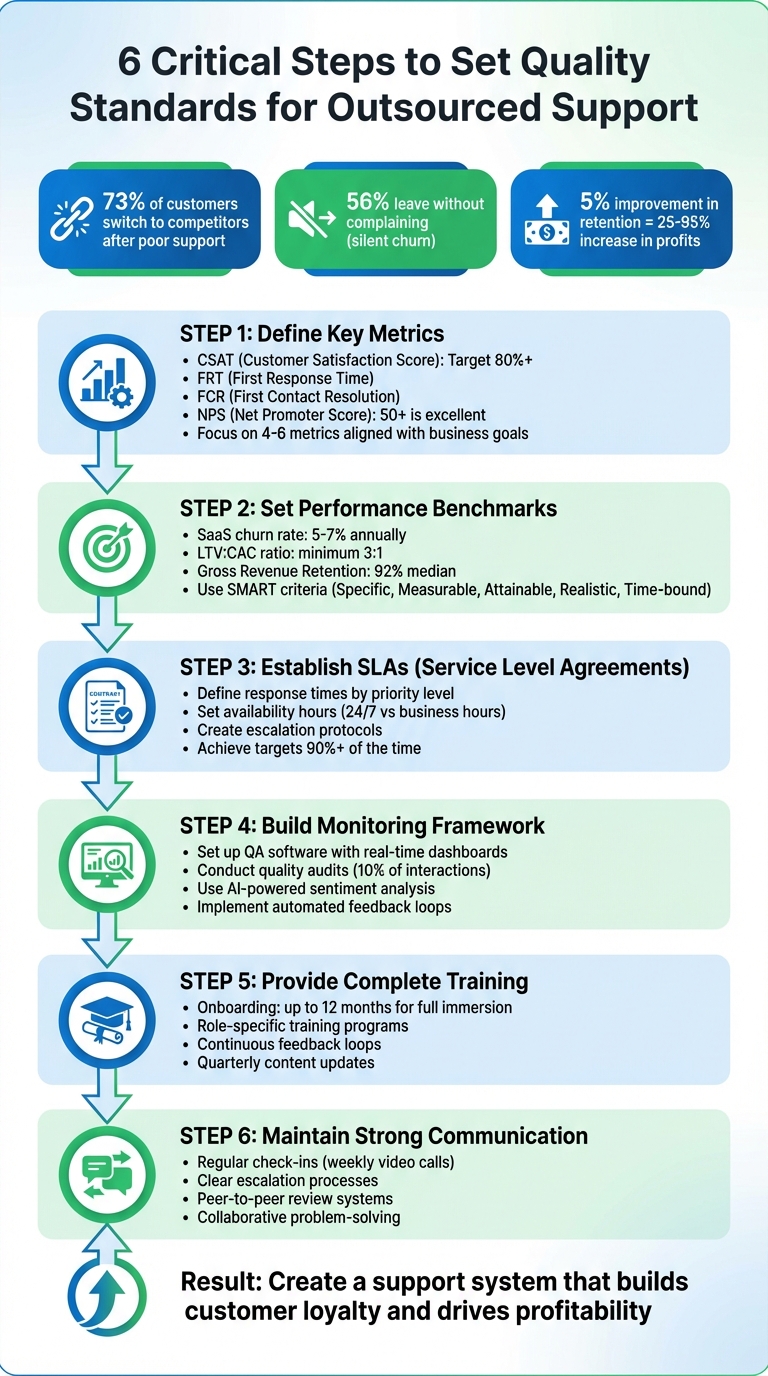
6 Critical Steps to Set Quality Standards for Outsourced Customer Support
Set Key Quality Metrics for Outsourced Support
Identify Core Metrics
When outsourcing support, it’s essential to focus on metrics that align with your business goals. For startups, this often means prioritizing growth, while established SaaS companies typically aim for profitability. The key is to link these metrics to financial outcomes rather than just tracking activity.
- Customer Satisfaction Score (CSAT): This measures how satisfied customers are immediately after an interaction, typically on a 5-point scale. Aiming for 80% or higher (ratings of 4 or 5) ensures your outsourced team is meeting expectations.
- First Response Time (FRT): Tracks how quickly agents respond to customers initially.
- First Contact Resolution (FCR): Measures the ability to resolve issues in a single interaction, which reduces customer effort and support costs.
Another critical metric is the Net Promoter Score (NPS), which goes beyond satisfaction to gauge customer loyalty and predict churn. Scores above +50 are considered excellent, while scores between 0 and 6 signal potential retention problems. Alan Taylor from Maxio emphasizes the importance of renewals, stating:
Renewals are your earliest warning system for product-market fit issues.
To keep things focused, prioritize 4–6 metrics that align with your business objectives. For example, focus on sustainability metrics like Monthly Recurring Revenue (MRR), efficiency metrics such as Customer Acquisition Cost (CAC), or retention indicators like churn rate. Once you’ve identified the core metrics, set benchmarks that reflect both industry standards and your internal data.
Set Performance Benchmarks
Benchmarks provide the performance targets needed to maintain and improve support quality. Start by assessing your in-house team’s metrics to establish a baseline before outsourcing. For example, if your in-house CSAT is 85%, it may not be realistic to expect a 90% score from an outsourced team right away.
While industry benchmarks can serve as a helpful guide, they should be tailored to your business. For instance, SaaS companies typically see annual churn rates between 5% and 7%, and a healthy LTV-to-CAC ratio should be at least 3:1. Additionally, the median Gross Revenue Retention for bootstrapped SaaS companies with $3M to $20M in ARR was 92% in 2025. Use these figures as a reference but adjust based on factors like product complexity, customer demographics, and your stage of growth.
When setting goals, apply the SMART criteria – Specific, Measurable, Attainable, Realistic, and Time-bound. For example, instead of a vague goal like "improve response times", set a precise target: "achieve First Response Time under 2 hours for 95% of tickets within 60 days." Regularly review these metrics – monthly for operational goals and quarterly for strategic ones – to address issues as they arise.
sbb-itb-8132e49
Call Center Services Outsourcing: How to assure the quality of your Customer Service
Create Clear Service Level Agreements (SLAs)
Building on your quality metrics, clear SLAs help formalize expectations and hold everyone accountable.
An SLA, or Service Level Agreement, is essentially a contract that outlines expected service levels and the consequences of failing to meet them. Without one, assumptions can lead to misalignment, unhappy customers, and broken promises. Jonathan Bar, Founder of Corebee, emphasizes this point:
An SLA you cannot keep is worse than no SLA. If your team consistently misses a 1-hour first response target, you are training customers to expect broken promises.
The key is to craft an SLA that’s specific, realistic, and enforceable. Targets should be achievable at least 90% of the time. If your team frequently misses them, customers lose trust in your commitments. On the flip side, if you’re hitting targets over 95% of the time, it might be worth tightening the benchmarks. This balance ensures accountability without setting your team up for failure.
Define SLA Components
To align your support team with quality goals, you need to clearly define the core components of your SLA. Here are the essentials:
- First Response Time (FRT): This defines how quickly a human agent must acknowledge a ticket. Typical targets in SaaS range from under 4 hours for general customers to under 30 minutes for enterprise accounts.
- Resolution Time: Tracks how long it takes to fully resolve an issue. Since complexity varies, this metric focuses your team on outcomes instead of just quick replies.
- Availability: Specify whether you’re offering 24/7 support or only business hours, and clearly state the time zones covered. If you don’t provide round-the-clock coverage, pause SLA timers outside your defined hours to avoid unfair breaches.
- Escalation Protocols: Outline what happens when an SLA breach is imminent. Who gets notified? How are tickets reassigned? Automated alerts at 75% and 90% of the SLA’s elapsed time can act as a safety net.
The most commonly overlooked SLA gap is between support and engineering. Define internal SLAs for every escalation path.
Other important elements include communication cadence (frequency of updates during prolonged investigations), uptime targets (e.g., 99.9% availability, allowing for roughly 43 minutes of downtime per month), and service credits (financial penalties for missed targets, often around 5% of monthly fees).
Categorize tickets by priority to ensure urgency matches the issue’s impact. Avoid vague terms like "as soon as possible" and use specific numbers instead:
| Issue Priority | Definition | Example Response Target |
|---|---|---|
| P1 – Critical | Service outage, security issue, data loss | Within 1 hour |
| P2 – High | Core feature broken, major workflow impact | Within 4 hours |
| P3 – Medium | Feature not working as expected, workaround exists | Within 24 hours |
| P4 – Low | General questions, minor cosmetic issues | Within 48 hours |
You can also tailor SLAs by customer tier. For example, enterprise customers might receive 30-minute response times and 24/7 availability, while standard-tier customers get 4-hour responses during business hours.
Ensure Mutual Agreement and Transparency
Once you’ve outlined your SLA components, the next step is collaboration. Don’t simply impose the terms – work with your outsourced partner during contract negotiations using a customer support outsourcing checklist to avoid misunderstandings about processes, management, and reporting. Involve internal stakeholders too, such as risk officers, compliance teams, business owners, and frontline support staff who understand the day-to-day realities.
Clearly define all terms to avoid loopholes. For instance, explicitly state what qualifies as "uptime", "outage", or "resolution" to prevent providers from meeting metrics with automated responses that don’t actually solve problems. Dylan Tao from SaasGree highlights this:
An SLA is not just for customers. It also helps your internal teams work better. When product, support, and legal teams follow the same rules, they understand what service goals to meet.
Transparency matters. Shared dashboards displaying real-time performance data for both parties can eliminate ambiguity about whether targets are being met. For instance, Continental Stock Transfer & Trust boosted SLA adherence from 70–80% to 99% by using real-time monitoring and automated ticket routing.
Lastly, list exclusions upfront – such as scheduled maintenance, natural disasters, external internet outages, or user errors. This prevents unfair penalties and disputes later. Formalize the agreement by having it reviewed and signed by authorized representatives from both sides.
To keep your SLA relevant, schedule regular reviews – quarterly is common – to adjust for shifts in business needs, workloads, or technical environments. Use SMART-R criteria (Specific, Measurable, Achievable, Relevant, Time-bound, and Reportable) to ensure your SLA evolves alongside your business. This approach keeps it from becoming a static, outdated document.
Build a Quality Monitoring and Reporting Framework
Building on your SLAs and performance benchmarks, a solid monitoring and reporting framework is essential to ensure quality standards move beyond theory. This framework relies on effective tools, regular audits, and structured reporting schedules to maintain accountability across the board.
Set Up Monitoring Tools
Real-time visibility is key to catching issues before they escalate. Contact Center Quality Assurance (QA) software provides features like call recording, transcriptions, and live supervision tools such as "whispering" (coaching agents during calls) or "barging" (taking over a call if necessary). Modern platforms also leverage AI-powered sentiment analysis to detect emotional tones in customer interactions, flagging frustrated customers for immediate intervention.
For outsourced teams working across different time zones, productivity tools help track active time, attendance, and application use while respecting privacy. If your team handles technical issues, infrastructure monitoring tools like Datadog or SolarWinds can monitor the health of IT systems, ensuring faster resolution of problems.
Gamification features such as scorecards and leaderboards provide real-time performance updates, motivating agents by offering transparent productivity data. Additionally, transitioning from manual sampling to automated full interaction analysis allows AI tools to review and score every call or chat, uncovering patterns that might otherwise go unnoticed. This approach ensures comprehensive oversight and eliminates blind spots, with insights fueling targeted quality audits.
Conduct Regular Quality Audits
Monitoring tools generate data, but audits convert that data into actionable insights. A common benchmark is to audit around 10% of total customer interactions – enough to spot trends without overwhelming your QA team.
Use a weighted scorecard to structure audits objectively. Assign weights to categories based on your business priorities, such as "Issue Resolution" (50%), "Empathy & Tone" (30%), and "Compliance" (20%). This method reduces grader bias and ensures consistency. For compliance-heavy tasks, binary scoring (Pass/Fail) can speed up evaluations and remove subjectivity.
Scorecards take the guesswork out of coaching and ensure precise evaluations.
Consistency is critical, which is why calibration sessions are a must. These sessions train reviewers and agents to interpret scoring criteria uniformly, avoiding discrepancies where one reviewer might rate an interaction as "excellent" while another sees it as "needs improvement". For example, in 2025, MeUndies successfully used interaction-based QA scorecards to maintain consistent service during peak hiring seasons, ensuring temporary staff met the same standards as full-time employees.
An automated feedback loop adds value to audits. Reviewers flag improvement areas, agents make adjustments, and reviewers approve final responses before they reach customers. This system addresses quality issues in real time, which is vital since 73% of customers switch brands after multiple poor support experiences.
Establish Reporting Schedules
Regular audits feed into a structured reporting schedule, ensuring continuous improvement. Tailor your reporting frequency to your team’s needs – whether it’s daily, weekly, or monthly – based on ticket volume and operational priorities.
- Daily reports are ideal during onboarding or high-priority transitions, focusing on immediate blockers and task volume.
- Weekly reports work for ongoing operations, tracking metrics like backlog volume, resolution rates, and average handling time.
- Monthly reports align strategy by analyzing trends in CSAT/NPS scores, SLA performance, and training needs.
More than 63% of companies that failed in their outsourcing efforts lacked clear performance indicators from the start. To avoid this, ensure every metric in your reports ties directly to your quality standards and business goals. For example, instead of a vague goal like "improve customer satisfaction", aim for a specific target like "increase CSAT by 10% over the next quarter."
Transparency is essential. Give your outsourced team access to real-time client portals so they can track ticket status and system performance. Consolidating data into a single dashboard can cut reporting time by 22%, and weekly dashboards have been shown to reduce delivery delays by 28%. Tools like Power BI or Google Data Studio automate data collection and create real-time KPI visualizations, reducing administrative work.
Managing an outsourced team without clear indicators is like navigating without a compass.
Balance monitoring with autonomy. While regular updates are necessary, too many check-ins can feel like micromanagement, which can erode trust and productivity. Treat reporting sessions as two-way conversations where agents can share challenges and successes, rather than just receiving scores. Support numerical data with specific examples from customer interactions to give context to the metrics.
Finally, revisit your reporting framework every 3 to 6 months to ensure it aligns with changing customer expectations and business goals. Metrics that were critical during onboarding may become less relevant as your team matures, so adjust your focus as needed.
| Reporting Frequency | Best Use Case | Key Focus Areas |
|---|---|---|
| Daily | Initial onboarding or high-priority transitions | Immediate blockers, task volume, real-time sentiment |
| Weekly | Standard operational monitoring | Backlog volume, resolution rates, average handling time |
| Monthly | Strategic alignment and trend analysis | CSAT/NPS trends, performance against SLAs, training needs |
| Quarterly | Framework and scorecard optimization | Metric weighting adjustments, goal realignment, ROI |
Provide Complete Onboarding and Training
Onboarding isn’t just about introducing outsourced agents to your company – it’s about fully immersing them in your brand’s culture, voice, and quality expectations. This process, which can take up to 12 months, is critical to meeting SLAs and maintaining quality metrics. However, there’s a glaring issue: only 12% of employees feel their company does a great job at onboarding, and just 29% of new hires feel adequately prepared for their roles. This disconnect can directly affect performance, making thorough training a non-negotiable.
Take SalesNexus as an example. This SaaS-based sales CRM faced high employee turnover and poor customer satisfaction. By collaborating with SupportZebra and implementing targeted product training, they saw a 25% jump in service revenue and slashed hiring time by 70%. The takeaway? Investing in role-specific training delivers measurable results.
Develop Tailored Training Programs
A one-size-fits-all approach to training won’t cut it. To be effective, your program should focus on three key areas: deep product knowledge, brand voice alignment, and customer interaction protocols. Start by auditing your current resources – like help center articles, pricing guides, and internal manuals – ensuring there are no inconsistencies. Then, map out the top 20–30 customer scenarios (like refunds or password resets) with clear, step-by-step workflows. Include "stop-and-escalate" instructions for high-stakes situations.
Consider RealtyNinja, a Canadian real estate platform. They initially struggled with a lack of structured processes for handling inquiries. By creating Standard Operating Procedures (SOPs) for every aspect of their business, they doubled their team size over eight years while maintaining consistent quality. Their success highlights how clear documentation is essential for scalable training.
Define your brand tone with clear examples of what works and what doesn’t. For instance, if your brand voice is casual and approachable, teach agents to replace stiff phrases like "We apologize for any inconvenience" with friendlier alternatives like "We’re so sorry this happened – let’s make it right." Introduce a two-week shadowing period where agents create internal drafts before going live. Facebook employs a similar strategy with its "45-minute rule", ensuring all tools are ready so new hires can start contributing within their first hour.
Once your training programs are in place, reinforce them with ongoing feedback and updates to keep quality consistent over time.
Implement Continuous Training and Feedback Loops
Onboarding is just the starting point. To maintain high performance, agents need ongoing training and regular feedback. Employees who receive effective onboarding are nearly three times more likely to report job satisfaction. Continuous feedback and structured reviews help sustain this momentum.
Introduce peer-to-peer review systems where experienced agents evaluate tickets from newer team members. This not only fosters mentorship but also makes the feedback process less intimidating. Use automated tools to provide agents with improvement suggestions on ticket responses before they’re sent to customers. Pair this with clear empathy guidelines to ensure feedback is constructive and supportive. As an expert from Teamwork.com puts it:
Your QA process is just as much about people as it is about efficiency.
Schedule regular performance reviews to monitor key metrics like task completion rates, response times, and error resolution times. Make these reviews a two-way street, encouraging agents to share their challenges and suggest improvements.
Don’t forget to revisit your training materials every quarter. Outdated content can lead to mistakes, which hurt customer satisfaction. Conduct weekly audits of 20–50 interactions to identify any drift in brand voice or process consistency. Use these insights for data-driven coaching, ensuring your outsourced team grows with your business while maintaining high standards.
Maintain Strong Communication and Collaboration
Strong communication and collaboration are the backbone of maintaining quality in any operation. Even the most well-designed training programs can fall apart without clear communication channels and teamwork. When communication flows smoothly, everyone understands the goals, challenges, and expectations. But when it falters, priorities become misaligned, escalation paths get muddled, and problem-solving becomes fragmented – resulting in inconsistent customer experiences.
The solution lies in creating structured communication protocols and fostering collaborative problem-solving frameworks. These systems not only empower outsourced teams but also ensure alignment across the board. As Teamwork.com aptly states:
One of the best ways to keep your QA process running smoothly is to maintain an open dialogue with your team and your customers.
Maintaining this open dialogue becomes even more essential as your support operations grow. Without it, minor issues can quickly spiral into significant quality gaps. These strategies work hand-in-hand with the quality metrics and SLAs discussed earlier.
Establish Clear Communication Protocols
Start by implementing regular check-ins and progress updates to keep everyone aligned. Weekly video calls using platforms like Zoom or Microsoft Teams are a great way to review performance metrics, address challenges, and discuss upcoming changes. Video conferencing adds a personal touch, allowing you to pick up on non-verbal cues and build stronger relationships – something email alone can’t achieve.
Consider adopting the 10-5-3 rule: acknowledge an issue within 10 minutes, respond with a plan within 5 minutes, and resolve non-urgent matters within 3 hours. This approach can dramatically improve response times and overall efficiency. For example, one regional customer support center reduced complaints by 35% in just one quarter by shifting their focus from lagging metrics like average handle time to leading metrics such as transfer rates and post-call work time.
It’s also vital to define clear escalation processes. Specify when and how agents should escalate issues to senior team members or specialists. After calls, send summary emails to create a written record of next steps. Using collaborative language – like "I need more information on this issue" – helps maintain a constructive tone, avoiding unnecessary tension.
To further fine-tune communication, gather feedback from your outsourced team through anonymous surveys. These insights can help you identify and address any friction points before they become larger issues.
Encourage Collaborative Problem-Solving
Once clear communication protocols are in place, collaboration can take your operation to the next level. Involve outsourced teams early in the ideation phase when setting quality goals and KPIs. When team members understand the "why" behind their tasks, they’re more likely to feel invested in the outcome. Creating a shared "problem and goal statement" ensures that everyone is working toward the same objectives.
Introduce peer-to-peer review systems where experienced agents mentor newer team members. This not only boosts professional growth but also strengthens the overall team dynamic. Tools like Teamwork Desk’s "Training Wheels" feature can automate feedback loops by routing ticket responses to reviewers before they reach customers. This approach maintains quality without the need for micromanagement.
When delivering feedback, compassion is key. Constructive, respectful communication motivates agents to uphold high standards and even propose new ideas for improvement. Regularly analyze support metrics and team feedback to refine your communication and collaboration practices. By treating outsourced teams as true partners, you create an environment where everyone is committed to shared success.
Conclusion
This guide highlights the essential steps for building effective outsourced support, emphasizing the importance of combining clear metrics, strong collaboration, and strategic planning. Together, these elements create a system that ensures success: metrics and SLAs establish clear goals, monitoring frameworks identify potential issues early, onboarding programs prepare agents for success, and open communication keeps everyone aligned and motivated. These aren’t just theoretical strategies – they directly impact customer loyalty and profitability.
The stakes couldn’t be higher. Studies show that 73% of customers leave after repeated poor support experiences, while improving retention by just 5% can lead to significant profit increases. On the flip side, focusing on customer satisfaction can fuel revenue growth by up to 41%. For SaaS companies and startups, where every customer relationship matters, maintaining high-quality standards is crucial.
For businesses with limited resources, Aidey provides a valuable solution. They offer 24/7/365 support, along with free onboarding that handles recruitment, training, and system setup. Their teams can establish automated feedback systems, conduct regular quality checks, and maintain strong communication protocols – all while allowing you to focus on your core operations. With a partner like Aidey, building a reliable quality assurance program becomes much more manageable.
In the end, the difference between average and outstanding outsourced support lies in how effectively you define, measure, and improve your standards. By treating quality as an ongoing effort rather than a one-time task, you’ll create a support system that doesn’t just solve problems – it builds lasting customer loyalty.
Start small, track your progress, and refine your approach – each step brings your support closer to becoming a true reflection of your brand.
FAQs
Which 4–6 support metrics should I track first?
When it comes to evaluating the effectiveness of your customer support, keeping an eye on the right metrics is crucial. Here are four essential ones to monitor:
- First Response Time (FRT): Speed matters. For email, aim to respond in less than 4 hours. For live chat, keep it under 2 minutes to ensure customers feel heard quickly.
- Customer Satisfaction (CSAT): A good benchmark is maintaining a score above 85%. This reflects how happy your customers are with the support they’re receiving.
- Cost-per-ticket: Efficiency is key. Keeping the cost between $25 and $35 per ticket helps balance quality support with operational costs.
- Customer Retention or Churn Rate: This metric reveals how well your support efforts contribute to customer loyalty. A higher retention rate often signals better service quality.
Tracking these metrics consistently can help you fine-tune your support strategy and deliver better experiences for your customers.
How do I set SLA targets that won’t get missed?
To hit your SLA targets consistently, start by setting clear, realistic, and measurable goals for key metrics like response and resolution times. Make sure these targets align with both your team’s capacity and the expectations of different customer tiers.
Keep a close eye on performance by monitoring progress regularly. Automate escalation processes to tackle delays quickly, and don’t hesitate to adjust goals when circumstances change.
For reference, common benchmarks include a first response time of less than 4 hours during business hours and resolution times that vary based on the complexity of the issue. With proper planning and management, you can create SLAs that are both practical and effective.
How can I QA outsourced agents without micromanaging?
To effectively assess outsourced agents, rely on structured tools like QA scorecards to ensure performance is evaluated fairly and consistently. Pair this approach with regular, low-pressure reviews, such as periodic evaluations and feedback sessions. This helps maintain quality while respecting the agents’ independence. The key is to provide constructive feedback rooted in data from these evaluations, striking a balance between maintaining high standards and avoiding micromanagement.