

Open-source help desk tools are a cost-effective alternative to pricey proprietary platforms like Zendesk and Intercom. They eliminate per-agent fees, provide full control over your data, and offer customization options to fit your team’s needs. For SaaS teams, this translates to reducing support costs by thousands annually while maintaining compliance with regulations like GDPR and HIPAA.
Here’s a quick look at five popular options:
- osTicket: Known for its ticketing system and automation features, ideal for handling mixed customer inquiries.
- Zammad: Offers multi-channel support and AI tools for ticket management.
- FreeScout: Lightweight and modular, perfect for small teams with basic needs.
- UVdesk: Built for customization, especially useful for e-commerce-focused teams.
- Hesk: Simple and quick to set up, great for small teams needing core ticketing features.
Quick Comparison
| Tool | Cost (Self-Hosted) | Main Features | Best For |
|---|---|---|---|
| osTicket | Free | Ticket automation, knowledge base | Mid-sized SaaS teams |
| Zammad | Free (Cloud: $7/agent/month) | AI ticket tools, multi-channel support | Global, multi-channel teams |
| FreeScout | Free | Modular, lightweight, mobile apps | Small SaaS teams |
| UVdesk | Free | Multi-channel, Symfony-based customization | E-commerce support |
| Hesk | Free ($39.95 for branding removal) | Core ticketing, knowledge base | Small teams needing simplicity |
Each tool has its strengths and trade-offs. Your choice will depend on your team’s size, technical expertise, and specific support needs. Choosing the right stack is the first step to scale customer support for SaaS growth effectively.
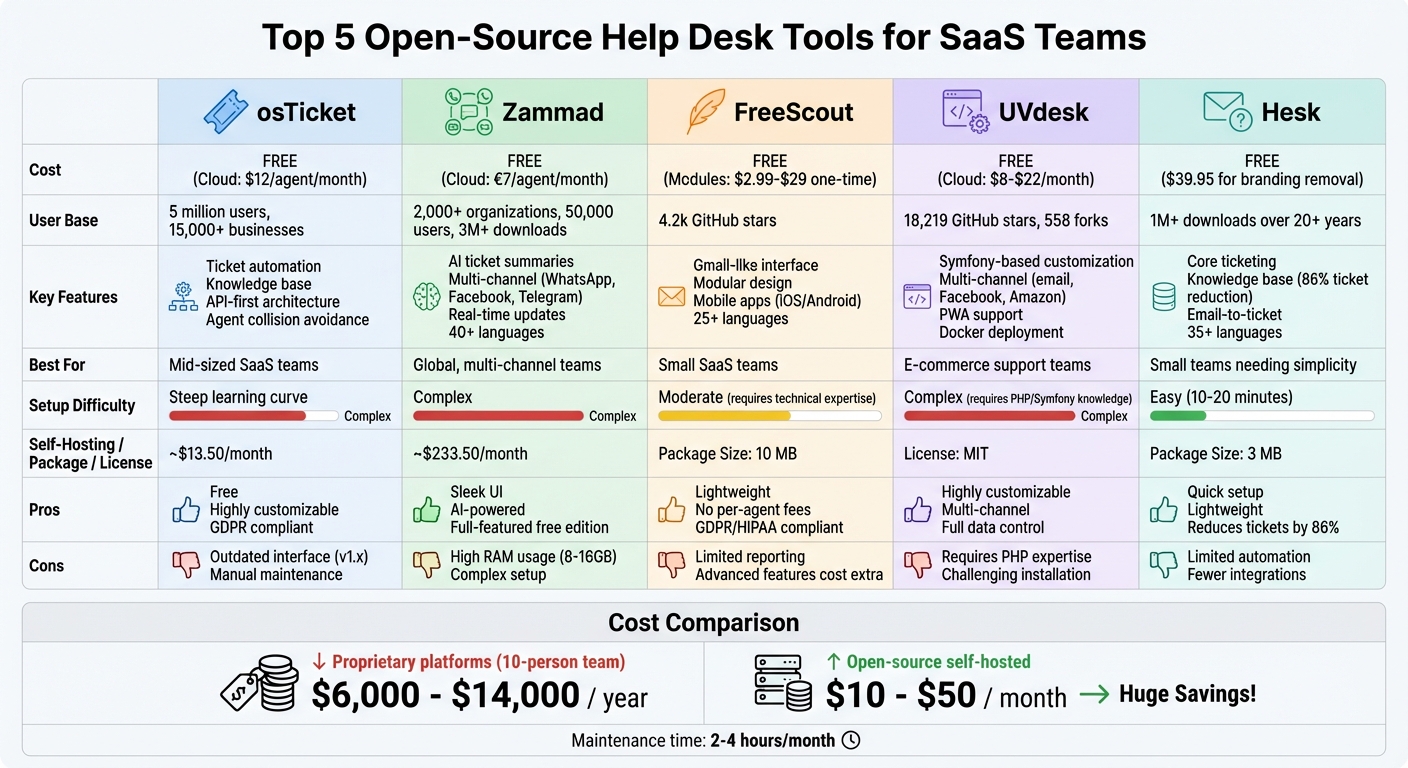
Open-Source Help Desk Tools Comparison: Features, Costs, and Best Use Cases
Zammad – Open Source Helpdesk and Ticketing software for your MSP, IT or other business needs!
osTicket
osTicket has been around for over two decades, serving a massive user base of 5 million across more than 15,000 businesses. Its core functionality revolves around converting emails, web submissions, and API requests into manageable tickets, which are then routed automatically. This setup is ideal for SaaS teams handling a mix of technical support, billing inquiries, and feature requests from various customer groups. These tools align with the agile support demands of SaaS teams, emphasizing the affordability and flexibility that osTicket offers. Its self-hosted model ensures both cost efficiency and full data control – two critical factors for SaaS businesses.
Features and Benefits
The latest version, osTicket 2.0, introduces a Ticket Workspace with collapsible conversations and a mobile-responsive design, making remote support easier. It also includes agent collision avoidance, a feature that prevents multiple agents from responding to the same ticket at once – a lifesaver for teams managing high ticket volumes.
The platform’s Content Management System allows you to build a self-service knowledge base using a page builder, widgets, and templates. SaaS teams can use this to publish FAQs and troubleshooting guides, enabling customers to resolve issues independently and reducing incoming support requests. Another standout feature is the Issues tracker, which links multiple tickets to a single incident and supports a public status page. This means you can communicate system outages without being overwhelmed by duplicate inquiries.
osTicket also boasts an API-first architecture, allowing seamless integration with tools like CRMs, billing systems, or product analytics. Its form builder, equipped with conditional logic, captures detailed information – such as product versions, error codes, or subscription tiers – right at the time of ticket submission.
Pros and Cons
| Advantages | Disadvantages |
|---|---|
| Free for self-hosted setups with no per-agent fees | Outdated interface in earlier v1.x versions, often criticized for its dated look |
| Highly customizable through PHP and plugins | Steep learning curve during initial setup and advanced configurations |
| Efficient resource usage, running on minimal hardware or shared hosting | Manual upkeep required for updates, patches, and backups |
| Full data control, ensuring GDPR and CCPA compliance for self-hosted deployments | Slow progress in rolling out the modern v2.0 architecture |
If you prefer a managed solution, the cloud-hosted version (SupportSystem) starts at $12 per agent per month and includes perks like managed support, onboarding, and daily backups. On the other hand, self-hosting costs are relatively low, averaging around $13.50 per month for basic cloud infrastructure, plus about two hours of maintenance time each month.
Zammad
Zammad is trusted by over 2,000 organizations and 50,000 users globally, with support from more than 390 contributors and over 3 million downloads. The platform brings together communications from email, chat, phone, and social media channels – including Telegram, Facebook, and WhatsApp Business – into one web-based interface. This makes it especially useful for SaaS teams managing a remote customer support team, offering agents instant access to customer conversations across different time zones.
Features and Use Cases
Zammad is built to simplify global support for SaaS teams, with tools designed to streamline communication and ensure fast responses. The release of Zammad 7.0 (March 4, 2026) introduced several AI-powered features that make workflows smoother. For instance:
- AI Ticket Summaries: Quickly condenses conversation threads for easier handovers between shifts.
- AI Writing Assistant: Helps refine responses, offering real-time translations to bridge language gaps.
- AI Agents: Automate ticket routing and categorization to save time.
For teams that operate under strict data regulations, Zammad allows self-hosting with local LLMs like Ollama, ensuring compliance with GDPR requirements.
Other features enhance collaboration and productivity, such as editing conflict alerts, a mentions system for better communication, and an out-of-office function that automatically reassigns tasks when agents are unavailable. A mobile-optimized view and tab-based interface make it easy to manage tasks on the go –.
The platform also boasts lightning-fast Elasticsearch-powered full-text search, capable of scanning 40GB of data in under 3 seconds. Customizable Core Workflows allow teams to tailor ticket fields for better clarity. Additionally, Zammad supports over 40 languages, enabling distributed teams to work in their preferred language.
Pros and Cons
| Advantages | Disadvantages |
|---|---|
| Sleek, responsive UI with real-time WebSocket updates | High RAM usage (8–16 GB) due to Elasticsearch |
| Full functionality in the free Community Edition with no limitations | Self-hosting setup can be complex, requiring server management skills |
| Multi-channel support, including WhatsApp, social media, and live chat | Smaller app marketplace compared to other platforms |
| Built-in AI tools for ticket summaries and writing assistance | PostgreSQL is mandatory from version 7.0 onward, dropping MySQL/MariaDB support |
| Strong security features like SSO, SAML, 2FA, and LDAP | Advanced reporting may need additional configuration |
The Professional Plan for managed hosting starts at $7 per agent per month, while the Community Edition is free for self-hosting. However, self-hosting costs can average around $233.50 per month, factoring in server infrastructure and about two hours of monthly maintenance. To ease the transition from other platforms, Zammad includes a Migration Wizard that simplifies importing tickets and customer data from systems like Zendesk, Freshdesk, or OTRS.
FreeScout
FreeScout is a self-hosted help desk solution perfect for teams that want complete control over their customer data without worrying about recurring per-agent fees. With a lightweight package size of just 10 MB, it’s built on PHP (Laravel) and MySQL, making it easy to deploy on a $5 VPS or even basic shared hosting. It’s no surprise that FreeScout has gained over 4.2k stars on GitHub after eight years of active development, becoming a favorite among bootstrapped SaaS teams aiming to scale support while keeping costs in check.
Features and Benefits
FreeScout’s appeal lies in its affordability, self-hosted flexibility, and practical design. Its clean, Gmail-like interface ensures minimal learning curves for new users. Key collaboration tools include collision detection to avoid duplicate responses, internal notes for team communication, conversation tagging, and the ability to follow specific threads. Impressively, it supports over 25 languages, making it a great choice for global teams.
The platform’s modular design is another standout feature. While the core system is completely free, advanced tools like a Knowledge Base, Live Chat, and SLA management can be added for one-time fees ranging from $2.99 to $29. Unlike many SaaS help desks, FreeScout doesn’t impose limits on users, tickets, or mailboxes, and there are no per-agent fees. Deployment is straightforward, with one-click options available via Softaculous, Cloudron, and Docker. For those needing custom features, modules can be built using Laravel.
FreeScout’s self-hosted nature ensures full data ownership, making it a strong choice for teams handling sensitive customer information. It also supports GDPR and HIPAA compliance. To keep remote teams connected, the platform offers native iOS and Android apps with push notifications, ensuring responsiveness across time zones.
Pros and Cons
FreeScout’s features bring clear advantages, but there are some trade-offs to consider:
| Pros | Cons |
|---|---|
| Free core with no per-agent fees | Limited reporting and analytics compared to enterprise solutions |
| Lightweight – runs even on shared hosting | Requires technical expertise for hosting and updates |
| Modular system – pay only for added features | Advanced features (e.g., Knowledge Base, Live Chat) come with additional costs |
| Native iOS/Android apps with push notifications | No built-in voice or video calling capabilities |
| Privacy-focused and GDPR compliant | Minor bugs may occur with the latest PHP versions |
For teams that prefer to outsource technical support and avoid server management, third-party hosting options are available starting at around $9/month. However, self-hosting keeps infrastructure costs impressively low.
sbb-itb-8132e49
UVdesk
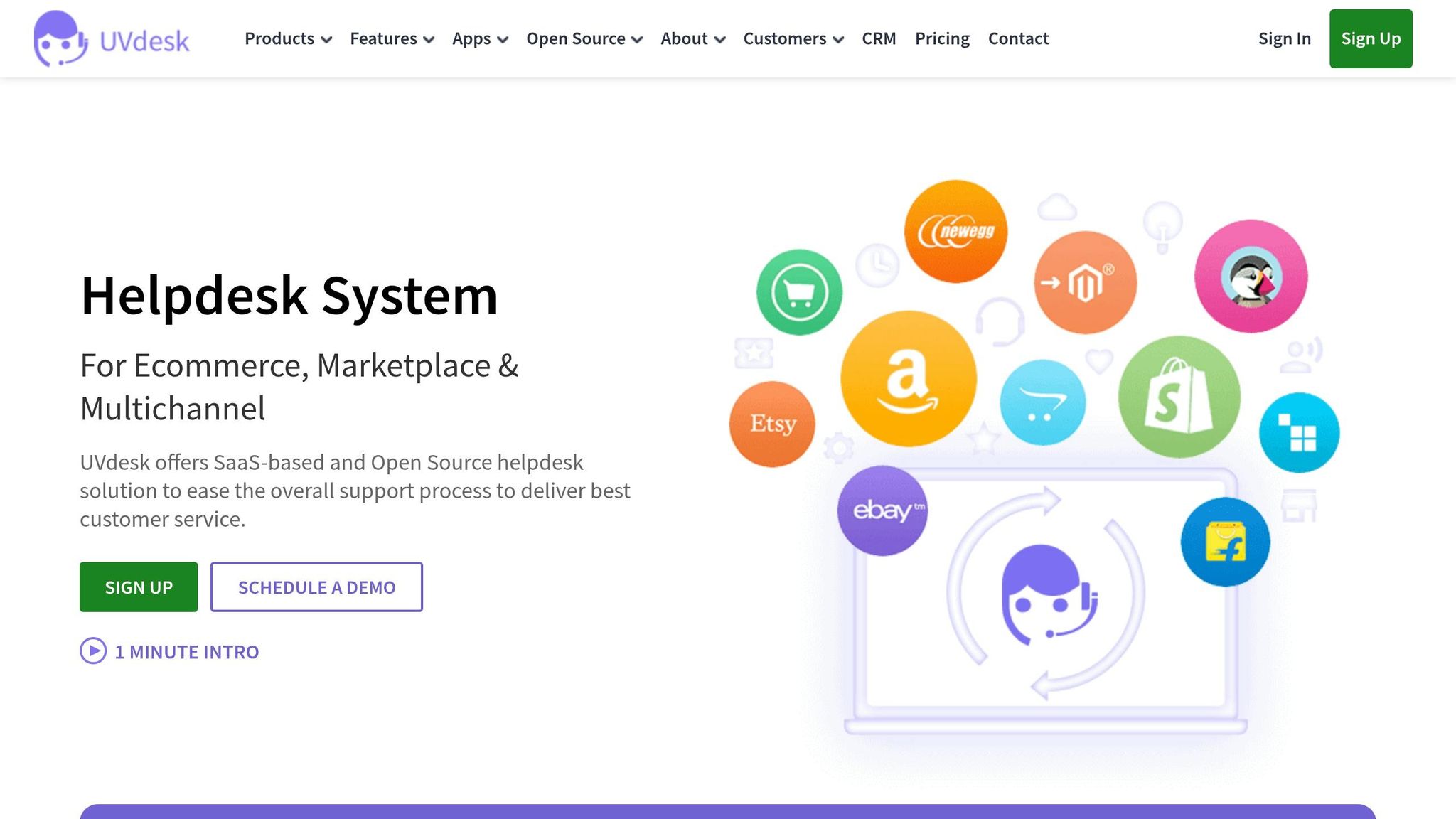
UVdesk is a PHP-based help desk solution built on the Symfony framework, offering SaaS developers the ability to customize its core functionality. With over 18,219 stars and 558 forks on GitHub, it has become a popular choice for startups looking for a flexible support system without the constraints of proprietary software. Distributed under the MIT License, UVdesk prioritizes transparency – an essential feature for teams that handle sensitive customer data.
Features and Advantages
UVdesk stands out with its multi-channel aggregation, which consolidates support requests from email, websites, Facebook, and even platforms like Amazon into a single, easy-to-manage interface. Teams can take advantage of workflow automation to create rules, canned responses, and task workflows, streamlining follow-ups and ticket handling. Its self-service knowledge base empowers customers to resolve issues on their own, reducing the overall ticket volume through well-organized articles and guides.
For teams on the rise, UVdesk provides powerful tools for team management and customizable agent permissions. You can also tailor the platform to your brand with custom themes and branding, including a form builder to ensure the support portal matches your SaaS product’s look and feel.
Deploying UVdesk is versatile – choose between traditional hosting or Dockerized containers for easier scaling across development and production environments. Migration from other platforms is simplified using built-in tools, and Progressive Web App (PWA) features enhance the mobile experience, allowing agents to manage tickets on the go. As a self-hosted solution, UVdesk ensures teams maintain full control over their data, making it a reliable choice for companies focused on compliance and security.
Pros and Cons
| Pros | Cons |
|---|---|
| Flexible customization using the Symfony framework | Advanced customizations require PHP/Symfony expertise |
| Multi-channel support (email, Facebook, Amazon, web forms) | Installation can be challenging due to specific system requirements |
| Comprehensive task management tools | Some premium features are only available in paid versions |
| Self-hosted for complete data control and GDPR compliance | Teams are responsible for server maintenance and updates |
| Supports Docker for containerized deployment | Interface is functional but less polished compared to commercial alternatives |
The Community Edition of UVdesk is entirely free, while businesses needing advanced capabilities and professional support can explore paid plans. For SaaS startups that value customization and scalability over ease of initial setup, UVdesk’s Symfony-based framework provides a strong foundation for building a tailored support system.
Hesk
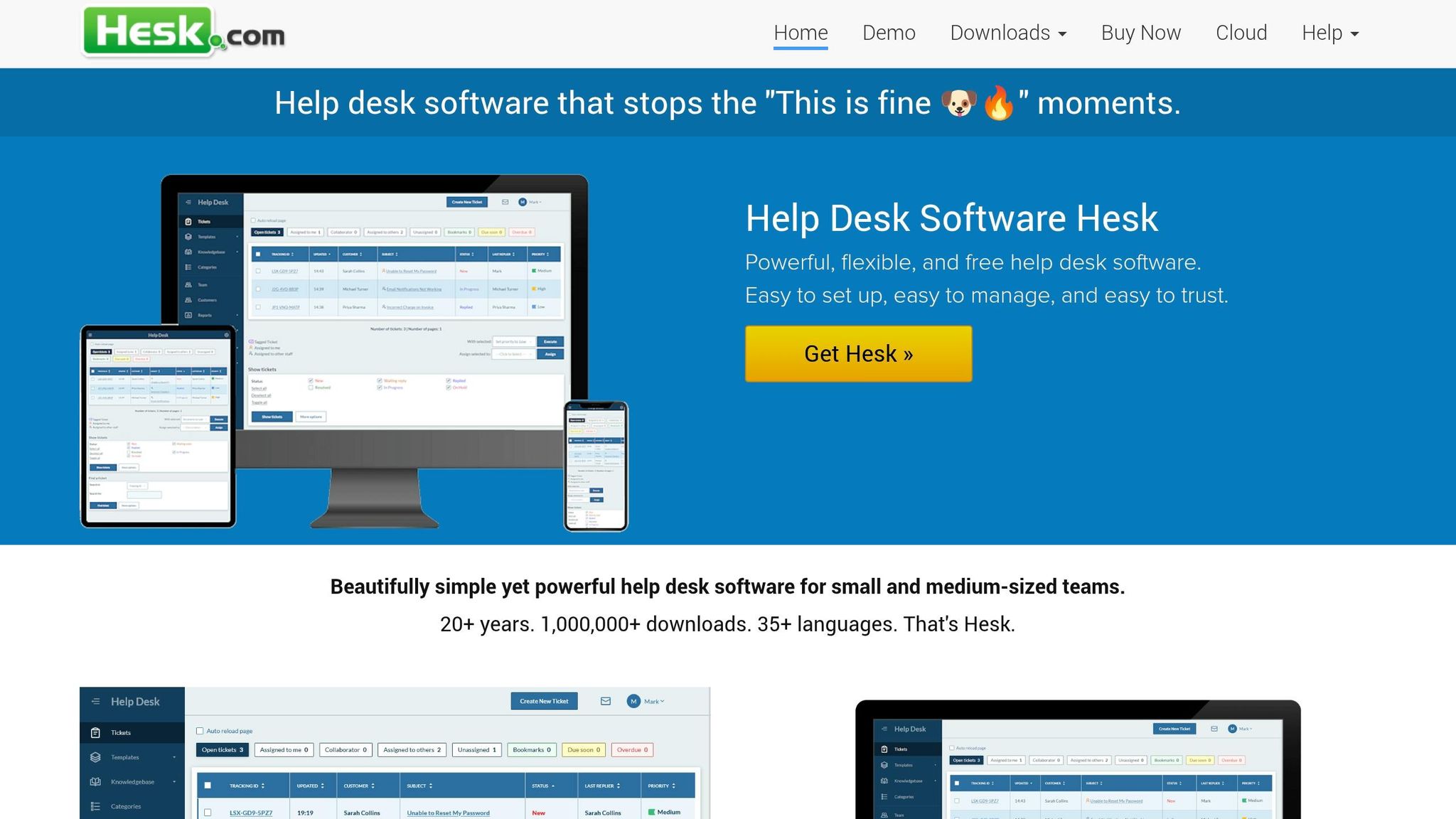
Hesk keeps things simple, focusing on essential ticketing without the clutter of extra features. With a tiny 3 MB download and over 1,000,000 downloads in its 20+ year history, this PHP-based tool proves that less can be more. If your small SaaS team needs a help desk system that’s quick to set up and easy to use, Hesk could be a solid choice.
This software zeroes in on the core ticketing essentials – submitting, tracking, assigning, and resolving customer issues – without overwhelming users with unnecessary extras. One of its standout qualities is speed: even non-technical users can get it up and running in just 10 minutes.
"I’m still amazed how much functionality you can pack into a 3 MB download – our previous help desk was a 440 MB package that took an hour to install." – Ben from London, UK
Features and Applications
Hesk delivers the day-to-day functionality that small SaaS teams depend on. Its ticketing system supports email-to-ticket conversion through POP3, IMAP, or email piping. Features like auto-assignment ensure tickets are distributed evenly across your team, while canned responses help agents handle repetitive queries – like password resets or billing questions – quickly.
A major highlight is the built-in knowledge base, which is a game-changer for resource-limited teams. According to user data, 86% of Hesk users report fewer tickets after implementing self-service articles.
Hesk also supports 35+ languages and unlimited custom fields, making it a good fit for global SaaS teams. You can customize ticket submission forms to gather specific technical details upfront – like operating system or app version – which helps cut down on back-and-forth communication. It runs on standard PHP/MySQL hosting, but there’s also a Hesk Cloud option for those who prefer managed hosting with automatic updates and daily backups.
By focusing on the essentials, Hesk ensures small SaaS teams can provide efficient, straightforward support without added complexity.
Pros and Cons
| Pros | Cons |
|---|---|
| Quick setup (10–20 minutes, even for non-technical users) | Limited advanced automation compared to enterprise platforms |
| Lightweight (3 MB) and runs well on budget hosting | Lacks scaling features for larger, multi-department organizations |
| No per-agent fees – flat fee for Hesk Cloud or free self-hosted | Fewer third-party integrations than commercial alternatives |
| Knowledge base reduces ticket volume by up to 86% | Paid license ($39.95) required to remove "Powered by" branding |
| Supports 35+ languages for global teams | Interface less sleek compared to modern commercial options |
For startups and small teams on tight budgets, the self-hosted version is entirely free. If you’re looking for professional branding and email support, a one-time $39.95 license fee removes the "Powered by" credits.
"Hesk hits the sweet spot across fundamentals expected from enterprise-grade systems without the cost." – Ranga Bodla, technology researcher
For small SaaS teams prioritizing simplicity and speed over advanced features, Hesk offers a straightforward, effective solution. It’s a no-frills tool that gets the job done.
Why SaaS Teams Use Open-Source Help Desk Tools
SaaS teams often turn to open-source help desk tools because they offer a mix of affordability, control over data, and flexibility. Unlike proprietary tools that come with hefty subscription fees, open-source solutions eliminate recurring costs. For example, a 10-person team might spend anywhere from $6,000 to $14,000 annually on proprietary software. In contrast, open-source options typically only require infrastructure expenses – usually between $10 and $50 per month for a VPS or cloud server – regardless of team size. This makes open-source tools especially appealing to SaaS teams looking to manage budgets effectively or consider outsourcing customer support as an alternative.
Another key advantage is data ownership, which is crucial for industries with strict regulations. When you self-host, all customer interactions and support history remain securely stored on your servers. This is a major benefit for complying with regulations like GDPR and HIPAA.
"For companies in healthcare, finance, education, or any industry with data residency requirements, self-hosting isn’t a nice-to-have; it’s a compliance necessity." – Listicler
Open-source tools also shine when it comes to flexibility. With full access to the source code, teams can customize workflows and integrate tools with their existing systems. There’s no vendor lock-in, meaning you’re not at the mercy of a provider’s pricing changes or operational decisions. On top of that, over 90% of cybersecurity experts believe open-source platforms are as secure – or even more secure – than their proprietary counterparts.
To highlight these benefits, here’s a comparison of some popular open-source help desk tools:
| Tool | Cost (Self-Hosted) | Installation Difficulty | Remote Access Support |
|---|---|---|---|
| osTicket | Free | Difficult/Manual | Internal Network Only |
| Zammad | Free (Cloud: 7 EUR/agent/month) | Complex | Cloud Option Available |
| FreeScout | Free | Difficult to Deploy | Internal Network Only |
| UVdesk | Free (Cloud: $8–$22/month) | Complex Initial Config | Cloud Option Available |
However, these advantages come with a trade-off. Self-hosted tools demand ongoing maintenance, which includes managing updates, applying security patches, configuring servers, and monitoring performance. For SaaS teams that value control, customization, and long-term savings, this extra responsibility is often a small price to pay.
Conclusion
Open-source help desk tools offer SaaS teams a way to cut costs while keeping complete control over their support operations. Proprietary platforms can run a 10-person team anywhere from $6,000 to $14,000 annually, but self-hosting an open-source solution might cost as little as $10–$50 per month. Beyond saving money, these tools provide flexibility with workflow customization, data ownership, and freedom from being tied to a single vendor.
The tools covered here cater to different needs: osTicket for simplicity, Zammad for multi-channel support, FreeScout for those needing a lightweight option, UVdesk for teams focused on e-commerce, and Hesk for straightforward ticketing systems. Your choice will depend on whether your priorities include real-time chat, structured ticket handling, or efficient resource use.
For industries like healthcare or finance, where compliance is strict, hosting customer data on your own servers is often a must. Open-source solutions allow access to the source code, so you can tailor the system to meet your exact requirements without waiting on a vendor to release updates.
That said, self-hosting does come with some responsibilities. Maintenance involves handling updates, security patches, and monitoring servers, which typically takes about 2–4 hours per month. If your team has the DevOps expertise, this can be a cost-effective solution. If not, managed cloud versions are available, often at 50% to 80% less than the cost of proprietary platforms.
To find the right tool, consider your key support channels, compliance requirements, and available technical resources. Open source doesn’t mean sacrificing quality – it means you’re in charge of how your support system works.
FAQs
Which open-source help desk is best for my SaaS team size and channels?
When choosing the best open-source help desk for your SaaS team, it all comes down to your team’s size and how you prefer to communicate.
- FreeScout works great for small to medium teams. It’s lightweight, customizable, and offers multi-channel support to keep things running smoothly without overwhelming your system.
- For larger teams that need advanced tools like SLA management or omnichannel support, Zammad and Chatwoot are excellent options to explore.
- If you’re looking for a balance between simplicity and functionality, Trudesk and Libredesk offer customizable workflows that can adapt to your team’s needs.
Each of these tools has its strengths, so the right choice depends on how you want to manage your support process.
What does self-hosting actually require each month (time, skills, upkeep)?
Self-hosting a help desk system comes with its own set of responsibilities. You’ll need to dedicate time to maintenance, updates, and troubleshooting. Managing the server setup, ensuring security, and handling software customizations also require a solid technical skill set. Regular tasks like applying security patches, performing backups, and monitoring stability are crucial to keep everything running efficiently and securely. It’s a continuous effort to maintain a smooth and reliable system.
How do these tools handle GDPR/HIPAA and data residency when self-hosted?
Self-hosted, open-source help desk tools make it easier for organizations to comply with GDPR and HIPAA regulations, as well as address data residency requirements. By allowing on-premise deployment, these tools give businesses complete control over their data. Common features include data encryption, user access controls, and alignment with privacy laws, ensuring compliance is managed efficiently.